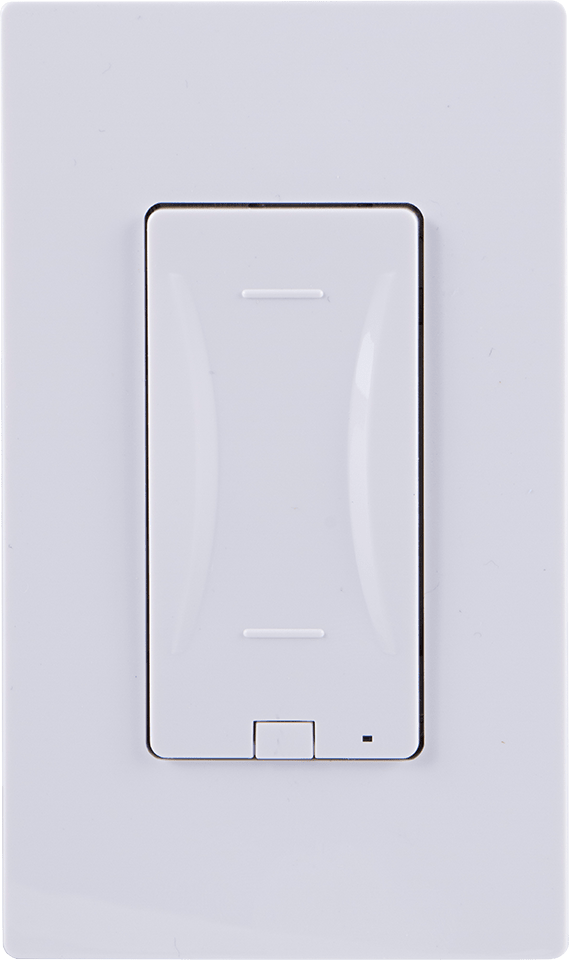
Product Recognition | |
|---|
Certification Number | ZC10-17105823 |
|---|
Name | In-Wall Touch Sensing Smart Dimmer |
|---|
Short Description | The GE Z-Wave Touch Sensing Dimmer brings together advanced touch sensing technology with an intuitive, minimalist design that sets a new standard for in-wall smart lighting controls. |
|---|
Long Description | The GE Touch Sensing Dimmer is the industry’s first Z-Wave Plus Smart Dimmer with fully integrated capacitive touch technology. The effortless and intuitive touch operation of GE Z-Wave Touch Dimmer reinvents the way consumers interact with lighting controls. The new Touch Dimmer offers an extremely smooth dimming performance with a simple intuitive design—simple tap on, tap off, or convenient zero to 100 percent dimming by simply gliding your finger up and down touch sensing surface. The GE Touch Sensing Dimmer is our most elegant in-wall lighting control that embeds Z-Wave Plus smart home technology to be controlled at the wall, by a mobile device, or by voice with Amazon Echo or Google Home.
The GE Z-Wave Touch Sensing Dimmer brings together advanced touch sensing technology with an intuitive, minimalist design that sets a new standard for in-wall smart lighting controls. The sleek GE Z-Wave Touch Dimmer is poised to meet every interior design requirement with interchangeable paddle options
available. Regardless of the home décor, users can complement any design aesthetics with paddle colors available in light almond, black, white, brown, and ivory.
The GE Z-Wave Touch Dimmer also features advanced settings to remember the most recent light levels. For example, the dimmer automatically remembers the last used settings and smoothly returns to the same light level when it is turned back on. This simple one-touch feature allows users to set
the perfect lighting level every time. |
|---|
Brand | GE |
|---|
Product Identifier | 14289/ZW3009 |
|---|
OEM Version | HW: 255 FW: 5.11 |
|---|
Hardware Platform | ZM5101 |
|---|
Z-Wave Version | 6.51.10 |
|---|
Library Type | SLAVE_ENHANCED_232 |
|---|
Device Type | Light Dimmer Switch |
|---|
Role Type | ROLE_TYPE_SLAVE_ALWAYS_ON |
|---|
Manufacturer ID | 0x0063 |
|---|
Product Type ID | 0x4944 |
|---|
Product ID | 0x3233 |
|---|
User Icon | 0x0600 |
|---|
Installer Icon | 0x0600 |
|---|
Frequency Plans | US: 916.00MHz, 908.40MHz |
|---|
Categories | All Lighting Devices, Dimming Lighting Devices |
|---|
Countries / Regions | United States of America |
|---|
Supported Command Classes | Identifier | Name | Key | Version |
|---|
COMMAND_CLASS_SCENE_ACTUATOR_CONF | Scene Actuator Conf | 0x2C | 1 | COMMAND_CLASS_POWERLEVEL | Powerlevel | 0x73 | 1 | COMMAND_CLASS_SWITCH_ALL | Switch All | 0x27 | 1 | COMMAND_CLASS_BASIC | Basic | 0x20 | 1 | COMMAND_CLASS_CONFIGURATION | Configuration | 0x70 | 1 | COMMAND_CLASS_CRC_16_ENCAP | CRC16 Encapsulation | 0x56 | 1 | COMMAND_CLASS_SWITCH_MULTILEVEL_V2 | Switch Multilevel V2 | 0x26 | 2 | COMMAND_CLASS_VERSION_V2 | Version V2 | 0x86 | 2 | COMMAND_CLASS_DEVICE_RESET_LOCALLY | Device Reset Locally | 0x5A | 1 | COMMAND_CLASS_ZWAVEPLUS_INFO_V2 | Z-Wave Plus Info V2 | 0x5E | 2 | COMMAND_CLASS_ASSOCIATION_V2 | Association V2 | 0x85 | 2 | COMMAND_CLASS_ASSOCIATION_GRP_INFO | Association Group Info | 0x59 | 1 | COMMAND_CLASS_SCENE_ACTIVATION | Scene Activation | 0x2B | 1 | COMMAND_CLASS_FIRMWARE_UPDATE_MD_V2 | Firmware Update Meta-Data V2 | 0x7A | 2 | COMMAND_CLASS_MANUFACTURER_SPECIFIC_V2 | Manufacturer Specific V2 | 0x72 | 2 |
|
|---|
Controlled Command Classes | Identifier | Name | Key | Version |
|---|
COMMAND_CLASS_BASIC | Basic | 0x20 | 1 |
|
|---|
Documents | Category | Description | File |
|---|
Manual_Primary_Lang | Product or Owner's Manual | |
|
|---|
Features | Feature | Values |
|---|
Switch Load Capacity Watts | Value |
|---|
600W Incandescent, 150W Dimmable CFL/LED |
| Neutral Wire Required | | Electric Load Type | Value |
|---|
Dimmable LED | Dimmable Fluorescent |
| Firmware Updatable | Value |
|---|
Updatable by Manufacturer |
| Color | |
|
|---|
Association Groups | Group Number | Maximum Nodes Supported | End Point ID | Description |
|---|
1 | 5 | 0 | Z-Wave Plus Lifeline, Multi-level Switch Report, Device Reset Locally Notification. | 2 | 5 | 0 | Basic Set and is controlled with the local load. |
|
|---|
Configuration Parameters | Parameter Number | Name | Description | Format | Size | Min Value | Max Value | Default Value | Parameter Values |
|---|
6 | Dim up/Dim down rate | Changes speed light dims when manually operated | 0 | 1 | 0 | 0 | 0 | From | To | Description |
|---|
0 | 0 | Dim up/down the light to the specified level quickly | 1 | 1 | Dim up/down the light to the specified level slowly |
| 11 | Dim Rate Adjustment (ON/OFF) | Adjusts the total amount of steps | 0 | 1 | 0 | 0 | 1 | From | To | Description |
|---|
1 | 99 | Number of steps or levels |
| 7 | Dim Rate Adjustment (Between levels) | Adjusts the total amount of steps | 0 | 1 | 0 | 0 | 1 | From | To | Description |
|---|
1 | 99 | Number of steps or levels |
| 8 | Dim Rate Adjustment (Between levels)(Parameter 7 must be default) | Adjusts the time between steps | 0 | 2 | 0 | 0 | 3 | From | To | Description |
|---|
1 | 255 | Time between steps |
| 3 | LED Light | Used to either invert or disable the LED indicator. | 0 | 1 | 0 | 0 | 0 | From | To | Description |
|---|
1 | 1 | LED ON when load is ON | 2 | 2 | LED always OFF | 0 | 0 | Default - LED OFF when load is ON |
| 4 | Invert Switch | Changes the switch from "ON at top, OFF on the bottom" to "OFF at the top, ON on the bottom". | 0 | 1 | 0 | 0 | 0 | From | To | Description |
|---|
0 | 0 | Default | 1 | 1 | Invert Switch |
|
|
|---|
Texts | ID | Description | Value |
|---|
1 | Inclusion | Adding your device to a Z-Wave network
1. Follow the instructions for your Z-Wave certified
controller to add a device to the Z-Wave network.
2. Once the controller is ready to add your device, press
and release anywhere on the touch panel. | 2 | Exclusion | To remove and reset the device
1. Follow the instructions for your Z-Wave certified controller
to remove a device from the Z-Wave network.
2. Once the controller is ready to remove your device, press
and hold the side button (G) of the smart dimmer. While
holding, press and release anywhere on the touch panel,
then release the side button to remove it from the network. | 5 | Factory Reset | To return your switch to factory defaults
1. Press and release side program button (G) three times quickly. The
LED will flash ON/OFF five (5) times when completed successfully.
All button presses must be completed within five (5) seconds.
Note: This should only be used in the event your network’s
primary controller is missing or otherwise inoperable. | 6 | Additional Special Features | Invert LED
1. Press and hold the side program button (G).
2. Touch and release anywhere on the capacitive touch surface 3 times quickly.
3. Release side button to invert LED. |
|
|---|
Supports NWI | Yes |
|---|
Supports Explorer Frames | Yes |
|---|