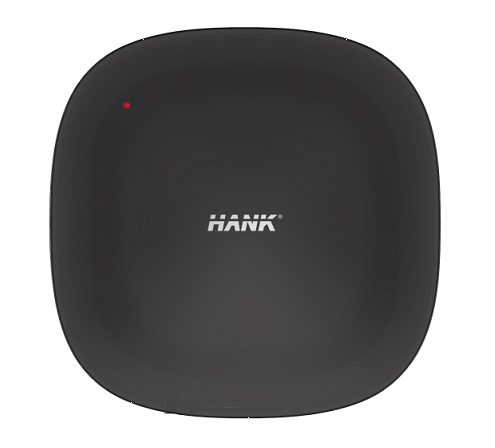
Product Recognition | |
|---|
Certification Number | ZC10-17035507 |
|---|
Name | IR Transceiver |
|---|
Short Description | ACC01 is an IR Transceiver based on ZWAVE technology. |
|---|
Long Description | ACC01 is an IR Transceiver based on ZWAVE technology. It is used for sending IR codes to infrared communication controlling devices such as TV , air condition and TV box . |
|---|
Brand | Hank |
|---|
Product Identifier | HKZW-ACC01 |
|---|
OEM Version | HW: 1 FW: 1.00:01.00 |
|---|
Hardware Platform | ZM5202 |
|---|
Z-Wave Version | 6.51.09 |
|---|
Library Type | SLAVE_ENHANCED_232 |
|---|
Device Type | AV Control Point |
|---|
Role Type | ROLE_TYPE_SLAVE_ALWAYS_ON |
|---|
Manufacturer ID | 0x0208 |
|---|
Product Type ID | 0x0100 |
|---|
Product ID | 0x0007 |
|---|
User Icon | 0x0900 |
|---|
Installer Icon | 0x0900 |
|---|
Frequency Plans | EU: 869.85MHz, 868.40MHz |
|---|
Categories | Infrared Devices |
|---|
Countries / Regions | European Union |
|---|
Supported Command Classes | Identifier | Name | Key | Version |
|---|
COMMAND_CLASS_POWERLEVEL | Powerlevel | 0x73 | 1 | COMMAND_CLASS_SIMPLE_AV_CONTROL_V4 | Simple AV Control V4 | 0x94 | 0 | COMMAND_CLASS_CONFIGURATION | Configuration | 0x70 | 1 | COMMAND_CLASS_SECURITY | Security S0 | 0x98 | 1 | COMMAND_CLASS_VERSION_V2 | Version V2 | 0x86 | 2 | COMMAND_CLASS_DEVICE_RESET_LOCALLY | Device Reset Locally | 0x5A | 1 | COMMAND_CLASS_ZWAVEPLUS_INFO_V2 | Z-Wave Plus Info V2 | 0x5E | 2 | COMMAND_CLASS_ASSOCIATION_V2 | Association V2 | 0x85 | 2 | COMMAND_CLASS_ASSOCIATION_GRP_INFO | Association Group Info | 0x59 | 1 | COMMAND_CLASS_FIRMWARE_UPDATE_MD_V2 | Firmware Update Meta-Data V2 | 0x7A | 2 | COMMAND_CLASS_MANUFACTURER_SPECIFIC_V2 | Manufacturer Specific V2 | 0x72 | 2 |
|
|---|
Documents | Category | Description | File |
|---|
Manual_Primary_Lang | Product or Owner's Manual | |
|
|---|
Features | Feature | Values |
|---|
Color | | Communications Protocol | Value |
|---|
Manufacturer Proprietary Protocol |
| Firmware Updatable | Value |
|---|
Updatable by Consumer by RF |
|
|
|---|
Association Groups | Group Number | Maximum Nodes Supported | End Point ID | Description |
|---|
1 | 5 | 0 | Z-Wave Plus Lifeline
IR Transceiver will send Device_Reset_Locally to associated node. |
|
|---|
Configuration Parameters | Parameter Number | Name | Description | Format | Size | Min Value | Max Value | Default Value | Parameter Values |
|---|
93 | Clear all IR information | Device will clear all stored IR code. | 0 | 4 | 0 | 0 | 0 | From | To | Description |
|---|
1431655765 | 1431655765 | Device will clear all stored IR code. |
| 254 | Enable/disable the configuration command | Lock/unlock all configuration parameters. | 0 | 1 | 0 | 0 | 0 | From | To | Description |
|---|
0 | 0 | Unlock | 1 | 1 | lock |
| 255 | Reset device | Reset to factory default settings and removed from the Z-Wave network. | 0 | 4 | 0 | 0 | 0 | From | To | Description |
|---|
1431655765 | 1431655765 | Reset to factory default settings and removed from the Z-Wave network. |
|
|
|---|
Texts | ID | Description | Value |
|---|
1 | Inclusion | Add for inclusion (non-security):
1. Connect power supply.
2. Set the Z-Wave network main controller into learning mode.
3. Triple clicking the Z- button.
4. If the add for inclusion is successful, the LED will blink fast for less than 5 seconds and then keep on. Otherwise, the LED will blink 5 seconds and then keep blinking slowly, in which case you need to repeat the process from step 2.
Add for inclusion (security):
1. Connect power supply.
2. Set the Z-Wave network main controller into learning mode.
3. Press and hold the Z-button for 3 seconds.
If the add for inclusion is successful, the LED will blink for less than 5 seconds and then keep on. Otherwise, the LED will blink 5 seconds and then keep blinking slowly, in which case you need to repeat the process from step 2. | 2 | Exclusion | Remove for exclusion;
1. Connect power supply.
2. Set the Z-Wave network main controller into learning mode.
3. Triple clicking the Z- button.
4. If the remove for exclusion is successful, Led will blink fast for less than 5 seconds and keep blinking slowly. Otherwise, led will blink for 5 seconds and then keep on , in which case you need to repeat the process from step 2. | 5 | Factory Reset | Press and hold the Z-button for 20 seconds. IR Transceiver will send “Device_Reset_Locally” to the main controller and exclude from the Z-Wave network, this procedure will reset the Sensor to factory default.
Please include a request to use the reset procedure only when the primary controller is missing or inoperable. |
|
|---|
Supports NWI | Yes |
|---|
Supports Explorer Frames | Yes |
|---|
Radio Range Z-Wave (m) | 40 |
|---|