Product Recognition | |
|---|
Certification Number | ZC12-21120325 |
|---|
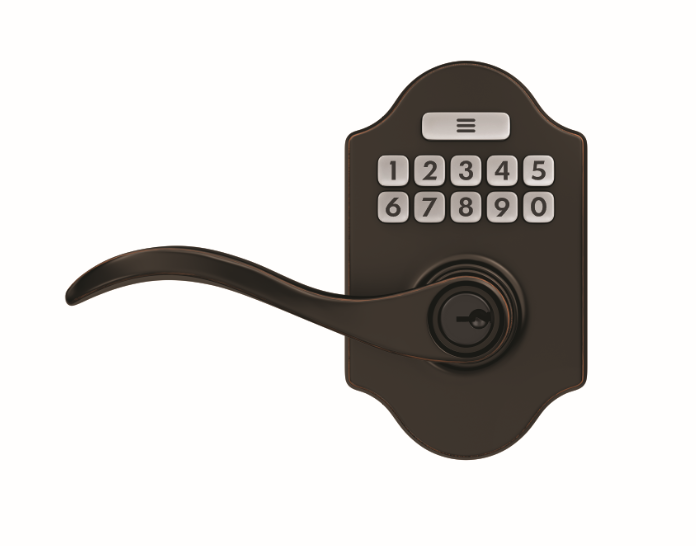
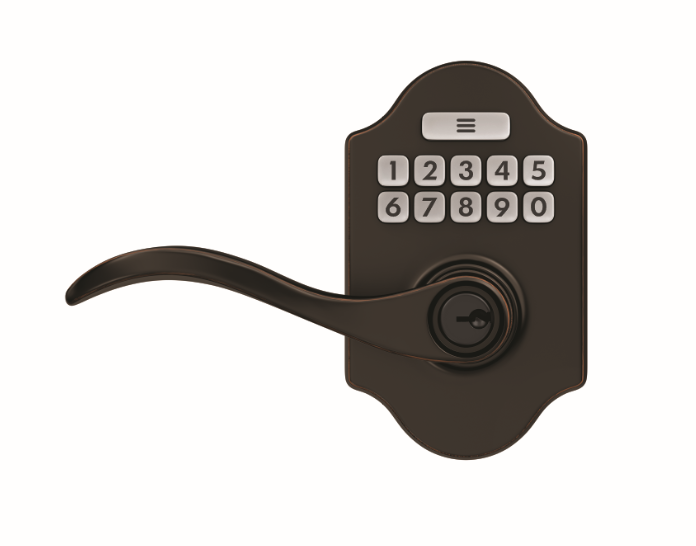
Name | J-Series by Schlage Z-Wave Keypad Lever |
|---|
Short Description | The J-Series by Schlage Z-Wave™ Lever combines advanced features and compatibility with home automation or security systems, so you can control your lock from anywhere using your smartphone. |
|---|
Long Description | The J-Series by Schlage Z-Wave™ Deadbolt combines advanced features and compatibility with your home automation or security system, allowing you to control your lock from anywhere and freeing you from the hassles of lost keys, getting locked out, or hiding a spare for friends and family.
The lock comes preprogrammed with two access codes and can hold up to 30 unique codes for family members and trusted friends. The fingerprint-resistant touchscreen helps access codes stay private, minimizing tell-tale wear that can tip off possible intruders.
The J-Series by Schlage Z-Wave Deadbolt is battery-powered with a low battery warning that gives you weeks of advanced notice before it runs out. With guaranteed fit on standard doors, it’s easy for homeowners to install in minutes with just a screwdriver. The touchscreen continues to work in the event of a power outage, so you don’t have to worry about getting locked out – plus, a back-up key is included with the lock for peace of mind.
The J-Series by Schlage Z-Wave Lever incorporates Z-Wave Plus™ S2 technology, an enhanced security protocol that features an additional layer of AES encryption of wireless signals. The Z-Wave technology allows you to integrate your exterior door locks with other Z-Wave smart home devices, such as cameras, motion detectors, lights and thermostats, bringing the safety, simplicity and style of Schlage to your smart home. |
|---|
Brand | Schlage |
|---|
Product Identifier | JFE109 |
|---|
Product Line | J-Series |
|---|
OEM Version | HW: 3 FW: 1.06:01.09 |
|---|
Hardware Platform | ZGM130 |
|---|
Z-Wave Version | 7.11.1 |
|---|
Library Type | SLAVE_ENHANCED_232 |
|---|
Device Type | Lock |
|---|
Role Type | ROLE_TYPE_SLAVE_SLEEPING_LISTENING |
|---|
Manufacturer ID | 0x003B |
|---|
Product Type ID | 0x0004 |
|---|
Product ID | 0x6109 |
|---|
User Icon | 0x0300 |
|---|
Installer Icon | 0x0300 |
|---|
Frequency Plans | US: 916.00MHz, 908.40MHz |
|---|
Categories | Locks |
|---|
Countries / Regions | United States of America |
|---|
Supported Command Classes | Identifier | Name | Key | Version |
|---|
COMMAND_CLASS_CONFIGURATION_V4 | Configuration V4 | 0x70 | 4 | COMMAND_CLASS_POWERLEVEL | Powerlevel | 0x73 | 1 | COMMAND_CLASS_USER_CODE | User Code | 0x63 | 1 | COMMAND_CLASS_ASSOCIATION_GRP_INFO_V3 | Association Group Information (AGI) V3 | 0x59 | 3 | COMMAND_CLASS_DOOR_LOCK_V4 | Door Lock V4 | | 0 | COMMAND_CLASS_INDICATOR_V3 | Indicator V3 | 0x87 | 3 | COMMAND_CLASS_BATTERY | Battery | 0x80 | 1 | COMMAND_CLASS_APPLICATION_STATUS | Application Status | 0x22 | 1 | COMMAND_CLASS_TIME | Time | 0x8A | 1 | COMMAND_CLASS_FIRMWARE_UPDATE_MD_V5 | Firmware Update Meta Data V5 | 0x7A | 5 | COMMAND_CLASS_MULTI_CHANNEL_ASSOCIATION_V3 | Multi Channel Association V3 | 0x8E | 3 | COMMAND_CLASS_SECURITY_2 | Security 2 | 0x9F | 1 | COMMAND_CLASS_SECURITY | Security 0 | 0x98 | 1 | COMMAND_CLASS_TRANSPORT_SERVICE_V2 | Transport Service V2 | 0x55 | 2 | COMMAND_CLASS_DEVICE_RESET_LOCALLY | Device Reset Locally | 0x5A | 1 | COMMAND_CLASS_ZWAVEPLUS_INFO_V2 | Z-Wave Plus Info V2 | 0x5E | 2 | COMMAND_CLASS_ASSOCIATION_V2 | Association V2 | 0x85 | 2 | COMMAND_CLASS_NOTIFICATION_V8 | Notification V8 | 0x71 | 8 | COMMAND_CLASS_BASIC_V2 | Basic V2 | 0x20 | 2 | COMMAND_CLASS_MANUFACTURER_SPECIFIC | Manufacturer Specific | 0x72 | 1 | COMMAND_CLASS_VERSION_V3 | Version V3 | 0x86 | 3 | COMMAND_CLASS_SUPERVISION | Supervision | 0x6C | 1 | COMMAND_CLASS_SCHEDULE_ENTRY_LOCK_V3 | Schedule Entry Lock V3 | 0x4E | 3 |
|
|---|
Controlled Command Classes | Identifier | Name | Key | Version |
|---|
COMMAND_CLASS_TIME | Time | 0x8A | 1 | COMMAND_CLASS_SUPERVISION | Supervision | 0x6C | 1 |
|
|---|
S2 Classes | S2_ACCESS_CONTROL |
|---|
Documents | Category | Description | File |
|---|
Manual_Primary_Lang | Product Manual | | Adv_Manual | Advanced Information Product Manual | |
|
|---|
Association Groups | Group Number | Maximum Nodes Supported | End Point ID | Group Name | Description |
|---|
1 | 2 | 0 | Lifeline | Group 1 Lifeline. Sends: Lock Lock Report |
|
|---|
Configuration Parameters | Parameter Number | Name | Description | Format | Read-only | Size | Min Value | Max Value | Default Value | Parameter Values |
|---|
6 | USER_SLOT_BIT_FIELD | GET USER SLOT OCCUPIED | 2 | Yes | 4 | 0 | 4 | 0 | From | To | Description |
|---|
3 | 3 | User Slots 24 – 17 (MSB – LSB) 24,23,22,21,20,19,18,17 | 1 | 1 | User Slots 8 – 1 (MSB – LSB) 8,7,6,5,4,3,2,1 | 2 | 2 | User Slots 16 – 9 (MSB – LSB) 16,15,14,13,12,11,10,9 | 4 | 4 | User Slots 30 – 25 (MSB – LSB) X,X,30,29,28,27,26,25 |
| 3 | BEEPER | CONFIG ENABLE SND FF ELSE 00 | 2 | | 1 | 0 | 1 | 0 | From | To | Description |
|---|
0 | 0 | Disable Beeper | 1 | 1 | Enable Beeper |
| 4 | VACATION_MODE | CONFIG ENABLE SND FF ELSE 00 | 2 | | 1 | 0 | 1 | 0 | From | To | Description |
|---|
1 | 1 | Enable Vacation Mode | 0 | 0 | Disable Vacation Mode |
| 5 | LOCK_AND_LEAVE | CONFIG ENABLE SND FF ELSE 00 | 2 | Yes | 1 | 0 | 1 | 0 | From | To | Description |
|---|
1 | 1 | Enable Lock & Leave | 0 | 0 | Disable Lock & Leave |
|
|
|---|
Texts | ID | Description | Value |
|---|
8 | Where to find S2 DSK on product | For enrollment in some Z-Wave Plus networks, an additional
5 digit code may be required to be entered into the home
automation system or panel during Step 4. Enter the 5
digit code shown on the label located on lock or on the
cover of the included installation instructions | 1 | Classic Inclusion | Place your Z-Wave Controller into the "Add" (Inclusion Mode) or "Remove" (Exclusion Mode). Refer to the respective documentation for your home automation system for details. Remove the battery cover. Press and hold enrollment button under battery cover for 0.5 to 3 seconds as shown. Solid amber LED will be ON. Release the enrollment button. An LED will flash amber indicating the "Add" or "Remove" process is in progress. Success is indicated by a green LED blink and a beep. | 2 | Classic Exclusion | Place your Z-Wave Controller into the "Add" (Inclusion Mode) or "Remove" (Exclusion Mode). Refer to the respective documentation for your home automation system for details. Remove the battery cover. Press and hold enrollment button under battery cover for 0.5 to 3 seconds as shown. Solid amber LED will be ON. Release the enrollment button. An LED will flash amber indicating the "Add" or "Remove" process is in progress. Success is indicated by a green LED blink and a beep. | 5 | Factory Reset Procedure | Press and hold the enrollment button. The LED will light solid amber. After about 8 seconds of holding the button, the amber light will turn off. Release the button. Successful FDR is indicated by 3 long green blinks and 3 long beeps. You must enter a valid user code. Lock will enter auto-handling routine, locking and unlocking several times. Auto-handling is complete when lock movement stops. | 6 | Other Special Features | N/A | 4 | Wake-Up Procedure | N/A |
|
|---|
Supported Notification Types | Notification Type | Event / State |
|---|
Access Control | Manual lock operation | Access Control | Manual unlock operation | Access Control | RF lock operation | Access Control | RF unlock operation | Access Control | Keypad lock operation | Access Control | Keypad unlock operation | Access Control | Auto lock locked operation | Access Control | Lock state: Lock jammed | Access Control | Keypad state: Keypad temporary disabled | Access Control | New program code entered : unique code for lock configuration | Power Management | Battery maintenance status: Replace battery soon | Power Management | Battery maintenance status: Replace battery now |
|
|---|
Supports NWI | Yes |
|---|
Supports Explorer Frames | Yes |
|---|
Is Flirs | Yes |
|---|
Supports SmartStart | Yes |
|---|
Radio Range Z-Wave (m) | 40 |
|---|