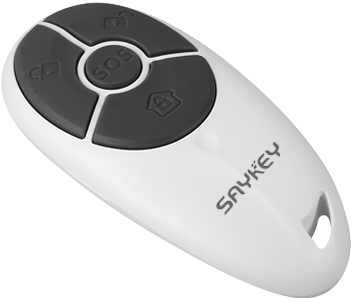
Product Recognition | |
|---|
Certification Number | ZC10-17115851 |
|---|
Name | Keyfob Remote Control |
|---|
Short Description | Key‐fob Remote Control with 4 keys is a Z‐Wave standard reporting portable controller (RPC). |
|---|
Long Description | Key‐fob Remote Control with 4 keys is a Z‐Wave standard reporting portable controller (RPC). It supports multiple key press action
trigger central scenes notification and/or controls max 8 devices in group turn on, off, stop. A special "SOS" key designs for
emergency notification. Further more, it can act as primary controller to add and control Z‐Wave device as standalone application.
The product supports acting as Z‐Wave primary controller to add (inclusion), remove (exclusion) device stand alone, meanwhile it
can associated device to control groups while the device was added, supports triggers control associated device in groups.
Also, It supports learn mode for added by other master controller, supports trigger central scene command to master controller, and
it can associated control devices by key‐fob local operation or master controller association set configuration. |
|---|
Brand | Saykey |
|---|
Product Identifier | SK-5005-02 |
|---|
OEM Version | HW: 33 FW: 1.01 |
|---|
Hardware Platform | ZM5202 |
|---|
Z-Wave Version | 6.51.09 |
|---|
Library Type | CONTROLLER_PORTABLE |
|---|
Device Type | Remote Control - Multi Purpose |
|---|
Role Type | ROLE_TYPE_CONTROLLER_PORTABLE |
|---|
Manufacturer ID | 0x032C |
|---|
Product Type ID | 0x5005 |
|---|
Product ID | 0x0002 |
|---|
User Icon | 0x0B01 |
|---|
Installer Icon | 0x0B00 |
|---|
Frequency Plans | EU: 869.85MHz, 868.40MHz |
|---|
Categories | All Controllers, Handheld Controller |
|---|
Countries / Regions | European Union |
|---|
Supported Command Classes | Identifier | Name | Key | Version |
|---|
COMMAND_CLASS_POWERLEVEL | Powerlevel | 0x73 | 1 | COMMAND_CLASS_MULTI_CHANNEL_ASSOCIATION_V3 | Multi-Channel Association V3 | 0x8E | 3 | COMMAND_CLASS_BATTERY | Battery | 0x80 | 1 | COMMAND_CLASS_APPLICATION_STATUS | Application Status | 0x22 | 1 | COMMAND_CLASS_CONFIGURATION | Configuration | 0x70 | 1 | COMMAND_CLASS_SECURITY | Security S0 | 0x98 | 1 | COMMAND_CLASS_NOTIFICATION_V3 | Notification V3 | 0x71 | 3 | COMMAND_CLASS_VERSION_V2 | Version V2 | 0x86 | 2 | COMMAND_CLASS_WAKE_UP_V2 | Wake Up V2 | 0x84 | 2 | COMMAND_CLASS_DEVICE_RESET_LOCALLY | Device Reset Locally | 0x5A | 1 | COMMAND_CLASS_ZWAVEPLUS_INFO_V2 | Z-Wave Plus Info V2 | 0x5E | 2 | COMMAND_CLASS_ASSOCIATION_V2 | Association V2 | 0x85 | 2 | COMMAND_CLASS_ASSOCIATION_GRP_INFO | Association Group Info | 0x59 | 1 | COMMAND_CLASS_CENTRAL_SCENE_V3 | Central Scene V3 | 0x5B | 3 | COMMAND_CLASS_PROTECTION | Protection | 0x75 | 1 | COMMAND_CLASS_MANUFACTURER_SPECIFIC_V2 | Manufacturer Specific V2 | 0x72 | 2 |
|
|---|
Controlled Command Classes | Identifier | Name | Key | Version |
|---|
COMMAND_CLASS_SWITCH_MULTILEVEL | Switch Multilevel | 0x26 | 1 | COMMAND_CLASS_DOOR_LOCK | Door Lock | 0x62 | 1 | COMMAND_CLASS_SWITCH_BINARY | Switch Binary | 0x25 | 1 | COMMAND_CLASS_BASIC | Basic | 0x20 | 1 | COMMAND_CLASS_SECURITY | Security S0 | 0x98 | 1 | COMMAND_CLASS_MULTI_CHANNEL_V4 | Multi-Channel V4 | 0x60 | 4 |
|
|---|
Documents | Category | Description | File |
|---|
Manual_Primary_Lang | Product or Owner's Manual | |
|
|---|
Features | Feature | Values |
|---|
Loads Controlled | | Supported Notification Types | | Z-Wave Scene Type | | Battery Quantity | | Battery Type | |
|
|---|
Association Groups | Group Number | Maximum Nodes Supported | End Point ID | Description |
|---|
1 | 1 | 0 | Z-Wave Plus Lifeline, is assigned to send unsolicited report lifeline status, including central scene report, notification alarm report,
battery report, factory reset locally report etc. | 3 | 8 | 0 | Group #3 assigned to send Basic Set On/Binary Switch On/Multilevel Start Change Up/Door Lock Unsecure Command control associated devices corresponding to the “on” key operation, including key press 1 times. | 2 | 8 | 0 | Group #2 assigned to send Basic Set Off/Binary Switch Off/Multilevel Start Change Down/Door Lock Secure Command control associated devices corresponding to the “off” key operation, including key press 1 times. | 4 | 8 | 0 | Group #4 assigned to send Stop Multilevel Change Command control associated devices corresponding to the “stop” key operation, including key press 1 times. |
|
|---|
Configuration Parameters | |
|---|
Texts | ID | Description | Value |
|---|
24 | Controller Exclusion | 1) Press and hold both ""On"" and ""Off"" key together for 2 seconds until LED indicator light on, release all key;
2) Press and hold ""Off"" key for 2 seconds until LED indicator flash quickly (1 second on, 1 second off), key‐fob starts remove device processing;
3) Refer to device manual, trigger the device which is going to included start network add/remove mode;
4) If key‐fob detects any device started network add/remove mode, it implement remove device procedure and LED indicator light on for 3 seconds after exclusion successful; If key‐fob has not detects any device in 15 seconds, exit remove device process and LED indicator turn off. | 4 | Device Wake-Up | 1) Press and hold both ""On"" and ""Off"" key together for 2 seconds until LED indicator light on, release all key;
2) Press ""Stop"" key 3 times in 2 seconds and LED indicator flash Flash on fast 3 times, then product keep in wakeup for 30 second without initial
wakeup parameter or 10 second has initial wakeup parameter. | 5 | Factory Reset | 1) Press and hold both ""On"" and ""Off"" key together for 2 seconds until LED indicator light on, release all key;
2) Press and hold both ""Stop"" and ""SOS"" key together for 10 seconds, during hold time LED will blink off 0.5 second interval 2 seconds. After hold 10 seconds LED indicator light off, then release all keys, factory default is retrieve, LED indicator will flashes three times after restore factory default success.
Please use this procedure only when the network primary controller is missing or otherwise inoperable. | 6 | Additional Special Features | User can protect key‐fob’s keyboard avoid un‐want press key‐fob keyboard by Protect Command Class.
Factory default un‐protect the keyboard, user can re‐configuration protect timeout value between 30 second to 60 second to enable keyboard protect function. From last key‐fob operation complete protect timeout or received protect command from master controller; key‐fob’s keyboard was protected no more keyboard except un‐protect sequence is acceptable. | 23 | Controller Inclusion | 1) Press and hold both ""On"" and ""Off"" key together for 2 seconds until LED indicator light on, release all key;
2) Press and hold ""On"" key for 2 seconds until LED indicator flash slowly (3 second on, 3 second off), key‐fob starts add device processing;
3) Refer to device manual, trigger the device which is going to included start network add/remove mode;
4) If key‐fob detects any device started network add/remove mode, it implement add device procedure and LED indicator light on for 3 seconds after inclusion successful; If key‐fob has not detects any device in 60 seconds, exit add device process and LED indicator turn off. | 3 | Learn Mode (adding another controller) | 1) Press and hold both ""On"" and ""Off"" key together for 2 seconds until LED indicator light on, release all key;
2) Press and hold ""Stop"" key for 2 seconds until LED indicator intermittently flash (light on 2 times in 3 second), key‐fob starts copy controller network processing;
3) Refer to controller manual, trigger the controller which is going to copied starts network learn mode;
4) If key‐fob detects any controller started network learn mode, it implement copy controller procedure and LED indicator
light on for 3 seconds after copy successful; If key‐fob has not detects any device in 60 seconds, exit copy controller process and LED indicator turn off. |
|
|---|
Supports NWI | Yes |
|---|
Supports Explorer Frames | Yes |
|---|