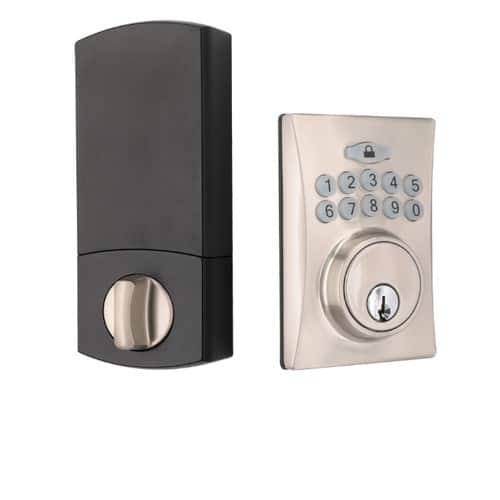
Product Recognition | |
|---|
Certification Number | ZC14-22050105 |
|---|
Name | Keypad Electronic Z-WAVE Deadbolt |
|---|
Short Description | Keypad Electronic Z-Wave™ Deadbolt with SmartStart |
|---|
Long Description | Great Convenience
。Connect your Z-Wave™ smart home system and operate from anywhere
。Holds up to 10 user codes
。Holds up to 4 single-entry codes
。Vacation mode (deactivates all user codes temporarily)
。Auto-lock with adjustable delay (10 - 99 seconds)
。Back-up mechanical keyway
Uncompromised Security
。ANSI Grade 3 quality – deadbolt operates over 100,000 times
。ANSI A156.25 compliant - resistant to dust, rain, and corrosion under variable temperatures
。4-digit random guiding code prevents code-probing
。Touch screen is temporarily disabled after 4 consecutive incorrect entries
Easy Installation
。Easy installation with a Philips screwdriver
。Fits most standard door preparations
。Online video instruction available (please scan the QR code on this box) |
|---|
Brand | FAULTLESS |
|---|
Product Identifier | A50-WG040 |
|---|
Product Line | Electronic Deadbolt |
|---|
OEM Version | HW: 01 FW: 02.06 |
|---|
Hardware Platform | ZGM130S037HGN2 / ZGM130S037HGN1 |
|---|
Z-Wave Version | 7.16.3 |
|---|
Library Type | END_NODE_ENHANCED_232 |
|---|
Device Type | Lock DT |
|---|
Role Type | ROLE_TYPE_SLAVE_SLEEPING_LISTENING |
|---|
Manufacturer ID | 0x0262 |
|---|
Product Type ID | 0x0006 |
|---|
Product ID | 0x0005 |
|---|
User Icon | 0x0300 |
|---|
Installer Icon | 0x0300 |
|---|
Radio Range Z-Wave (m) | 40 |
|---|
Frequency Plans | US: 916.00MHz, 908.40MHz |
|---|
Categories | Locks |
|---|
Countries / Regions | United States of America |
|---|
Supported Command Classes | Identifier | Name | Key | Version |
|---|
COMMAND_CLASS_ASSOCIATION_V2 | Association V2 | 0x85 | 2 | COMMAND_CLASS_ASSOCIATION_GRP_INFO_V3 | Association Group Information (AGI) V3 | 0x59 | 3 | COMMAND_CLASS_DEVICE_RESET_LOCALLY | Device Reset Locally | 0x5A | 1 | COMMAND_CLASS_FIRMWARE_UPDATE_MD_V5 | Firmware Update Meta Data V5 | 0x7A | 5 | COMMAND_CLASS_INDICATOR_V3 | Indicator V3 | 0x87 | 3 | COMMAND_CLASS_MANUFACTURER_SPECIFIC_V2 | Manufacturer Specific V2 | 0x72 | 2 | COMMAND_CLASS_MULTI_CHANNEL_ASSOCIATION_V3 | Multi Channel Association V3 | 0x8E | 3 | COMMAND_CLASS_VERSION_V3 | Version V3 | 0x86 | 3 | COMMAND_CLASS_ZWAVEPLUS_INFO_V2 | Z-Wave Plus Info V2 | 0x5E | 2 | COMMAND_CLASS_SECURITY_2 | Security 2 | 0x9F | 1 | COMMAND_CLASS_SUPERVISION | Supervision | 0x6C | 1 | COMMAND_CLASS_TRANSPORT_SERVICE_V2 | Transport Service V2 | 0x55 | 2 | COMMAND_CLASS_POWERLEVEL | Powerlevel | 0x73 | 1 | COMMAND_CLASS_DOOR_LOCK_V4 | Door Lock V4 | 0x62 | 4 | COMMAND_CLASS_BASIC_V2 | Basic V2 | 0x20 | 2 | COMMAND_CLASS_SECURITY | Security 0 | 0x98 | 1 | COMMAND_CLASS_BATTERY | Battery | 0x80 | 1 | COMMAND_CLASS_USER_CODE | User Code | 0x63 | 1 | COMMAND_CLASS_CONFIGURATION_V4 | Configuration V4 | 0x70 | 4 | COMMAND_CLASS_NOTIFICATION_V8 | Notification V8 | 0x71 | 8 |
|
|---|
S2 Classes | S2_ACCESS_CONTROL |
|---|
Documents | Category | File |
|---|
Manual_English | |
|
|---|
Association Groups | Group Number | Maximum Nodes Supported | End Point ID | Group Name | Profile |
|---|
1 | 5 | 0 | Lifeline | 0x0001 |
|
|---|
Configuration Parameters | Parameter Number | Name | Description | Format | Size | Min Value | Max Value | Default Value |
|---|
1 | Guiding Code | Reserve for Touchpad device | 1 | 1 | 0 | 0 | 0x00 | 2 | VacationMode | Disable all user PIN code | 1 | 1 | 0 | 0 | 0x00 | 3 | Volume | Control Lock Sound volume | 1 | 1 | 0 | 0 | 0x01 | 4 | AutoLock | Auto Lock after X second than unlock the lock | 1 | 1 | 0 | 0 | 0x00 | 5 | AutoLockTimer | Delay time for auto lock | 1 | 1 | 0 | 0 | 0x0A |
|
|---|
Texts | ID | Description | Value |
|---|
8 | Where to find S2 DSK on product | "find the DSK on the sticker on the left or on the battery case." | 1 | Classic Inclusion | Press [SET] for 1 second. → Programming Code (4-6 digits) → press the Lock mark bottom → press number 9 → press number 0 → Include successfully (beep x 1) | 2 | Classic Exclusion | Press [SET] for 1 second. → Programming Code (4-6 digits) → press the Lock mark bottom → press number 9 → press number 0 → Exclude successfully (beep x 1) | 4 | Wake-Up Procedure | NA | 5 | Factory Reset Procedure | Press and hold SET button while inserting the battery back. Hold the set button until long beep has finished. |
|
|---|
Supported Notification Types | Notification Type | Event / State |
|---|
Access Control | Manual lock operation | Access Control | Manual unlock operation | Access Control | Keypad lock operation | Access Control | RF lock operation | Access Control | RF unlock operation | Access Control | Keypad unlock operation | Access Control | Auto lock locked operation | Access Control | Lock state: Lock jammed | Access Control | New program code entered : unique code for lock configuration | Power Management | Battery maintenance status: Replace battery now |
|
|---|
Supports NWI | Yes |
|---|
Supports Explorer Frames | Yes |
|---|
Is Flirs | Yes |
|---|
Supports SmartStart | Yes |
|---|