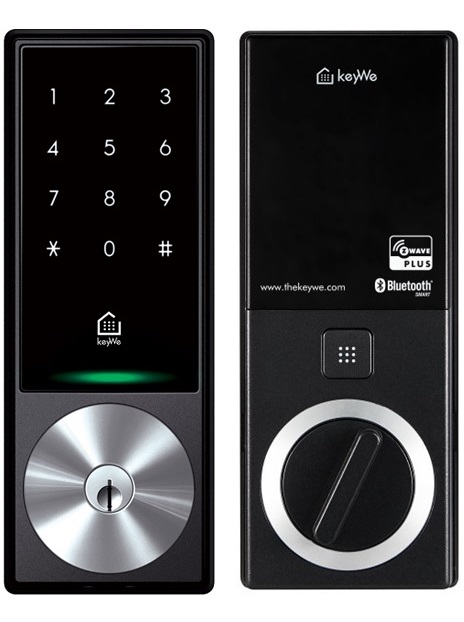
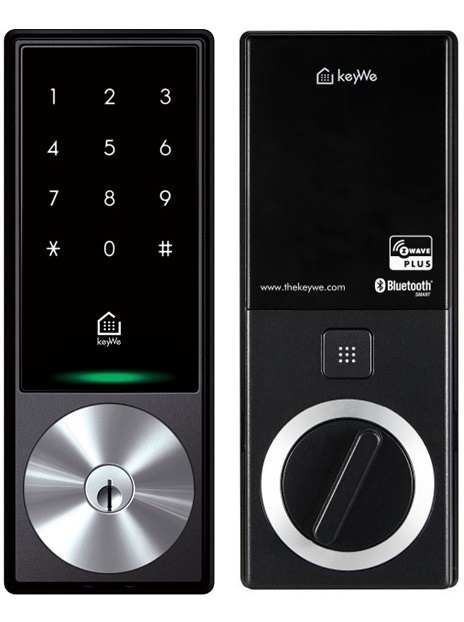
Product Recognition | |
|---|
Certification Number | ZC10-18086221 |
|---|
Name | KeyWe Smart Lock |
|---|
Short Description | Smart lock that can be used conveniently with Z-Wave and Bluetooth. |
|---|
Long Description | The GKW-2000D is a smart lock that can be conveniently used with Z-Wave and Bluetooth.
You can control the door lock directly from the phone via the Bluetooth function in close range. You can also check the status of the door lock on the outside by connecting to the Z-Wave hub.
You can also control door locks and check status via Google Home or Amazon Alexa. |
|---|
Brand | keyWe |
|---|
Product Identifier | GKW-2000D |
|---|
OEM Version | HW: 1 FW: 1.00:01.00 |
|---|
Hardware Platform | ZM5101 |
|---|
Z-Wave Version | 6.71.01 |
|---|
Library Type | SLAVE_ENHANCED_232 |
|---|
Device Type | Door Lock - Keypad |
|---|
Role Type | ROLE_TYPE_SLAVE_SLEEPING_LISTENING |
|---|
Manufacturer ID | 0x037B |
|---|
Product Type ID | 0x0002 |
|---|
Product ID | 0x0001 |
|---|
User Icon | 0x0300 |
|---|
Installer Icon | 0x0300 |
|---|
Frequency Plans | KR: 920.90MHz, 921.70MHz, 923.10MHz |
|---|
Categories | Locks |
|---|
Countries / Regions | Thailand |
|---|
S2 Classes | S2_ACCESS_CONTROL |
|---|
Documents | Category | Description | File |
|---|
Manual_Primary_Lang | Product or Owner's Manual | |
|
|---|
Features | Feature | Values |
|---|
Battery Quantity | | Battery Type | | Color | | Communications Connections | | Door Lock Type | | Supported Notification Types | |
|
|---|
Association Groups | Group Number | Maximum Nodes Supported | End Point ID | Description |
|---|
1 | 5 | 0 | Z-Wave Plus Lifeline | 2 | 5 | 0 | Doorlock Op Group |
|
|---|
Texts | ID | Description | Value |
|---|
1 | Inclusion | Please proceed with the door lock open.
1. Set the controller in inclusion mode.
2. Open the battery cover of the indoor body and press the [REG] button.
3. Press the Master Pin [1][2][3][4] (Default value) button after pressing the [#] button.
4. Press the [8][8] button after pressing the [*] button. | 2 | Exclusion | Please proceed with the door lock open.
1. Set the controller in exclusion mode.
2. Open the battery cover of the indoor body and press the [REG] button.
3. Press the Master Pin [1][2][3][4] (Default value) button after pressing the [#] button.
4. Press the [9][9] button after pressing the [*] button. | 5 | Factory Reset | Please proceed with the door lock open.
Please use this procedure only when the primary controller is missing or otherwise inoperable.
1. Open the battery cover of the indoor body and press the [REG] button.
2. Press the Master Pin [1][2][3][4] (Default value) button after pressing the [#] button.
3. Press the [5] button after pressing the [*] button.
4. Press the [2] button after pressing the [*] button.
5. Press the Master Pin [1][2][3][4] (Default value) button after pressing the [#] button
*Master pins can change user settings. |
|
|---|
Supported Notification Types | Notification Type | Event / State |
|---|
Access Control | (Refer to parameters): State idle |
|
|---|
Supports NWI | Yes |
|---|
Supports Explorer Frames | Yes |
|---|
Is Flirs | Yes |
|---|
Radio Range Z-Wave (m) | 40 |
|---|