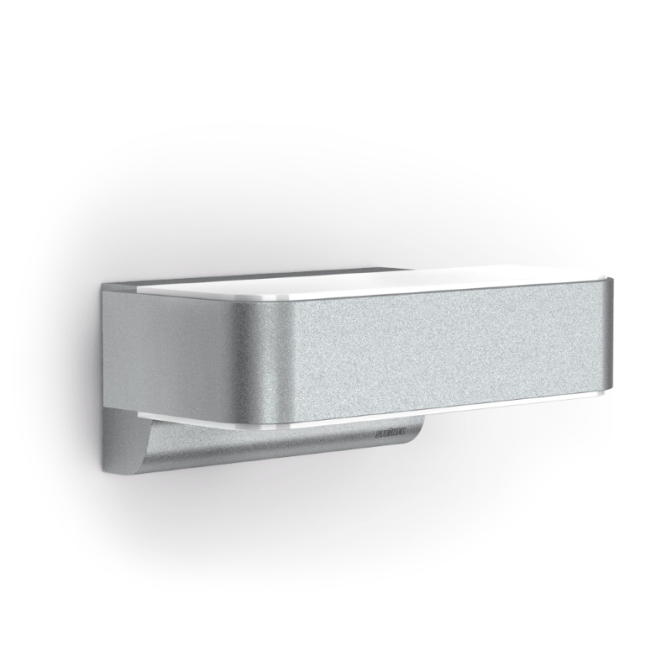
Product Recognition | |
|---|
Certification Number | ZC10-17045557 |
|---|
Name | L 810 LED iHF Z-Wave |
|---|
Short Description | Designer sensor-switched outdoor light L 810 LED iHF Z-Wave, can be integrated into the Smart Friends system or any other Z-Wave network, with invisible high-frequency sensor, ideal for building entrances and fronts of buildings, 12,5 W STEINEL LED lighting system, 612 lm, 160° coverage angle, reach from 1 - 5 m. |
|---|
Long Description | A high-quality product is cleverly thought through and made from materials that last. Its value also extends beyond today, it has permanency and constancy. The L 810 iHF outdoor SensorLight is an LED uplight and downlight that translates intelligent technology into form and function. For the first time, we have managed to make a light's sensor completely invisible – without compromising on first-class design and technological perfection. For stunning upward and downward lighting. New: optional manual override for 4 hours.
Smart home included.
The optional Smart Friends box and the free Smart Friends app make it easy to set the L 810 LED iHF Z-Wave via smart phone or tablet. The light can also be switched ON or OFF via app. Other Steinel products can also be interconnected. If you wish, this also works via remote control when you are out. That completes your own light management system.
Along with STEINEL products, Smart Friends solutions from PAULMANN, SCHELLENBERG and ABUS can also integrated. Smart homes from a brand-name provider. |
|---|
Brand | Steinel GmbH |
|---|
Product Identifier | 50111677301 |
|---|
OEM Version | HW: 1 FW: 1.01:01.02 |
|---|
Hardware Platform | ZM5202 |
|---|
Z-Wave Version | 6.51.09 |
|---|
Library Type | SLAVE_ENHANCED_232 |
|---|
Device Type | Light Dimmer Switch |
|---|
Role Type | ROLE_TYPE_SLAVE_ALWAYS_ON |
|---|
Manufacturer ID | 0x0271 |
|---|
Product Type ID | 0x0001 |
|---|
Product ID | 0x1A75 |
|---|
User Icon | 0x0600 |
|---|
Installer Icon | 0x0600 |
|---|
Frequency Plans | EU: 869.85MHz, 868.40MHz |
|---|
Categories | All Lighting Devices, Dimming Lighting Devices |
|---|
Countries / Regions | European Union |
|---|
Supported Command Classes | Identifier | Name | Key | Version |
|---|
COMMAND_CLASS_SCENE_ACTUATOR_CONF | Scene Actuator Conf | 0x2C | 1 | COMMAND_CLASS_NODE_NAMING | Node Naming | 0x77 | 1 | COMMAND_CLASS_POWERLEVEL | Powerlevel | 0x73 | 1 | COMMAND_CLASS_MULTI_CHANNEL_ASSOCIATION_V3 | Multi-Channel Association V3 | 0x8E | 3 | COMMAND_CLASS_SWITCH_ALL | Switch All | 0x27 | 1 | COMMAND_CLASS_APPLICATION_STATUS | Application Status | 0x22 | 1 | COMMAND_CLASS_BASIC | Basic | 0x20 | 1 | COMMAND_CLASS_CONFIGURATION | Configuration | 0x70 | 1 | COMMAND_CLASS_SENSOR_MULTILEVEL_V4 | Sensor Multilevel V4 | 0x31 | 4 | COMMAND_CLASS_VERSION_V2 | Version V2 | 0x86 | 2 | COMMAND_CLASS_DEVICE_RESET_LOCALLY | Device Reset Locally | 0x5A | 1 | COMMAND_CLASS_ZWAVEPLUS_INFO_V2 | Z-Wave Plus Info V2 | 0x5E | 2 | COMMAND_CLASS_ASSOCIATION_V2 | Association V2 | 0x85 | 2 | COMMAND_CLASS_ASSOCIATION_GRP_INFO | Association Group Info | 0x59 | 1 | COMMAND_CLASS_MULTI_CHANNEL_V4 | Multi-Channel V4 | 0x60 | 4 | COMMAND_CLASS_SWITCH_MULTILEVEL_V4 | Switch Multilevel V4 | 0x26 | 4 | COMMAND_CLASS_MANUFACTURER_SPECIFIC | Manufacturer Specific | 0x72 | 1 | COMMAND_CLASS_SCENE_ACTIVATION | Scene Activation | 0x2B | 1 | COMMAND_CLASS_FIRMWARE_UPDATE_MD_V3 | Firmware Update Meta-Data V3 | 0x7A | 3 | COMMAND_CLASS_NOTIFICATION_V4 | Notification V4 | 0x71 | 4 |
|
|---|
Controlled Command Classes | Identifier | Name | Key | Version |
|---|
COMMAND_CLASS_BASIC | Basic | 0x20 | 1 |
|
|---|
Documents | Category | Description | File |
|---|
Manual_Primary_Lang | Product or Owner's Manual | |
|
|---|
Features | Feature | Values |
|---|
Sensors | Value |
|---|
Motion/No Motion (Binary) | Luminance |
| Z-Wave Scene Type | | Firmware Updatable | Value |
|---|
Updatable by Consumer by RF |
| Neutral Wire Required | | IP (Ingress Protection) Rated | | Outdoor Use | | Supported Notification Types | | Electric Load Type | |
|
|---|
Association Groups | Group Number | Maximum Nodes Supported | End Point ID | Description |
|---|
1 | 1 | 0 | Z-Wave Plus Lifeline
Lifeline messages
- Device Reset Locally
- Notifications:
0x09 ( System ) – Hardware failure with manufacturer
proprietary code ( 0x03 )
0x09 ( System ) – Software failure with manufacturer
proprietary code ( 0x04 )
0x07 ( Home security ) – Motion Begin event ( 0x08 )
0x07 ( Home security ) – Motion End event ( 0x00, 0x08 )
- Binary Switch Report – lamp state
- Multilevel Sensor Report – value of internal ambient light
sensor
Motion Begin and Motion End events are sent along with
frames to group 3. If multichannel association is created the
events are sent from motion sensor endpoint.
Switch Report is sent immediately upon a change of status
along with frames to group 2. If multichannel association is
created the events are sent from lamp endpoint.
Multilevel Sensor Report is sent a maximum of once per
1 minute (if the value has changed by least by 3%) and
a minimum of once per 15 minutes (if the value has not
changed). If the ambient light value is old (cannot measure
because of permanent light), the value is not transmitted via
lifeline. Multilevel Sensor Report can be also added to some
other events to send in bulk. If multichannel association is
created the events are sent from light sensor endpoint.
All notifications to lifeline are sent as sensor states regardless
of sensor settings and states as SLAVE_MODE, LOCAL_DISABLED and MOTION_ENABLE. |
|
|---|
Configuration Parameters | Parameter Number | Name | Description | Format | Size | Min Value | Max Value | Default Value | Parameter Values |
|---|
1 | TIME | Duration of light after motion detection. | 0 | 2 | 0 | 0 | 180 | From | To | Description |
|---|
5 | 900 | seconds |
| 4 | RANGE | Motion Radar Range [cm] Value can be controlled via potentiometer – potentiometer value is used as the default value and any potentiometer movement rewrites the current setting | 0 | 2 | 0 | 0 | 500 | From | To | Description |
|---|
100 | 500 | cm |
| 6 | BRIGHTNES MEAS INTERVAL | Brightness measuring interval [ minutes ] Interval for ambient light measuring when lamp is on ( lamp switches off shortly and measures ). 0=function is off | 0 | 1 | 0 | 0 | 0 | From | To | Description |
|---|
5 | 120 | minutes | 0 | 0 | function is off |
| 10 | OFF_BEHAVIOUR | Behaviour after BASIC OFF ( and similar commands ). If a transition ( even with zero change ) with a non-default duration is to be processed, the transition cannot be interrupted by any motion event in any case. for values 1-209 - Lamp is switched off and remains so until after a specified timeout once a new motion event (local or remote) is received. | 0 | 2 | 0 | 0 | 10 | From | To | Description |
|---|
1 | 100 | timeout: 1 second (1) to 100 seconds (100) in 1-second resolution | 101 | 200 | timeout: 1 minute (101) to 100 minutes (200) 1-minute resolution | 201 | 209 | timeout: 1 hour (201) to 9 hours (209) in 1-hour resolution | 255 | 255 | Lamp is switched off for TIME (cfg 1). It does not wait for a motion event and works normally via current motion evaluation | 0 | 0 | Lamp is switched off and remains so until any new motion event (local or remote) is received. |
| 11 | ON_BEHAVIOUR | Behaviour after BASIC ON (and similar commands). If a transition (even with zero change) with a non-default duration is to be processed, the transition cannot be interrupted by any motion event in any case. for values 1-209 - Lamp is switched on and remains so until after a specified timeout once a new motion event (local or remote) is received. It then works normally via current motion evaluation. | 0 | 2 | 0 | 0 | 255 | From | To | Description |
|---|
101 | 200 | timeout: 1 minute (101) to 100 minutes (200) 1-minute resolution | 201 | 209 | timeout: 1 hour (201) to 9 hours (209) in 1-hour resolution | 255 | 255 | Lamp is switched on for TIME (cfg 1). It does not wait for a motion event and works normally via current motion evaluation. | 0 | 0 | Lamp is switched on and remains so until any new motion event (local or remote) is received. It then works normally via current motion evaluation. Notice – during the day, this mode cannot be ended remotely due to motion events not being transmitted – only via local motion sensor if enabled. | 1 | 100 | timeout: 1 second (1) to 100 seconds (100) in 1-second resolution |
| 3 | DIM | Night dim mode and time [min] Dim mode is also disabled when local control is disabled (as well as in Slave mode) | 0 | 1 | 0 | 0 | 0 | From | To | Description |
|---|
1 | 60 | time [minutes] (enabled in night mode, starts after lamp is switched off after motion detection) | -1 | -1 | whole night (dim through the whole night when lamp is off) | 0 | 0 | off (dim = basic light completely disabled) |
| 9 | SLAVE_MODE | Can disable sensor controll “Stupid” mode (bit 2 = 1): - has higher priority then slave mode. - lamp is permanently on (usefull for simple power wall switch controlling). Slave mode ( bit 0 = 1 ): - only if included in Z-Wave network - usefull for controlling via third-party sensor - lamp is directly controlled via Z-Wave, internal sensors are not used for controlling it. Central unit checking ( bit 1 = 1 ): ( usefull especialy for controlling via gateway ) When Slave bit is 0: - lamp signalises fail of lifeline connection ( if this bit is zero fail of lifeline connection is not signalised ) When slave bit is 1: - lamp checks presence of Z-Wave device in lifeline group ( gateway ). If it is not present for 2 minutes ( testing repeatedly every 30 seconds ) device switches to normal mode in the same way as after the end of local disabled mode ( ON_BEHAVIOUR ) - The device checks every 1 minute for recovery of Lifeline connection. - if no lifeline specified - it works in normal mode Be careful with this option, lamp stops using it’s own motion sensor in Slave and Stupid mode. | 0 | 1 | 0 | 0 | 2 | From | To | Description |
|---|
1 | 1 | Slave mode without gateway checking | 2 | 2 | Normal mode with lifeline error signalisation | 3 | 3 | Slave mode with gateway checking | 4 | 4 | Stupid mode - lamp permanetly on | 0 | 0 | Normal mode |
| 2 | LIGHT | Light threshold [ lx ] Value can be controlled via potentiometer – potentiometer value is used as the default value and any potentiometer movement rewrites the current setting. | 0 | 2 | 0 | 0 | 2000 | From | To | Description |
|---|
0 | 0 | run Learn ambient light sequence (the level is set automatically) | 2 | 1999 | lux | 2000 | 2000 | 2000 - is used as daylight ( always night mode) |
| 8 | GLOBAL_LIGHT | Use External Ambient Light Value When GLOBAL_LIGHT mode is ON – device overrides its own light sensor values and uses Light report values from any Z-Wave light sensor instead – this has to be configured appropriately to send light automatically. If the last remote light level value is older than 30 minutes, the internal light value is used again until the next external value is received. | 0 | 1 | 0 | 0 | 1 | From | To | Description |
|---|
1 | 1 | ON function | 0 | 0 | OFF function |
|
|
|---|
Texts | ID | Description | Value |
|---|
6 | Additional Special Features | Setting L 810 LED iHF with the app
–– After programming, an ON/OFF scene is automatically created in the app.
–– The following setting values are then automatically stored:
a) Twilight setting = control-dial setting
b) Z Time setting = 3 min switch-off delay
–– The twilight and time settings can be selected to the accuracy of one lux and one second respectively in the ""Scene"" menu. | 5 | Factory Reset | Returning L 810 LED iHF to factory settings:
Please only perform these steps if the main network controller is missing or not working for other reasons.
1) Briefly press button (8) and directly afterwards keep it pressed for 5 seconds.
2) Status LED (12) briefly flashes to show that the light has been reset.
3) The device is now no longer included in the Z-Wave system and has been returned to factory settings. | 2 | Exclusion | Exclusion = Remove
To start the light's exclusion mode, briefly press button (8)
Removing L 810 LED iHF from the Smart Friends system:
1) In the rooms view, activate the edit mode.
2) Select the device in the chosen room and press the ""delete"" button. Press delete and follow the instructions in the app.
3) Briefly press the device's button (8) to set the light to exclusion mode. The red status LED (12) lights up to show that this mode is selected.
4) The app displays a confirmation message once exclusion has been successfully completed. | 1 | Inclusion | Inclusion = Add
To start the light's inclusion mode, briefly press button (8)
Adding L 810 LED iHF to the Smart Friends system:
1) Download Smart Friends app from the App Store.
2) In the rooms view, activate the edit mode.
3) Select the chosen room and press the ""Add device"" button.
4) Briefly press the device's button (8) to set the light to inclusion mode. The status LED (12) lights up to show that this mode is selected.
5) The app displays a confirmation message once inclusion has been successfully completed. |
|
|---|
Supported Notification Types | Notification Type | Event / State |
|---|
Home Security | (Refer to parameters): State idle | System | (Refer to parameters): State idle |
|
|---|
Supported Multilevel Sensors | Multilevel Sensor Type |
|---|
General purpose | Illuminance |
|
|---|
Supports NWI | Yes |
|---|
Supports Explorer Frames | Yes |
|---|