Product Recognition | |
|---|
Certification Number | ZC10-17055593 |
|---|
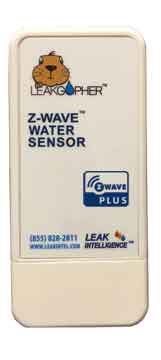
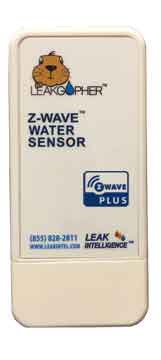
Name | Leak Gopher Z-Wave Leak Detector |
|---|
Short Description | Detects water leaks and reports them to the Z-Wave controller. |
|---|
Long Description | Detects water leaks and reports them to a Z-Wave Controller
6 water sensro pins are located in the bottom of the device.
Powered by battery or wall cube.
If powered by wall cube the battery serves as a battery backup
Easy Installation. Install battery, include in your Z-Wave network and place the device where you want to detect water. |
|---|
Brand | Leak Intelligence, LLC |
|---|
Product Identifier | LGZWLD |
|---|
OEM Version | HW: 255 FW: 1.06 |
|---|
Hardware Platform | ZM5202 |
|---|
Z-Wave Version | 6.71.01 |
|---|
Library Type | SLAVE_ENHANCED_232 |
|---|
Device Type | Notification Sensor |
|---|
Role Type | ROLE_TYPE_SLAVE_SLEEPING_REPORTING |
|---|
Manufacturer ID | 0x0173 |
|---|
Product Type ID | 0x4c47 |
|---|
Product ID | 0x4c44 |
|---|
User Icon | 0x0c05 |
|---|
Installer Icon | 0x0c05 |
|---|
Frequency Plans | US: 916.00MHz, 908.40MHz |
|---|
Categories | Sensors |
|---|
Countries / Regions | United States of America |
|---|
Supported Command Classes | Identifier | Name | Key | Version |
|---|
COMMAND_CLASS_FIRMWARE_UPDATE_MD_V4 | Firmware Update Meta-Data V4 | 0x7A | 4 | COMMAND_CLASS_POWERLEVEL | Powerlevel | 0x73 | 1 | COMMAND_CLASS_BATTERY | Battery | 0x80 | 1 | COMMAND_CLASS_SWITCH_BINARY | Switch Binary | 0x25 | 1 | COMMAND_CLASS_SECURITY | Security S0 | 0x98 | 1 | COMMAND_CLASS_TRANSPORT_SERVICE_V2 | Transport Service V2 | 0x55 | 2 | COMMAND_CLASS_VERSION_V2 | Version V2 | 0x86 | 2 | COMMAND_CLASS_WAKE_UP_V2 | Wake Up V2 | 0x84 | 2 | COMMAND_CLASS_DEVICE_RESET_LOCALLY | Device Reset Locally | 0x5A | 1 | COMMAND_CLASS_ZWAVEPLUS_INFO_V2 | Z-Wave Plus Info V2 | 0x5E | 2 | COMMAND_CLASS_ASSOCIATION_V2 | Association V2 | 0x85 | 2 | COMMAND_CLASS_ASSOCIATION_GRP_INFO | Association Group Info | 0x59 | 1 | COMMAND_CLASS_NOTIFICATION_V8 | Notification V8 | 0x71 | 8 | COMMAND_CLASS_SECURITY_2 | Security S2 | 0x9F | 1 | COMMAND_CLASS_SUPERVISION | Supervision | 0x6C | 1 | COMMAND_CLASS_MANUFACTURER_SPECIFIC_V2 | Manufacturer Specific V2 | 0x72 | 2 |
|
|---|
S2 Classes | S2_UNAUTHENTICATED |
|---|
Documents | Category | Description | File |
|---|
Manual_Primary_Lang | Product or Owner's Manual | |
|
|---|
Features | Feature | Values |
|---|
Battery Quantity | | Battery Type | | Color | | Firmware Updatable | Value |
|---|
Updatable by Consumer by RF |
| Supported Notification Types | |
|
|---|
Association Groups | Group Number | Maximum Nodes Supported | End Point ID | Description |
|---|
1 | 5 | 0 | Z-Wave Plus Lifeline |
|
|---|
Texts | ID | Description | Value |
|---|
5 | Factory Reset | Reset to Factory Defaults
How to reset the Leak Gopher Z-Wave Leak Detector
- If the exclusion process above is not working or the Z-Wave controller was lost or not available, the following process can be used to factory reset the device to the same state it has when shipped new.
- To reset the Leak Gopher Z-Wave Leak Detector Z-Wave radio and routing tables, press and HOLD the Z-Wave button for 15 seconds. The LED will blink very quickly while holding the Z-Wave button down. Once the LED turns off, release the Z-Wave button. | 1 | Inclusion | Z-Wave Inclusion
How to Add the Leak Gopher Leak Detector to your Z-Wave Controller
- Plug the wall cube power adapter (included) into the receptacle on the bottom of the Leak Gopher Z-Wave Valve Control marked “5 VDC”. Plug the wall cube into a 110 VAC outlet.
This provides power to the Leak Gopher Z-Wave Leak Detector.
- Configure the Z-Wave Controller to Include/Add a device.
- When the Z-Wave Controller is ready to include/add a device, it will display a message like “waiting to add device”. Press and release the Z-Wave button on the front of the LGZWLD.
- The Z-Wave Controller will acknowledge that the LGZWLD has been added to the Z-Wave network.
- Your Leak Gopher Z-Wave Leak Detector is ready to use.
Inclusion without Security
If your home automation hub is does not support the Z-Wave Security Command class, tap the Z-Wave button two times. Tapping the button twice will send a simpler message to the hub which will not include the security command classes.
Inclusion Legacy Mode
If your home automation hub does not support the Z-Wave Notification Command Class, the LGZWLD can substitute the simpler Binary Switch command class. To enable Legacy Mode, tap the Z-Wave button three times during inclusion. Virtually all hubs support the Binary Switch command class. | 2 | Exclusion | Z-Wave Exclusion
How to Remove the Leak Gopher Z-Wave Leak Detector from your Z-Wave Controller
- Plug the wall cube power adapter (included) into the receptacle on the bottom of the Leak Gopher Z-Wave Valve Control marked “5 VDC”. Plug the wall cube into a 110 VAC outlet.
This provides power to the Leak Gopher Z-Wave Valve Control.
- Configure the Z-Wave Controller to Exclude a device.
- When the Z-Wave Controller is ready to exclude a device, it will display a message like
“waiting to exclude device”. Press and release the Z-Wave button on the LGZWLD
- The Z-Wave Controller will acknowledge that the LGZWLD has been excluded from the Z-Wave network.
- Your Leak Gopher Z-Wave Leak Detector is excluded from this controller. |
|
|---|
Supported Notification Types | Notification Type | Event / State |
|---|
Water Alarm | (Refer to parameters): State idle |
|
|---|
Supports NWI | Yes |
|---|
Supports Explorer Frames | Yes |
|---|