Product Recognition | |
|---|
Certification Number | ZC10-21017006 |
|---|
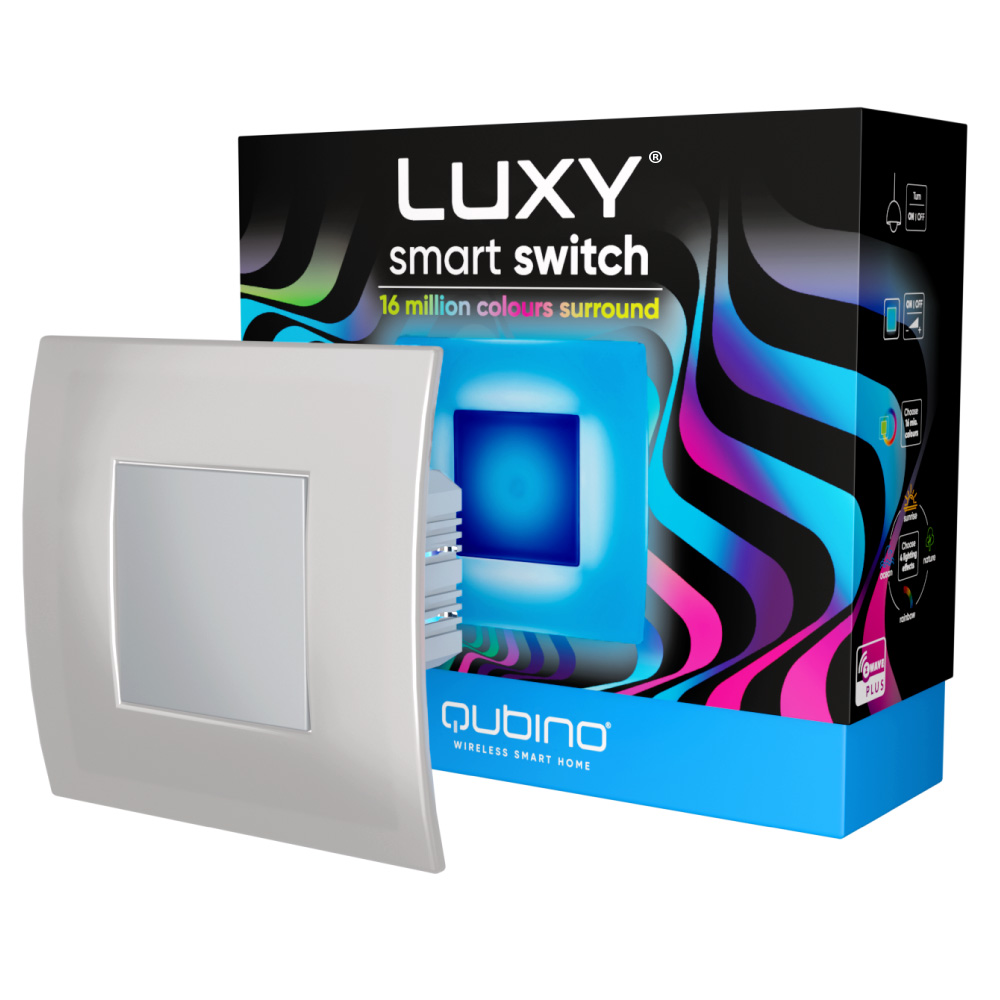
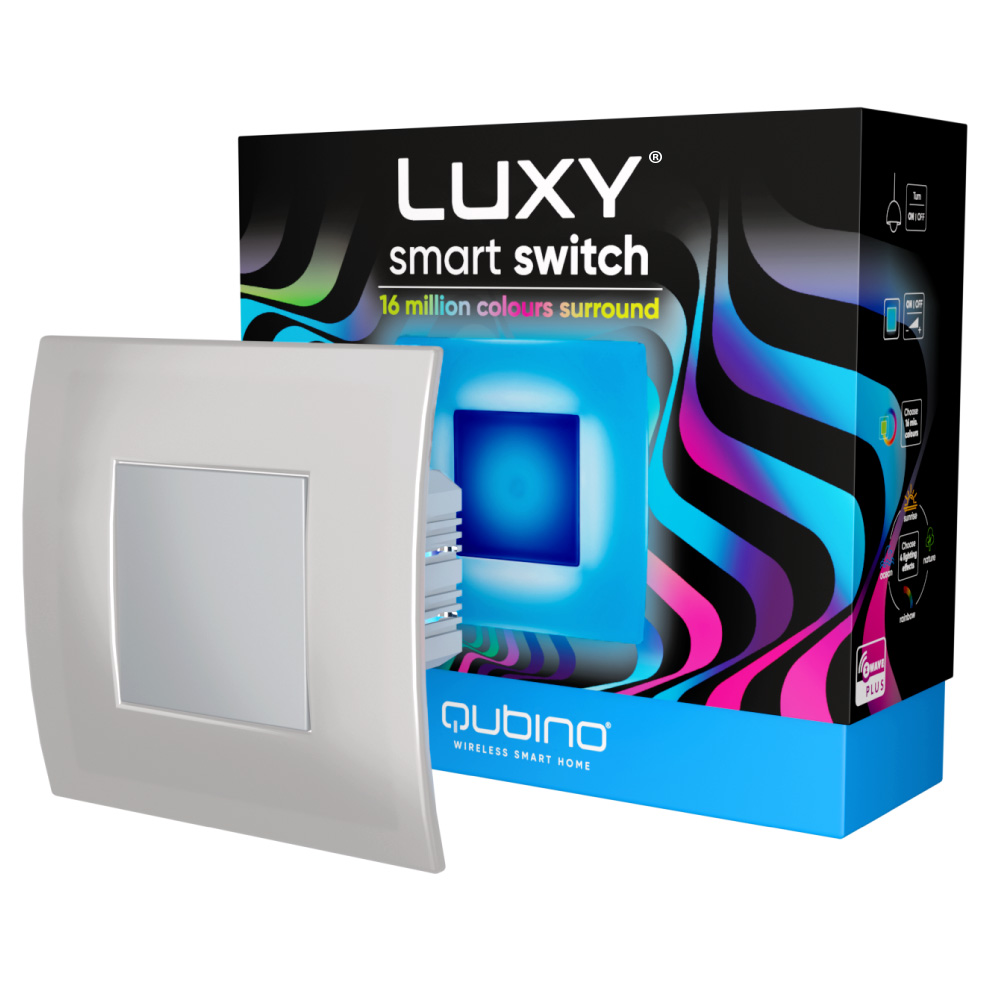
Name | Luxy Smart Switch |
|---|
Short Description | Luxy Smart Switch is an innovative light switch that can illuminate your home in more than 16 million colors and can easily replace existing light switches. |
|---|
Long Description | Luxy Smart Switch is an innovative light source that gently illuminates in more than 16 million colors and easily fits into places of your light switch or socket. It can be used standalone, as ambient light, or as a smart home device. With an additional output, it can simply replace your existing light switch or can be used for powering IR panels, fans, water heaters, etc. |
|---|
Brand | QUBINO |
|---|
Product Identifier | ZMNKAD1 |
|---|
Product Line | QUBINO |
|---|
OEM Version | HW: 1 FW: 20.00:20.00 |
|---|
Hardware Platform | ZM5101 |
|---|
Z-Wave Version | 6.82.01 |
|---|
Library Type | SLAVE_ENHANCED_232 |
|---|
Device Type | Color Switch |
|---|
Role Type | ROLE_TYPE_SLAVE_ALWAYS_ON |
|---|
Manufacturer ID | 0x0159 |
|---|
Product Type ID | 0x0008 |
|---|
Product ID | 0x0052 |
|---|
User Icon | 0x0600 |
|---|
Installer Icon | 0x0600 |
|---|
Frequency Plans | EU: 869.85MHz, 868.40MHz |
|---|
Categories | Energy Meters, All Lighting Devices, On/Off Switches/Devices, Lighting Accessories |
|---|
Countries / Regions | European Union |
|---|
Supported Command Classes | Identifier | Name | Key | Version |
|---|
COMMAND_CLASS_POWERLEVEL | Powerlevel | 0x73 | 1 | COMMAND_CLASS_SWITCH_COLOR_V3 | Switch Color V3 | 0x33 | 3 | COMMAND_CLASS_MULTI_CHANNEL_ASSOCIATION_V3 | Multi-Channel Association V3 | 0x8E | 3 | COMMAND_CLASS_SWITCH_BINARY | Switch Binary | 0x25 | 1 | COMMAND_CLASS_CONFIGURATION | Configuration | 0x70 | 1 | COMMAND_CLASS_TRANSPORT_SERVICE_V2 | Transport Service V2 | 0x55 | 2 | COMMAND_CLASS_VERSION_V2 | Version V2 | 0x86 | 2 | COMMAND_CLASS_DEVICE_RESET_LOCALLY | Device Reset Locally | 0x5A | 1 | COMMAND_CLASS_ZWAVEPLUS_INFO_V2 | Z-Wave Plus Info V2 | 0x5E | 2 | COMMAND_CLASS_ASSOCIATION_V2 | Association V2 | 0x85 | 2 | COMMAND_CLASS_MULTI_CHANNEL_V4 | Multi-Channel V4 | 0x60 | 4 | COMMAND_CLASS_SWITCH_MULTILEVEL_V4 | Switch Multilevel V4 | 0x26 | 4 | COMMAND_CLASS_ASSOCIATION_GRP_INFO_V3 | Association Group Information V3 | 0x59 | 3 | COMMAND_CLASS_NOTIFICATION_V8 | Notification V8 | 0x71 | 8 | COMMAND_CLASS_BASIC_V2 | Basic V2 | 0x20 | 2 | COMMAND_CLASS_SECURITY_2 | Security S2 | 0x9F | 1 | COMMAND_CLASS_SUPERVISION | Supervision | 0x6C | 1 | COMMAND_CLASS_MANUFACTURER_SPECIFIC_V2 | Manufacturer Specific V2 | 0x72 | 2 | COMMAND_CLASS_METER_V4 | Meter V4 | 0x32 | 4 |
|
|---|
S2 Classes | S2_UNAUTHENTICATED, S2_AUTHENTICATED |
|---|
Documents | Category | Description | File |
|---|
Manual_Primary_Lang | Qubino Luxy Smart Switch manual for certification | | Manual_English | Qubino Luxy Smart Switch manual for certification | |
|
|---|
Association Groups | Group Number | Maximum Nodes Supported | End Point ID | Group Name | Profile | Description |
|---|
2 | 5 | 0 | LEDs on/off | 0x0002 | Supports the following command:
COMMAND_CLASS_BASIC_V2, BASIC_SET_V2 - is triggered when a change of output state occurs; LEDs are on/off. | 1 | 1 | 0 | Lifeline | 0x0001 | Supports following commands:
COMMAND_CLASS_DEVICE_RESET_LOCALLY, DEVICE_RESET_LOCALLY_NOTIFICATION - triggered upon reset,
COMMAND_CLASS_SWITCH_MULTILEVEL_V4, SWITCH_MULTILEVEL_REPORT_V4 - triggered upon change of brightness,
COMMAND_CLASS_SWITCH_COLOR_V3, SWITCH_COLOR_REPORT_V3 - triggered upon change of color,
COMMAND_CLASS_NOTIFICATION_V8, NOTIFICATION_REPORT_V8 - triggered upon change of alarm detection state or upon current overload detection,
COMMAND_CLASS_SWITCH_BINARY, SWITCH_BINARY_REPORT - is triggered when a change of output state of relay occurs.
COMMAND_CLASS_METER, METER_REPORT - triggered upon energy consumption change according to configuration parameters 40 and 42.
CONFIGURATION_REPORT – triggered upon a local change of the working mode of the four capacitive buttons (see chapter 5.4)
Reserved for communication with the primary
gateway/hub. Used to report unsolicited messages to the controller.
| 3 | 5 | 0 | Change of brightness | 0x0003 | Supports the following command:
COMMAND_CLASS_SWITCH_MULTILEVEL_V4, SWITCH_MULTILEVEL_SET_V4 - is triggered when a change of output state occurs; brightness changes. | 4 | 5 | 0 | Change of color | 0x0004 | Supports the following command:
COMMAND_CLASS_SWITCH_COLOR_V3, SWITCH_COLOR_SET_V3 - is triggered when a change of output state occurs; colour changes.
| 5 | 5 | 0 | Relay on/off | 0x0005 | Supports the following command:
COMMAND_CLASS_BASIC_V2, BASIC_SET_V2 - is triggered when a change of output state of relay occurs. |
|
|---|
Configuration Parameters | Parameter Number | Name | Description | Format | Size | Min Value | Max Value | Default Value | Parameter Values |
|---|
1 | Parameter no. 1 – Relay contact type | Defines the contact type when open/closed contact. Values (size is 1-byte dec): • Default value 0 • 0 - NO (normally open) output type • 1 - NC (normally close) output type | 1 | 1 | 0 | 1 | 0 | From | To | Description |
|---|
0 | 0 | NO (normally open) output type | 1 | 1 | NC (normally close) output type |
| 3 | Parameter no 3. – turning off alarming | Values (size is 1-byte dec): • Default value 1 • 0 – only by z-wave command (basic set, switch multilevel set, switch multilevel start/stop level change, switch color set, switch color start/stop level change, notification report idle) • 1 – capacitive input (up, down, left, right) or z-wave command (basic set, switch multilevel set, switch multilevel start/stop level change, , switch color set, switch color start/stop level change, notification report idle) | 1 | 1 | 0 | 1 | 1 | From | To | Description |
|---|
0 | 0 | only by z-wave command (basic set, switch multilevel set, switch multilevel start/stop level change, switch color set, switch color start/stop level change, notification report idle) | 1 | 1 | capacitive input (up, down, left, right) or z-wave command (basic set, switch multilevel set, switch multilevel start/stop level change, , switch color set, switch color start/stop level change, notification report idle) |
| 31 | Parameter no. 31. – restore relay state on power failure | Values (size is 1-byte dec): • Default value 1 • 1 – enabled (the device will restore state on power failure) • 0 – disabled (the device will not restore state on power failure and will remain off) | 1 | 1 | 0 | 1 | 1 | From | To | Description |
|---|
1 | 1 | enabled (the device will restore state on power failure) | 0 | 0 | disabled (the device will not restore state on power failure and will remain off) |
| 60 | Parameter no. 60 – Lock touch for relay only | This parameter enables ONLY the touch functionality for closing/opening the relay meant for switching ON/OFF the connected light or any other connected load. See chapter 5.4 for additional information. Values (size is 1-byte dec): • Default value 0 • 0 – disabled • 1 – enabled (the user can switch ON/OFF the connected light or any other connected load by touching ANY button. Other functionalities (lighting mode, scenes, dimming and full white, inclusion/exclusion and reset) are unavailable until function disabled). | 1 | 1 | 0 | 1 | 0 | From | To | Description |
|---|
0 | 0 | disabled | 1 | 1 | enabled (the user can switch ON/OFF the connected light or any other connected load by touching ANY button. Other functionalities (lighting mode, scenes, dimming and full white, inclusion/exclusion and reset) are unavailable until function disabled). |
| 70 | Parameter no. 70 - Overload safety switch | The function allows for turning off the controlled device in case of exceeding the defined power for more than 5 sec. Controlled device can be turned back on by capacitive antenna/s or sending a control frame. Values (size is 2-byte dec): • Default value 2300 • 0 = function not active • 1 – 2300 = 1 W – 2300 W ⓘ NOTE: This functionality is not an overload safety protection, please check chapter “Functionalities” for more details. In case of overload the following message will be send towards the controller: COMMAND_CLASS_NOTIFICATION_V5 The Alarm V1 type field set to 0x00 Notification Type 0x08 and 0x08 (Overload detected) | 1 | 2 | 0 | 2300 | 1 | From | To | Description |
|---|
0 | 0 | function not active | 1 | 2300 | 1 W – 2300 W |
|
|
|---|
Texts | ID | Description | Value |
|---|
1 | Classic Inclusion | 1. Enable add/remove mode on your Z-Wave gateway (hub).
2. Connect the device to the power supply.
3. Make sure the device is within direct range of your Z-Wave gateway (hub).
4. Press once on button 3 – right. One press on button 4 – down for enabling full white. When full white is enabled, press, and hold button 3 – right, between 4 and 6 seconds. After 6 seconds, the device starts flashing green (1 second ON, 0.5 second OFF). Once the device receives node ID (after 10 seconds), it stops flashing and turns full green. The procedure is always available.
Note: In case of S2 Security inclusion a dialog will appear prompting you to enter the corresponding PIN number (5 underlined digits) that are written on the module label and the label inserted in the packaging (check the example picture). IMPORTANT: The PIN code must not be lost. | 2 | Classic Exclusion | 1. Connect the device to the power supply.
2. Make sure the device is within direct range of your Z-Wave gateway (hub) or use a hand-held Z-Wave remote to perform exclusion.
3. Enable exclusion mode on your Z-Wave gateway (hub).
4. Press once on button 3 – right. One press on button 4 – down for enabling full white. When full white is enabled, press, and hold button 3 – right for 5 seconds. After 5 seconds, the device starts flashing red 1 second ON, 0.5 second OFF.
Once the device loses node ID (after 10 seconds), it stops flashing and turns full red. The procedure is always available.
NOTE: LEARN MODE state allows the device to receive network information from the controller. | 5 | Factory Reset Procedure | 1. Connect the device to the power supply
2. Press once on button 3 – right. One press on button 4 – down for enabling full white. When full white is enabled, press and hold button 5 – left for 10 seconds. After 10 seconds, the device starts flashing blue 1 second on, 0.5 second off.
After 10 seconds the device stops flashing and turns full blue. The procedure is available always. By resetting the device, all custom parameters previously set on the device will return to their default values, and a node ID will be deleted. Use this reset procedure only when the gateway (hub) is missing or otherwise inoperable.
NOTE: See extended manual for custom settings and parameters available for this device. | 8 | Where to find S2 DSK on product | How to locate the DSK label on the product:
When adding the Luxy Smart Switch to a Z-Wave network with a controller
supporting Security 2 (S2), the PIN code of the Z-Wave Device Specific Key (DSK) is required.
The unique DSK code is printed on the product label and a copy is inserted in the packaging,
which must not be lost. Do not remove the DSK from the product. As a backup measure, use
the label in the packaging. The first five digits of the key are highlighted or underlined to help the
user identify the PIN code portion of the DSK text. The DSK is additionally represented with a QR Code.
How to access the DSK via UI:
SMARTSTART INCLUSION
1. Scan QR code on device label and add S2 DSK to Provisioning List in gateway (hub).
2. Connect the device to the power supply.
3. Make sure the device is within direct range of your Z-Wave gateway (hub.
4. Inclusion will be initiated automatically within few seconds of connection to the power supply and the device will automatically enrol in your network (when the device is excluded and connected to the power supply it automatically enters the LEARN MODE state).
MANUAL INCLUSION
1. Enable add/remove mode on your Z-Wave gateway (hub).
2. Connect the device to the power supply.
3. Make sure the device is within direct range of your Z-Wave gateway (hub).
4. Press once on button 3 – right. One press on button 4 – down for enabling full white. When full white is enabled, press, and hold button 3 – right, between 4 and 6 seconds. After 6 seconds, the device starts flashing green (1 second ON, 0.5 second OFF). Once the device receives node ID (after 10 seconds), it stops flashing and turns full green. The procedure is always available.
Note: In case of S2 Security inclusion a dialog will appear prompting you to enter the corresponding PIN number (5 underlined digits) that are written on the module label and the label inserted in the packaging (check the example picture). IMPORTANT: The PIN code must not be lost. |
|
|---|
Supported / Controlled Meter Types | Meter Type | Rate Type | Description |
|---|
Gas meter | Import | Gas Meter Consumption |
|
|---|
Supported Notification Types | Notification Type | Event / State |
|---|
Smoke Alarm | Alarm status: Smoke alarm test |
|
|---|
Supports NWI | Yes |
|---|
Supports Explorer Frames | Yes |
|---|
Radio Range Z-Wave (m) | 40 |
|---|