Product Recognition | |
|---|
Certification Number | ZC10-16015006 |
|---|
Name | Lynx Touch |
|---|
Short Description | Connected Home Controller |
|---|
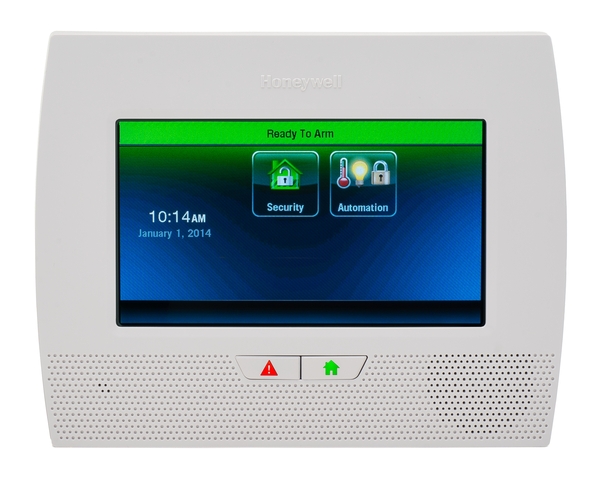
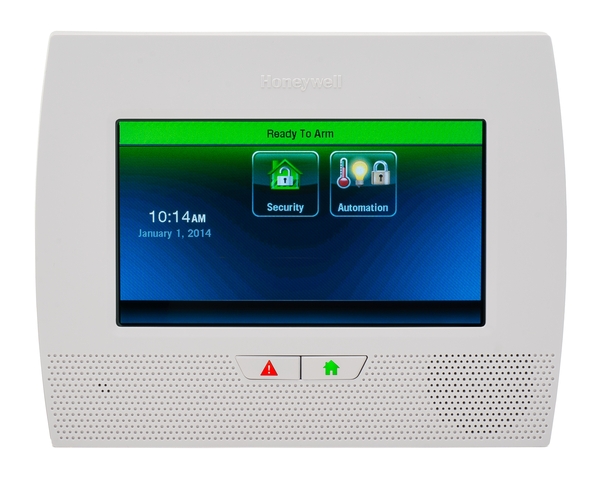
Long Description | The Honeywell LYNX Touch control is a security enabled Z-Wave® device that is designed to automate devices in a home control network. The control allows you to easily add and control multiple devices with the press of a button and supports Z-Wave Network Wide Inclusion (NWI) mode. |
|---|
Brand | Honeywell Home (Resideo) |
|---|
Product Identifier | L7000-ME |
|---|
OEM Version | HW: 1 FW: 7.00 |
|---|
Hardware Platform | ZM5202 |
|---|
Z-Wave Version | 6.51.06 |
|---|
Library Type | CONTROLLER_STATIC |
|---|
Device Type | Central Controller |
|---|
Role Type | ROLE_TYPE_CONTROLLER_CENTRAL_STATIC |
|---|
Manufacturer ID | 0x0039 |
|---|
Product Type ID | 0x1001 |
|---|
Product ID | 0x0007 |
|---|
User Icon | 0100 |
|---|
Installer Icon | 0100 |
|---|
Frequency Plans | EU: 869.85MHz, 868.40MHz |
|---|
Categories | All Controllers, Gateway Controller, Security Systems |
|---|
Countries / Regions | United Arab Emirates |
|---|
Controlled Command Classes | Identifier | Name | Key | Version |
|---|
COMMAND_CLASS_SWITCH_MULTILEVEL | Switch Multilevel | 0x26 | 1 | COMMAND_CLASS_ASSOCIATION_GROUP_INFORMATION | Association Group Information V1 | 0x59 | 0 | COMMAND_CLASS_DOOR_LOCK | Door Lock | 0x62 | 1 | COMMAND_CLASS_USER_CODE | User Code | 0x63 | 1 | COMMAND_CLASS_MULTI_CHANNEL_ASSOCIATION_V3 | Multi-Channel Association V3 | 0x8E | 3 | COMMAND_CLASS_BATTERY | Battery | 0x80 | 1 | COMMAND_CLASS_SENSOR_MULTILEVEL | Sensor Multilevel | 0x31 | 1 | COMMAND_CLASS_SWITCH_BINARY | Switch Binary | 0x25 | 1 | COMMAND_CLASS_BASIC | Basic | 0x20 | 1 | COMMAND_CLASS_CONFIGURATION | Configuration | 0x70 | 1 | COMMAND_CLASS_CRC_16_ENCAP | CRC16 Encapsulation | 0x56 | 1 | COMMAND_CLASS_SECURITY | Security S0 | 0x98 | 1 | COMMAND_CLASS_THERMOSTAT_FAN_MODE_V3 | Thermostat Fan Mode V3 | 0x44 | 3 | COMMAND_CLASS_THERMOSTAT_MODE_V2 | Thermostat Mode V2 | 0x40 | 2 | COMMAND_CLASS_THERMOSTAT_SETPOINT_V2 | Thermostat Setpoint V2 | 0x43 | 2 | COMMAND_CLASS_WAKE_UP_V2 | Wake Up V2 | 0x84 | 2 | COMMAND_CLASS_ASSOCIATION_V2 | Association V2 | 0x85 | 2 | COMMAND_CLASS_MULTI_CHANNEL_V4 | Multi-Channel V4 | 0x60 | 4 | COMMAND_CLASS_MANUFACTURER_SPECIFIC_V2 | Manufacturer Specific V2 | 0x72 | 2 |
|
|---|
Documents | Category | Description | File |
|---|
Manual_Primary_Lang | Product or Owner's Manual | |
|
|---|
Association Groups | Group Number | Maximum Nodes Supported | End Point ID | Description |
|---|
1 | 1 | 0 | Lifeline |
|
|---|
Texts | ID | Description | Value |
|---|
24 | Controller Exclusion | Press the Automation icon on the LYNX Touch Home Screen to access Z-Wave Home Automation features.
Use down arrow to scroll to the Automation Screen Page 2, and press Tools button to access Z-Wave Device Management Screen.
Then press Exclude Devices button to enter exclusion mode and ready to exclude another Z-Wave product. | 23 | Controller Inclusion | Press the Automation icon on the LYNX Touch Home Screen to access Z-Wave Home Automation features.
Use down arrow to scroll to the Automation Screen Page 2, and press Tools button to access Z-Wave Device Management Screen.
Then press Include Devices button to enter inclusion mode and ready to include another Z-Wave product. | 3 | Learn Mode (adding another controller) | Press the Automation icon on the LYNX Touch Home Screen to access Z-Wave Home Automation features.
Use down arrow to scroll to the Automation Screen Page 2, and press Tools button to access Advanced Tools option.
Press Advanced Tools button to access additional Z-Wave options, and then press Learn button to put the controller into learn mode. | 5 | Factory Reset | Press the Automation icon on the LYNX Touch Home Screen to access Z-Wave Home Automation features.
Use down arrow to scroll to the Automation Screen Page 2, and press Tools button to access Advanced Tools option.
Press Advanced Tools button to access additional Z-Wave options, and then press Reset Controller button. |
|
|---|
Supports NWI | Yes |
|---|
Supports Explorer Frames | Yes |
|---|