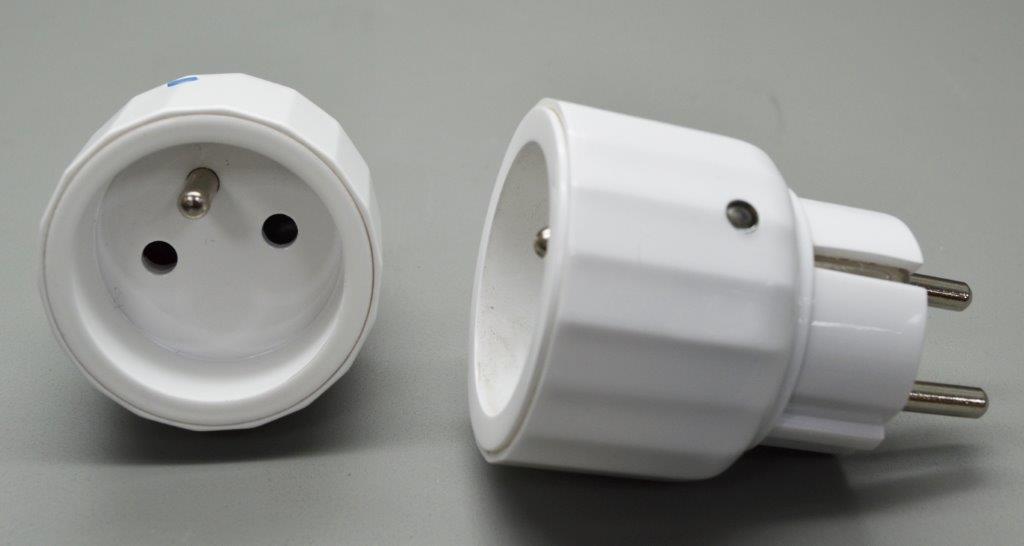
Product Recognition | |
|---|
Certification Number | ZC10-14080015 |
|---|
Name | Metering Mini Plug |
|---|
Short Description | The AN181-6 is a metering mini plug |
|---|
Long Description | The Metering Plug is a Z-Wave enabled device which is fully compatible with any Z-Wave enabled network. Z-Wave enabled devices displaying the Z-Wave logo can also be used with it regardless of the manufacturer, and ours can also be used in other manufacturer’s Z-Wave enabled networks. Inclusion of this unit on other manufacturer’s Wireless Controller menu allows remote operation of the unit and the connected load.
The Metering Plug is designed to control the on/off status of lighting and appliances load in your house. For metering the unit can detect up to 10485.75kW/h before resetting to 0 and can support wattage, voltage, ampere, and PF detection. The unit can also detect overload upon which the unit will switch off relay and keep LED flashing until power is off and re-applied. At 220-240V voltage, this Plug can support up to 2500W resistive, 1200W incandescent, 700W motor, or 320W (40W*8) fluorescent load. |
|---|
Brand | Everspring |
|---|
Product Identifier | AN181-6 |
|---|
OEM Version | 02 |
|---|
Hardware Platform | SD3502 |
|---|
Z-Wave Version | 6.51.02 |
|---|
Library Type | SLAVE_ENHANCED_232 |
|---|
Device Type | On/Off Power Switch |
|---|
Role Type | ROLE_TYPE_SLAVE_ALWAYS_ON |
|---|
Manufacturer ID | 0x0060 |
|---|
Product Type ID | 0x0004 |
|---|
Product ID | 0x0006 |
|---|
Frequency Plans | EU: 869.85MHz, 868.40MHz |
|---|
Categories | Energy Meters, All Lighting Devices, On/Off Switches/Devices |
|---|
Countries / Regions | European Union |
|---|
Controlled Command Classes | Identifier | Name | Key | Version |
|---|
COMMAND_CLASS_BASIC | Basic | 0x20 | 1 |
|
|---|
Documents | Category | Description | File |
|---|
Manual_Primary_Lang | Product or Owner's Manual | |
|
|---|
Association Groups | Group Number | Maximum Nodes Supported | End Point ID | Description |
|---|
1 | 1 | 0 | 1. When the unit is powered for the first time, the unit will send a Notification Report to the node of Group 1.
2. When setting the unit or changing the unit’s status, the unit will send a Binary Switch Report to the node of Group 1.
3. When performing Reset the unit will send Device Reset Locally Notification to the node of Group1.
4. The unit can be configured to periodically report the value of W and/or kW*h to the node of Group 1 (refer to Configuration parameter 4 & 5). The interval time between two reports is at least 30 seconds.
5. The unit can be configured to report the status of wattage to the node of Group 1 on special occasions (refer to Configuration parameter 6 & 7).
6. The minimum interval time between two reports sent from this unit to the node of Group 1 is 3 seconds. Refer to Configuration parameter 2 for more information.
| 2 | 4 | 0 | When the button on the unit or the wall switch is pressed, the unit will send a Basic Set command to the nodes of Group 2. When the unit is OFF, Basic Set Value = 0x00. When the unit is ON, Basic Set Value = 0xFF. |
|
|---|
Configuration Parameters | Parameter Number | Name | Description | Format | Size | Min Value | Max Value | Default Value | Parameter Values |
|---|
1 | Set Basic Set Command value | Set Basic Set Command value | 0 | 2 | 0 | 0 | 255 | | 2 | Set the delaying time to report to Group 1 | Set the delaying time to report to Group 1 | 0 | 1 | 0 | 0 | 3 | | 3 | Set whether to remember the last status | Set whether to remember the last status, 1: remember, 0: do not remember | 0 | 1 | 0 | 0 | 1 | | 4 | Set the interval for wattage auto report | Set the interval for wattage auto report | 0 | 2 | 0 | 0 | 1 | | 5 | Set the interval for kW*h auto report | Set the interval for kW*h auto report | 0 | 2 | 0 | 0 | 60 | | 6 | Auto report when load surpasses the set value of wattage | Auto report when load surpasses the set value of wattage | 0 | 2 | 0 | 0 | 0 | | 7 | Auto report when the change of wattage surpasses the set percentage | Auto report when the change of wattage surpasses the set percentage | 0 | 1 | 0 | 0 | 0 | |
|
|---|
Texts | ID | Description | Value |
|---|
1 | Inclusion | 1. Put the Z-Wave Controller into inclusion mode.
2. Press the link key three times within 1.5 seconds to put the unit into inclusion mode. (Please refer to the documentation for the location of the link key.) | 2 | Exclusion | 1. Put the Z-Wave Controller into exclusion mode.
2. Press the link key three times within 1.5 seconds to put the unit into exclusion mode. (Please refer to the documentation for the location of the link key.) | 3 | Learn Mode (adding another controller) | NR | 4 | Device Wake-Up | NR | 6 | Additional Special Features | NR | 5 | Factory Reset | (This procedure should only be used when the network primary controller is inoperable.)
1. Press the link key three times within 1.5 seconds to put the unit into exclusion mode.
2. Within 1 second of step 1, press link key again and hold it until LED is off (about 5 seconds). (Please refer to the documentation for the location of the link key.)
3. Node ID is excluded. The device reverts to factory default state and will be in auto-inclusion mode for 4 minutes.. |
|
|---|
Supports NWI | Yes |
|---|
Supports Explorer Frames | Yes |
|---|