Product Recognition | |
|---|
Certification Number | ZC10-17065646 |
|---|
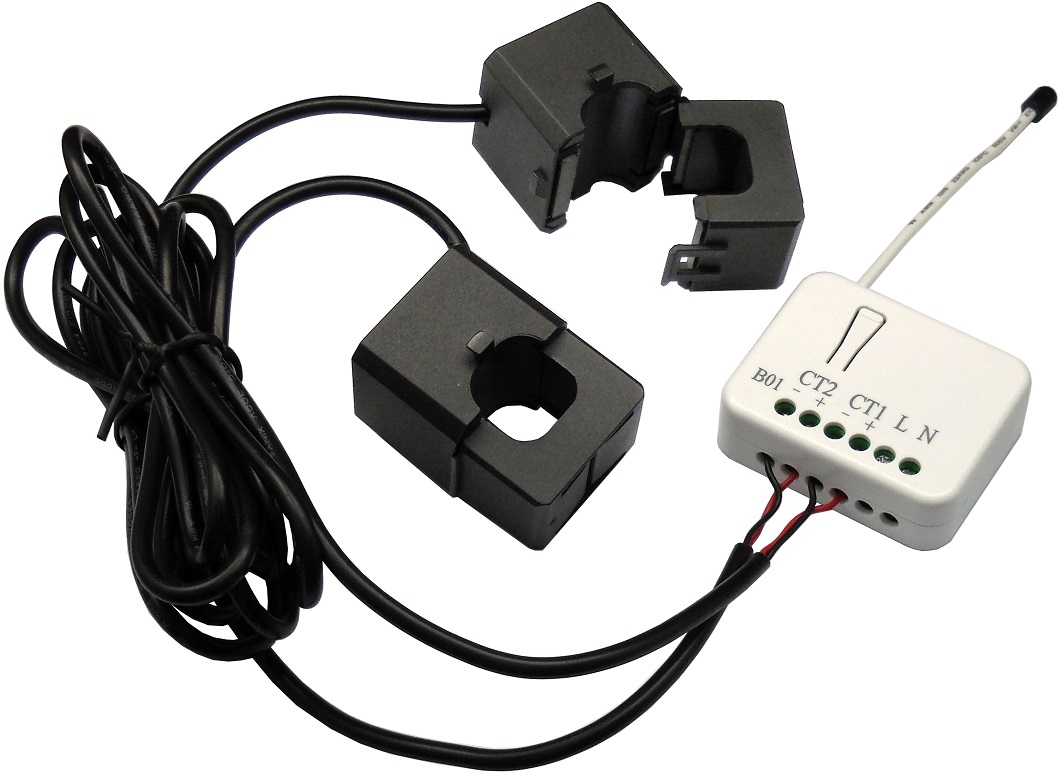
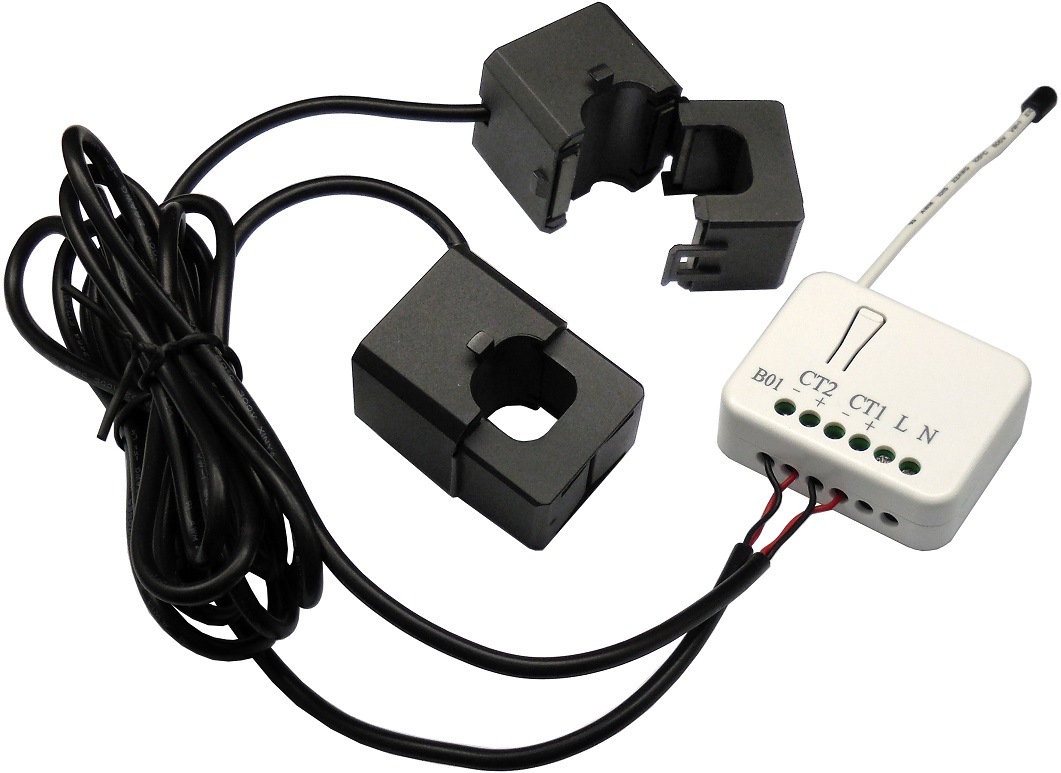
Name | Micromodule Energy Meter, Z-Wave |
|---|
Short Description | Zipato Energy Meter monitors total electricity consumption of connected appliances and reports it to Zipato or any other Z-Wave enabled controller in real time. |
|---|
Long Description | This product can be operated in any Z-Wave network with other Z-Wave certified devices from other manufacturers. All non-battery operated nodes within the network will act as repeaters regardless of vendor to increase reliability of the network. Zipato Energy Meter monitors total electricity consumption of connected appliances and reports it to Zipato or any other Z-Wave enabled controller in real time. Small and compact size allows easy installation in majority of electricity distribution boxes. It supports two loads upto 6000W each (@ 120V). |
|---|
Brand | Zipato |
|---|
Product Identifier | ph-pab01 |
|---|
OEM Version | HW: 1 FW: 1.02 |
|---|
Hardware Platform | SD3502 |
|---|
Z-Wave Version | 6.51.06 |
|---|
Library Type | SLAVE_ENHANCED_232 |
|---|
Device Type | Whole Home Meter - Simple |
|---|
Role Type | ROLE_TYPE_SLAVE_ALWAYS_ON |
|---|
Manufacturer ID | 0x0131 |
|---|
Product Type ID | 0x0006 |
|---|
Product ID | 0x001A |
|---|
User Icon | 0x1700 |
|---|
Installer Icon | 0x1700 |
|---|
Frequency Plans | EU: 869.85MHz, 868.40MHz |
|---|
Categories | Energy Meters |
|---|
Countries / Regions | European Union |
|---|
Supported Command Classes | Identifier | Name | Key | Version |
|---|
COMMAND_CLASS_POWERLEVEL | Powerlevel | 0x73 | 1 | COMMAND_CLASS_CONFIGURATION | Configuration | 0x70 | 1 | COMMAND_CLASS_CRC_16_ENCAP | CRC16 Encapsulation | 0x56 | 1 | COMMAND_CLASS_VERSION_V2 | Version V2 | 0x86 | 2 | COMMAND_CLASS_DEVICE_RESET_LOCALLY | Device Reset Locally | 0x5A | 1 | COMMAND_CLASS_ZWAVEPLUS_INFO_V2 | Z-Wave Plus Info V2 | 0x5E | 2 | COMMAND_CLASS_ASSOCIATION_V2 | Association V2 | 0x85 | 2 | COMMAND_CLASS_METER_V3 | Meter V3 | 0x32 | 3 | COMMAND_CLASS_ASSOCIATION_GRP_INFO | Association Group Info | 0x59 | 1 | COMMAND_CLASS_FIRMWARE_UPDATE_MD_V2 | Firmware Update Meta-Data V2 | 0x7A | 2 | COMMAND_CLASS_MANUFACTURER_SPECIFIC_V2 | Manufacturer Specific V2 | 0x72 | 2 |
|
|---|
Documents | Category | Description | File |
|---|
Manual_Primary_Lang | Product or Owner's Manual | |
|
|---|
Features | Feature | Values |
|---|
Color | | Switch Load Capacity Current | | Electric Load Type | | Firmware Updatable | Value |
|---|
Updatable by Consumer by RF |
| Supported Meter Type | |
|
|---|
Association Groups | Group Number | Maximum Nodes Supported | End Point ID | Description |
|---|
3 | 1 | 0 | For group 3, the Micromodule will report (1) Instant Power Consumption (Watt) read from CT2 (2) Accumulated Power Consumption (KWh) read from CT2. | 1 | 1 | 0 | Lifeline
For group 1, the Micromodule will report (1) The sum of instant Power Consumption (Watt) read from CT1 and CT2 (2) The sum of accumulated Power Consumption (KWh) read from CT1 and CT2. | 2 | 1 | 0 | For group 2, the Micromodule will report (1) Instant Power Consumption (Watt) read from CT1 (2) Accumulated Power Consumption (KWh) read from CT1. |
|
|---|
Configuration Parameters | Parameter Number | Name | Description | Format | Size | Min Value | Max Value | Default Value | Parameter Values |
|---|
1 | Watt Meter Report Period | If the setting is configured for 1hour (set value =720), Micromodule will report its instant power consumption every 1 hour to the node of correspond Group. The maximum interval to report its instant power consumption is 45 hours (5s*32767/3600=45hr). | 0 | 2 | 0 | 0 | 720 | From | To | Description |
|---|
1 | 32767 | 5*720s=3600s=1hour |
| 3 | Slected End Point | If Controller not using Multi_Channel command class to access the endpoint of Micromodule, you may configure the endpoint value to react the Basic Command Class, Binary Switch Command Class or Meter Command Class V3. 1. SELECTED ENDPOINT 1: Report the Meter Value as CT1+CT2. Defauly selected endpoint is 1. 2. SELECTED ENDPOINT 2: Report the Meter Value of CT1. 3. SELECTED ENDPOINT 3: Report the Meter Value of CT2. | 0 | 1 | 0 | 0 | 1 | From | To | Description |
|---|
3 | 3 | 3: CT2 | 1 | 1 | 1: CT1 and CT2 | 2 | 2 | 2: CT1 |
| 4 | Threshold of Current for Load Caution | This is a warning when the current of load over the preset threshold value, If the setting value is 750, when the load wattage of CT1 or CT2 over 7.5A, Micromodule will send current Meter Report command to the node of correspond Group. | 0 | 2 | 0 | 0 | 750 | From | To | Description |
|---|
10 | 750 | 750*0.01A=7.5A |
| 5 | Threshold of KWH for Load Caution | This is a warning when the KWh of load over the preset threshold value, If the setting value is 10000, when the Accumulated Power Consumption of CT1 or CT2 over this value, Micromodule will send KWh Meter Report command to the node of correspond Group, minum value is 1KWh and default value is 10000 kWh. | 0 | 2 | 0 | 0 | 10000 | From | To | Description |
|---|
1 | 10000 | 10000*1KWh = 10000KWh |
| 2 | KWH Meter Report Period | If the setting is configured for 1hour (set value =720), the PAB01 will report its Accumulated Power Consumption (KW/h) every 1 hour to the node of correspond Group. The maximum interval to report its Accumulated Power Consumption (KW/h) is 45 hours (5s*32767/3600=45hr). | 0 | 2 | 0 | 0 | 720 | From | To | Description |
|---|
1 | 32767 | 5*720s=3600s=1hour |
|
|
|---|
Texts | ID | Description | Value |
|---|
5 | Factory Reset | Use this procedure only in the event that the network primary controller is missing or otherwise inoperable.
Pressing On/Off (Include) button three times within 2 seconds will enter inclusion mode.
Within 1 second, press and hold On/Off (Include) button again for 5 seconds until LED is off.
IDs are excluded. | 1 | Inclusion | Put your Z-Wave controller into inclusion mode by following the instructions provided by the controller manufacturer.
Pressing On/Off (Include) button three times within 2 seconds will enter inclusion mode. | 2 | Exclusion | Put your Z-Wave controller into exclusion mode by following the instructions provided by the controller manufacturer.
Pressing On/Off (Include) button three times within 2 seconds will enter exclusion mode.
Node ID has been excluded. |
|
|---|
Supported / Controlled Meter Types | Meter Type | Rate Type | Description |
|---|
Electric meter | Import | Electric Meter Consumption |
|
|---|
Supports NWI | Yes |
|---|
Supports Explorer Frames | Yes |
|---|