Product Recognition | |
|---|
Certification Number | ZC10-18066147 |
|---|
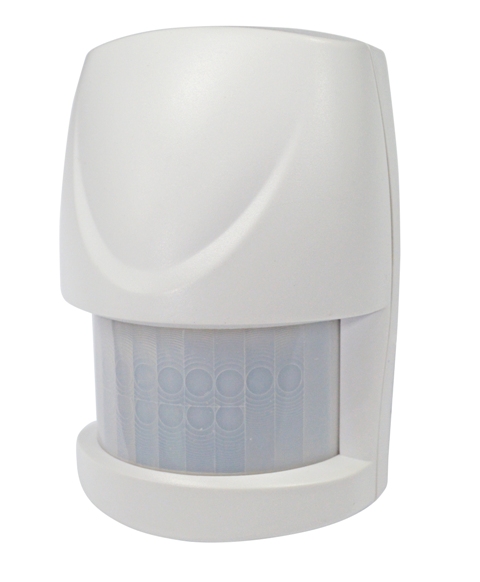
Name | MOTION DETECTOR |
|---|
Short Description | The Motion Detector is designed with two detecting sensors, Passive Infra-Red (PIR) sensor and light sensor, in order to fulfill the purpose of security and home automation. |
|---|
Long Description | This presence detector using PIR (passive infrared receiver) detects the presence of a person in a room. The units compatible with S2 security, send information to a controller or any other associated Z-Wave device.
Up to 4 devices can be controlled from this device.
The sensor is a battery-powered device, which is in sleeping mode unless an action is detected. After a programmable sleeping time the device wakes up and sends a status information. After this the unit goes back to sleeping mode. Batteries can be changed without unscrewing the device from the door or frame.
The unit will give a visual warning on the device and sends a warning to the Z-Wave controller, when batteries need to be replaced.
The unit offers a tampering control and sends an alarm message when tampered. |
|---|
Brand | Everspring |
|---|
Product Identifier | SP817-1 |
|---|
OEM Version | HW: 1 FW: 1.00:00.05 |
|---|
Hardware Platform | SD3502 |
|---|
Z-Wave Version | 6.71.01 |
|---|
Library Type | SLAVE_ENHANCED_232 |
|---|
Device Type | Notification Sensor |
|---|
Role Type | ROLE_TYPE_SLAVE_SLEEPING_REPORTING |
|---|
Manufacturer ID | 0x0060 |
|---|
Product Type ID | 0x0001 |
|---|
Product ID | 0x0006 |
|---|
User Icon | 0x0C07 |
|---|
Installer Icon | 0x0C07 |
|---|
Frequency Plans | EU: 869.85MHz, 868.40MHz |
|---|
Categories | Sensors |
|---|
Countries / Regions | European Union |
|---|
Supported Command Classes | Identifier | Name | Key | Version |
|---|
COMMAND_CLASS_FIRMWARE_UPDATE_MD_V4 | Firmware Update Meta-Data V4 | 0x7A | 4 | COMMAND_CLASS_POWERLEVEL | Powerlevel | 0x73 | 1 | COMMAND_CLASS_BATTERY | Battery | 0x80 | 1 | COMMAND_CLASS_CONFIGURATION | Configuration | 0x70 | 1 | COMMAND_CLASS_SECURITY | Security S0 | 0x98 | 1 | COMMAND_CLASS_TRANSPORT_SERVICE_V2 | Transport Service V2 | 0x55 | 2 | COMMAND_CLASS_VERSION_V2 | Version V2 | 0x86 | 2 | COMMAND_CLASS_WAKE_UP_V2 | Wake Up V2 | 0x84 | 2 | COMMAND_CLASS_DEVICE_RESET_LOCALLY | Device Reset Locally | 0x5A | 1 | COMMAND_CLASS_ZWAVEPLUS_INFO_V2 | Z-Wave Plus Info V2 | 0x5E | 2 | COMMAND_CLASS_ASSOCIATION_V2 | Association V2 | 0x85 | 2 | COMMAND_CLASS_ASSOCIATION_GRP_INFO | Association Group Info | 0x59 | 1 | COMMAND_CLASS_SECURITY_2 | Security S2 | 0x9F | 1 | COMMAND_CLASS_SUPERVISION | Supervision | 0x6C | 1 | COMMAND_CLASS_MANUFACTURER_SPECIFIC_V2 | Manufacturer Specific V2 | 0x72 | 2 | COMMAND_CLASS_NOTIFICATION_V4 | Notification V4 | 0x71 | 4 |
|
|---|
Controlled Command Classes | Identifier | Name | Key | Version |
|---|
COMMAND_CLASS_BASIC | Basic | 0x20 | 1 |
|
|---|
S2 Classes | S2_UNAUTHENTICATED, S2_AUTHENTICATED |
|---|
Documents | Category | Description | File |
|---|
Manual_Primary_Lang | Product or Owner's Manual | |
|
|---|
Features | Feature | Values |
|---|
Battery Type | | Supported Notification Types | | Battery Quantity | | Color | |
|
|---|
Association Groups | Group Number | Maximum Nodes Supported | End Point ID | Description |
|---|
1 | 1 | 0 | Z-Wave Plus Lifeline | 2 | 4 | 0 | PIR Control |
|
|---|
Configuration Parameters | Parameter Number | Name | Description | Format | Size | Min Value | Max Value | Default Value | Parameter Values |
|---|
1 | Basic Set Level | When Basic Set Command is sent where contains a value, the receiver will take it for consideration; for instance, if a lamp module is received the Basic Set command of which value is decisive as to how bright of dim level of lamp module shall be. | 0 | 1 | 0 | 0 | 99 | From | To | Description |
|---|
1 | 99 | Basic Set Level |
| 3 | Sensitivity Level | In order to provide a best efficiency of the detector, it is recommended to test the detector with movements from a farthest end of the coverage area at first time of use. If movements cannot be detected sensitively, simply adjust the sensitivity level with Configuration Parameter #3. This parameter can be configured with the value of 1 through 10, where 1 means low sensitivity and 10 means highest sensitivity. | 0 | 1 | 0 | 0 | 6 | From | To | Description |
|---|
1 | 10 | Sensitivity Level |
| 4 | Re-trigger Interval | The Configuration parameter that can be used to adjust the interval of being re-triggered after the detector has been triggered as Configuration Parameter #4. No response will be made during this interval if a movement is presented. The time interval can be set between 5 secs to 3600 secs. | 0 | 2 | 0 | 0 | 180 | From | To | Description |
|---|
5 | 3600 | Re-trigger Interval |
|
|
|---|
Texts | ID | Description | Value |
|---|
1 | Inclusion | 1. Put the Z-Wave Controller into inclusion mode.
2. Press the tamper switch 3 times within 1.5 seconds to put the unit into inclusion mode. | 2 | Exclusion | 1. Put the Z-Wave Controller into exclusion mode.
2. Press the tamper switch 3 times within 1.5 seconds to put the unit into exclusion mode. | 6 | Additional Special Features | The user can set a detecting percentage of lux level which determines when the light sensor will be activated. If percentage of lux level of ambient illumination falls below this percentage, and a person moves across or within the protected area, the detector will emit Z-Wave ON Command (i.e. Basic Set Command (Value = Basic Set Level)) to controller and activate connected modules and lighting. Percentage can be set between 1% to 100%. | 5 | Factory Reset | Please use this procedure only when the network primary controller is missing or otherwise inoperable.
1. Press the tamper switch 3 times within 1.5 seconds to put the unit into exclusion mode.
2. Within 1 second of step 1, press the tamper switch again and hold until LED is off (about 5 seconds).
3. Node ID is excluded. The device reverts to factory default state and will be in auto-inclusion mode for 4 minutes. | 4 | Device Wake-Up | After it has been included into a Z-Wave network, the detector will go to sleep but will send a Wakeup Notification Command periodically at preset period to the controller. The Motion detector will stay awake for 10 seconds at least and then go back to sleep to conserve battery life.
The time interval between Wakeup Notification Commands can be set in the Wakeup Command Class based on the range values below:
1) Minimum Wake Up Interval 600s (10 minutes)
2) Maximum Wake Up Interval 86400s (1 day)
3) Default Wake Up Interval 14400s (4 hours)
4) Wake Up Interval Step Seconds 600s (10 minutes) |
|
|---|
Supported Notification Types | Notification Type | Event / State |
|---|
Home Security | (Refer to parameters): State idle |
|
|---|
Supports NWI | Yes |
|---|
Supports Explorer Frames | Yes |
|---|
Radio Range Z-Wave (m) | 40 |
|---|