Product Recognition | |
|---|
Certification Number | ZC14-25020504 |
|---|
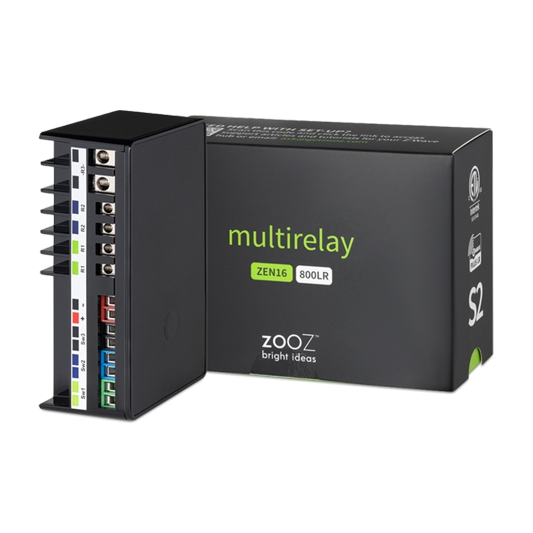
Name | MultiRelay |
|---|
Short Description | Turn almost any analog device smart with 3 Z-Wave inputs and NO output relays. |
|---|
Long Description | PRODUCT HIGHLIGHTS:
- Powerful dry contact relays to control loads up to 15 A and 20 A
- Perfect for outdoor lighting, pool pumps, garage door, or gas fireplace
- Control up to 3 connected loads independently or together
- Z-Wave® or optional wall switch control (toggle or momentary type)
- NEW: 800 series Z-Wave® chip for better range and faster control
- Z-Wave® Long Range for ultra reliable no-mesh communication
- Built-in timers for each relay to simplify automation
- Built-in Z-Wave® Plus signal repeater to extend network range
- Powered by 12-24 V DC/AC or USB C port for easy set-up
- Wall mounting and minimal design for clean installation
SPECS:
- Model Number: ZEN16 800LR
- Z-Wave® Region: US / CA / MX
- Power: 12-24 V DC/AC or USB C (DON’T use laptop / tablet chargers)
- Maximum Load: Relay 1: 15A |
|---|
Brand | Zooz |
|---|
Product Identifier | ZEN16 800LR |
|---|
Product Line | Smart Relays |
|---|
OEM Version | HW: 03 FW: 03.10 |
|---|
Hardware Platform | EFR32ZG23A |
|---|
Z-Wave Version | 7.19.3 |
|---|
Library Type | END_NODE_ENHANCED_232 |
|---|
Device Type | Binary Switch DT |
|---|
Role Type | ROLE_TYPE_END_NODE_ALWAYS_ON |
|---|
Manufacturer ID | 0x027A |
|---|
Product Type ID | 0xA000 |
|---|
Product ID | 0xA00A |
|---|
User Icon | 0x0701 |
|---|
Installer Icon | 0x0700 |
|---|
Frequency Plans | US: 916.00MHz, 908.40MHz, US_LR: 912.00MHz, 920.00MHz |
|---|
Categories | All Lighting Devices, Water Valves & Irrigation, On/Off Switches/Devices, HVAC |
|---|
Countries / Regions | Canada, Jamaica, United States of America |
|---|
Supported Command Classes | Identifier | Name | Key | Version |
|---|
COMMAND_CLASS_BASIC_V2 | Basic V2 | 0x20 | 2 | COMMAND_CLASS_SENSOR_BINARY_V2 | Binary Sensor V2 | 0x30 | 2 | COMMAND_CLASS_SWITCH_BINARY_V2 | Binary Switch V2 | 0x25 | 2 | COMMAND_CLASS_CONFIGURATION_V4 | Configuration V4 | 0x70 | 4 | COMMAND_CLASS_NOTIFICATION_V8 | Notification V8 | 0x71 | 8 | COMMAND_CLASS_ASSOCIATION_V2 | Association V2 | 0x85 | 2 | COMMAND_CLASS_ASSOCIATION_GRP_INFO_V3 | Association Group Information (AGI) V3 | 0x59 | 3 | COMMAND_CLASS_DEVICE_RESET_LOCALLY | Device Reset Locally | 0x5A | 1 | COMMAND_CLASS_FIRMWARE_UPDATE_MD_V5 | Firmware Update Meta Data V5 | 0x7A | 5 | COMMAND_CLASS_INDICATOR_V3 | Indicator V3 | 0x87 | 3 | COMMAND_CLASS_MANUFACTURER_SPECIFIC_V2 | Manufacturer Specific V2 | 0x72 | 2 | COMMAND_CLASS_MULTI_CHANNEL_ASSOCIATION_V3 | Multi Channel Association V3 | 0x8E | 3 | COMMAND_CLASS_VERSION_V3 | Version V3 | 0x86 | 3 | COMMAND_CLASS_ZWAVEPLUS_INFO_V2 | Z-Wave Plus Info V2 | 0x5E | 2 | COMMAND_CLASS_MULTI_CHANNEL_V4 | Multi Channel V4 | 0x60 | 4 | COMMAND_CLASS_SECURITY_2 | Security 2 | 0x9F | 1 | COMMAND_CLASS_SUPERVISION | Supervision | 0x6C | 1 | COMMAND_CLASS_TRANSPORT_SERVICE_V2 | Transport Service V2 | 0x55 | 2 | COMMAND_CLASS_POWERLEVEL | Powerlevel | 0x73 | 1 |
|
|---|
S2 Classes | S2_AUTHENTICATED, S2_UNAUTHENTICATED |
|---|
Documents | Category | File |
|---|
Manual_English | |
|
|---|
Features | Feature | Values |
|---|
Color | | Electric Load Type | Value |
|---|
Incandescent | Fluorescent | LED | Inductive (e.g. Motor) |
| Firmware Updatable | Value |
|---|
Updatable by Consumer by RF |
| Loads Controlled | |
|
|---|
Association Groups | Group Number | Maximum Nodes Supported | End Point ID | Group Name | Profile |
|---|
1 | 5 | 0 | Lifeline | 0x0001 | 2 | 5 | 0 | Basic Set Group 1 | 0x2001 | 3 | 5 | 0 | Basic Set Group 2 | 0x2002 | 4 | 5 | 0 | Basic Set Group 3 | 0x2003 | 1 | 0 | 1 | Lifeline | 0x0001 | 2 | 5 | 1 | Basic Set Group 1 | 0x2001 | 1 | 0 | 2 | Lifeline | 0x0001 | 2 | 5 | 2 | Basic Set Group 2 | 0x2002 | 1 | 0 | 3 | Lifeline | 0x0001 | 2 | 5 | 3 | Basic Set Group 3 | 0x2003 |
|
|---|
Configuration Parameters | Parameter Number | Name | Description | Format | Size | Min Value | Max Value | Default Value |
|---|
1 | Status restore | Restore status after power failure. | 1 | 1 | 0 | 0 | 0x01 | 2 | SW1 Type Select | Set SW1 type to sensor or switch. | 1 | 1 | 0 | 0 | 0x02 | 3 | SW2 Type Select | Set SW2 type to sensor or switch. | 1 | 1 | 0 | 0 | 0x02 | 4 | SW3 Type Select | Set SW3 type to sensor or switch. | 1 | 1 | 0 | 0 | 0x02 | 5 | LED indicator | Set indicator mode for output | 1 | 1 | 0 | 0 | 0x00 | 6 | Auto Turn Off 1 | Value for EP1 to turn off automatically. | 1 | 4 | 0 | 0 | 0x00000000 | 7 | Auto Turn On 1 | Value for EP1 to turn on automatically. | 1 | 4 | 0 | 0 | 0x00000000 | 8 | Auto Turn Off 2 | Value for EP2 to turn off automatically. | 1 | 4 | 0 | 0 | 0x00000000 | 9 | Auto Turn On 2 | Value for EP2 to turn on automatically. | 1 | 4 | 0 | 0 | 0x00000000 | 10 | Auto Turn Off 3 | Value for EP3 to turn off automatically. | 1 | 4 | 0 | 0 | 0x00000000 | 11 | Auto Turn On 3 | Value for EP3 to turn on automatically. | 1 | 4 | 0 | 0 | 0x00000000 | 17 | EP2 Auto Turn-Off Timer Unit | Time unit: second, minute or hour. | 1 | 1 | 0 | 0 | 0x00 | 23 | Default relay state 3 | Default relay state 3. | 1 | 1 | 0 | 0 | 0x00 | 24 | Switch union mode | Value 1 for Relay 1 and 2, 2 for all. | 1 | 1 | 0 | 0 | 0x00 | 25 | Reverse EP1 report | Reverse EP1's sensor report status. | 1 | 1 | 0 | 0 | 0x00 | 31 | Only on/off trigger for EP1 & EP2 | Only ON and Only OFF triggers. | 1 | 1 | 0 | 0 | 0x00 |
|
|---|
Texts | ID | Description | Value |
|---|
8 | Where to find S2 DSK on product | SCAN THE QR CODE / ENTER THE 5-DIGIT PIN if using the new SmartStart method. The SmartStart security PIN is located on the back label of the relay. | 1 | Classic Inclusion | 1. Initiate inclusion (pairing) in the app (or web interface).
2. TAP THE Z-WAVE BUTTON 3 TIMES QUICKLY if using traditional Z-Wave inclusion.
3. The LED indicator will blink to signal communication and remain on for 2 seconds to confirm inclusion. | 2 | Classic Exclusion | 1. Bring your MultiRelay close to the Z-Wave hub and power it
2. Put the Z-Wave® hub into exclusion mode (not sure how to do that? ask@getzooz.com)
3. Click the Z-Wave® button 3 times quickly
4. Your hub will confirm exclusion and the MultiRelay will disappear from your controller's device list | 5 | Factory Reset Procedure | If your primary controller is missing or inoperable, you may need to reset the device to factory settings. To complete the reset process manually, click the Z-Wave® button 4 times quickly, the LED indicator will flash once, then quickly click the Z-Wave® button 4 times again. The LED indicator will flash 3 times to confirm successful reset and will then turn off for two seconds, then the LED indicator will turn on solid.
NOTE: All previously recorded activity and custom settings will be erased from the device’s memory. |
|
|---|
Supported Notification Types | Notification Type | Event / State |
|---|
CO Alarm | (Refer to parameters): State idle | CO Alarm | Sensor status: Carbon monoxide detected | CO2 Alarm | Sensor status: Carbon dioxide detected | Heat Alarm | (Refer to parameters): State idle | Heat Alarm | Heat sensor status: Overheat detected | Water Alarm | (Refer to parameters): State idle | Water Alarm | Sensor status: Water leak detected | Access Control | Door state: Window/door is open | Access Control | Door state: Window/door is closed | Home Security | Motion sensor status: Motion detection |
|
|---|
Supports NWI | Yes |
|---|
Supports Explorer Frames | Yes |
|---|
Supports SmartStart | Yes |
|---|
Radio Range Z-Wave (m) | 40 |
|---|
Radio Range Z-Wave LR (m) | 400 |
|---|