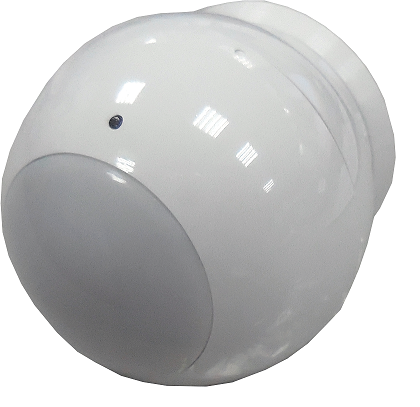
Product Recognition | |
|---|
Certification Number | ZC10-16115325 |
|---|
Name | mydlink™ Motion Sensor |
|---|
Short Description | The PIR sensor DCH-Z122 has PIR sensor function. |
|---|
Long Description | The PIR sensor DCH-Z122 has PIR sensor function,based on Z-Wave™ technology. |
|---|
Brand | D-Link Corporation |
|---|
Product Identifier | DCH-Z122 |
|---|
OEM Version | HW: 1 FW: 1.28:01.22 |
|---|
Hardware Platform | SD3502 |
|---|
Z-Wave Version | 6.51.09 |
|---|
Library Type | SLAVE_ROUTING |
|---|
Device Type | Notification Sensor |
|---|
Role Type | ROLE_TYPE_SLAVE_SLEEPING_REPORTING |
|---|
Manufacturer ID | 0x0108 |
|---|
Product Type ID | 0x0002 |
|---|
Product ID | 0x0035 |
|---|
User Icon | 0x0C07 |
|---|
Installer Icon | 0x0C07 |
|---|
Frequency Plans | ANZ: 919.80MHz, 921.40MHz |
|---|
Categories | Sensors |
|---|
Countries / Regions | Australia |
|---|
Supported Command Classes | Identifier | Name | Key | Version |
|---|
COMMAND_CLASS_POWERLEVEL | Powerlevel | 0x73 | 1 | COMMAND_CLASS_BATTERY | Battery | 0x80 | 1 | COMMAND_CLASS_CONFIGURATION | Configuration | 0x70 | 1 | COMMAND_CLASS_SECURITY | Security S0 | 0x98 | 1 | COMMAND_CLASS_SENSOR_BINARY_V2 | Sensor Binary V2 | 0x30 | 2 | COMMAND_CLASS_VERSION_V2 | Version V2 | 0x86 | 2 | COMMAND_CLASS_WAKE_UP_V2 | Wake Up V2 | 0x84 | 2 | COMMAND_CLASS_DEVICE_RESET_LOCALLY | Device Reset Locally | 0x5A | 1 | COMMAND_CLASS_ZWAVEPLUS_INFO_V2 | Z-Wave Plus Info V2 | 0x5E | 2 | COMMAND_CLASS_ASSOCIATION_V2 | Association V2 | 0x85 | 2 | COMMAND_CLASS_ASSOCIATION_GRP_INFO | Association Group Info | 0x59 | 1 | COMMAND_CLASS_MANUFACTURER_SPECIFIC_V2 | Manufacturer Specific V2 | 0x72 | 2 | COMMAND_CLASS_NOTIFICATION_V4 | Notification V4 | 0x71 | 4 | COMMAND_CLASS_MULTI_CMD | Multi-Command | 0x8F | 1 |
|
|---|
Controlled Command Classes | Identifier | Name | Key | Version |
|---|
COMMAND_CLASS_BASIC | Basic | 0x20 | 1 |
|
|---|
Documents | Category | Description | File |
|---|
Manual_Primary_Lang | Product or Owner's Manual | |
|
|---|
Features | Feature | Values |
|---|
Battery Quantity | | Battery Type | | Color | | Sensors | Value |
|---|
Motion/No Motion (Binary) |
|
|
|---|
Association Groups | Group Number | Maximum Nodes Supported | End Point ID | Description |
|---|
1 | 8 | 0 | Z-Wave Plus Lifeline | 2 | 8 | 0 | light control |
|
|---|
Configuration Parameters | Parameter Number | Name | Description | Format | Size | Min Value | Max Value | Default Value | Parameter Values |
|---|
2 | Basic Set Level | Setting the BASIC command value to turn on the light. -1(0xFF) means turn on the light. For dimmer equipment 1 to 100 means the light strength. 0 means turn off the light. Caution: The range is from 0x00 to 0xFF using hexadecimal notation. | 0 | 1 | 0 | 0 | -1 | From | To | Description |
|---|
-128 | 127 | Basic command value to turn on the light. |
| 3 | PIR Sensitivity | PIR sensitivity setting. 0 means disable the PIR motion. 1 means the lowest sensitivity. 99 means the highest sensitivity. High sensitivity means can detected long distance,but if there is more noise signal in the environment, it will re-trigger too frequency. | 0 | 1 | 0 | 0 | 80 | From | To | Description |
|---|
0 | 99 | PIR sensitivity setting. |
| 8 | PIR Re-Detect Interval Time | In the normal mode, after the PIR motion detected, setting the re-detect time. 8 seconds per tick,default tick is 3(24 seconds). Setting the suitable value to prevent received the trigger signal too frequently. Also can save the battery energy. | 0 | 1 | 0 | 0 | 3 | From | To | Description |
|---|
1 | 127 | Re-detect time |
| 9 | Turn Off Light Time | After turn on the light,setting the delay time to turn off the lighting when the PIR motion to turn off the lighting when the PIR motion is not detected.8 seconds per tick,default tick is 4(32 seconds). 0 means never send turn off light command. | 0 | 1 | 0 | 0 | 4 | From | To | Description |
|---|
0 | 127 | Delay time to turn off the lighting when the PIR motion is not detected. |
|
|
|---|
Texts | ID | Description | Value |
|---|
5 | Factory Reset | There is a button on DCH-Z122.
1. Pressing button for about 5 seconds.
2. IDs are excluded and all settings will reset to factory default.
Notice: Use this procedure only in the event that the primary controller is lost or otherwise inoperable. | 4 | Device Wake-Up | There is a button on DCH-Z122.
Press the button once, the device will awake 10 seconds. | 1 | Inclusion | There is a button on DCH-Z122.
1. Have Z-Wave™ Controller entered inclusion mode.
2. Pressing button once to enter the inclusion mode.
3. After add successful, the device will wake to receive the setting command from Z-Wave™ Controller about 20 seconds. | 2 | Exclusion | There is a button on DCH-Z122.
1. Have Z-Wave™ Controller entered exclusion mode.
2. Pressing button once to enter the exclusion mode. |
|
|---|
Supported Multilevel Sensors | Multilevel Sensor Type |
|---|
General purpose |
|
|---|
Supports NWI | Yes |
|---|
Supports Explorer Frames | Yes |
|---|
Radio Range Z-Wave (m) | 40 |
|---|