Product Recognition | |
|---|
Certification Number | ZC10-18036055 |
|---|
Name | NanoMote One |
|---|
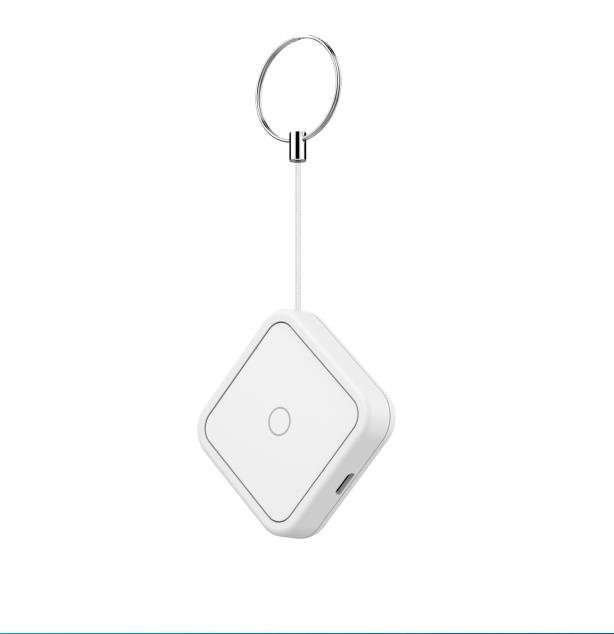
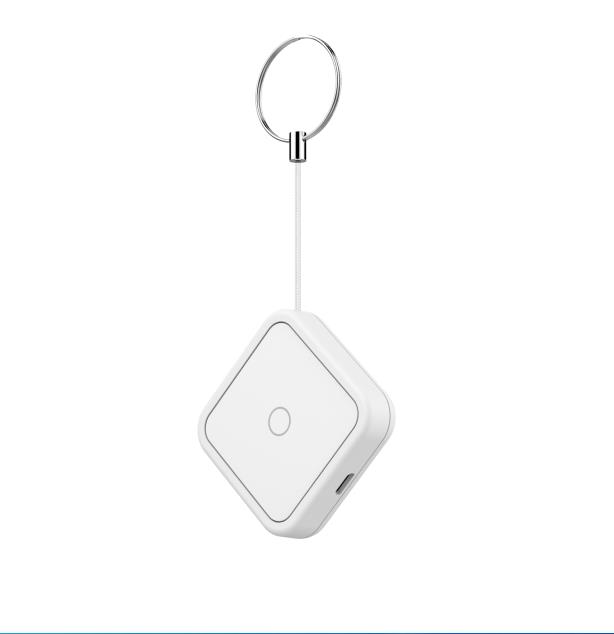
Short Description | The NanoMote One is a wireless, portable and rechargeable scene switch. It can control a Z-Wave device, such as smart plug, smart dimmer with a Z-Wave gateway. |
|---|
Long Description | The NanoMote One is a wireless, portable and rechargeable scene switch. It can control a Z-Wave device, such as smart plug, smart dimmer with a Z-Wave gateway. You can also activate a scene like sleep scene, movie scene and entertainment scene with it. |
|---|
Brand | Aeotec |
|---|
Product Identifier | ZWA004-C |
|---|
OEM Version | HW: 1 FW: 1.00 |
|---|
Hardware Platform | ZM5101 |
|---|
Z-Wave Version | 6.71.01 |
|---|
Library Type | SLAVE_ENHANCED_232 |
|---|
Device Type | Wall Controller |
|---|
Role Type | ROLE_TYPE_SLAVE_PORTABLE |
|---|
Manufacturer ID | 0x0371 |
|---|
Product Type ID | 0x0002 |
|---|
Product ID | 0x0004 |
|---|
User Icon | 0x1600 |
|---|
Installer Icon | 0x1600 |
|---|
Frequency Plans | EU: 869.85MHz, 868.40MHz |
|---|
Categories | All Lighting Devices, All Controllers, Handheld Controller, Lighting Accessories |
|---|
Countries / Regions | European Union |
|---|
Supported Command Classes | Identifier | Name | Key | Version |
|---|
COMMAND_CLASS_POWERLEVEL | Powerlevel | 0x73 | 1 | COMMAND_CLASS_BATTERY | Battery | 0x80 | 1 | COMMAND_CLASS_CONFIGURATION | Configuration | 0x70 | 1 | COMMAND_CLASS_SECURITY | Security S0 | 0x98 | 1 | COMMAND_CLASS_TRANSPORT_SERVICE_V2 | Transport Service V2 | 0x55 | 2 | COMMAND_CLASS_VERSION_V2 | Version V2 | 0x86 | 2 | COMMAND_CLASS_WAKE_UP_V2 | Wake Up V2 | 0x84 | 2 | COMMAND_CLASS_DEVICE_RESET_LOCALLY | Device Reset Locally | 0x5A | 1 | COMMAND_CLASS_ZWAVEPLUS_INFO_V2 | Z-Wave Plus Info V2 | 0x5E | 2 | COMMAND_CLASS_ASSOCIATION_V2 | Association V2 | 0x85 | 2 | COMMAND_CLASS_ASSOCIATION_GRP_INFO | Association Group Info | 0x59 | 1 | COMMAND_CLASS_SECURITY_2 | Security S2 | 0x9F | 1 | COMMAND_CLASS_CENTRAL_SCENE_V3 | Central Scene V3 | 0x5B | 3 | COMMAND_CLASS_SUPERVISION | Supervision | 0x6C | 1 | COMMAND_CLASS_FIRMWARE_UPDATE_MD_V3 | Firmware Update Meta-Data V3 | 0x7A | 3 | COMMAND_CLASS_MANUFACTURER_SPECIFIC_V2 | Manufacturer Specific V2 | 0x72 | 2 |
|
|---|
Controlled Command Classes | Identifier | Name | Key | Version |
|---|
COMMAND_CLASS_BATTERY | Battery | 0x80 | 1 | COMMAND_CLASS_BASIC | Basic | 0x20 | 1 | COMMAND_CLASS_SWITCH_MULTILEVEL_V2 | Switch Multilevel V2 | 0x26 | 2 |
|
|---|
S2 Classes | S2_UNAUTHENTICATED |
|---|
Documents | Category | Description | File |
|---|
Manual_Primary_Lang | Product or Owner's Manual | |
|
|---|
Features | Feature | Values |
|---|
Battery Quantity | | Battery Type | | Z-Wave Scene Type | |
|
|---|
Association Groups | Group Number | Maximum Nodes Supported | End Point ID | Description |
|---|
1 | 5 | 0 | Scene Controller will send Scene Controller sends the central scene notification command and battery report command to the associated nodes. | 2 | 5 | 0 | Scene Controller will send Basic Set command to the associated nodes. | 3 | 5 | 0 | Scene Controller will send switch multilevel set, the multilevel start level change and multilevel stop level change command to the associated nodes. |
|
|---|
Configuration Parameters | Parameter Number | Name | Description | Format | Size | Min Value | Max Value | Default Value | Parameter Values |
|---|
41 | Enable send central scene notification. | Enable send central scene notification. | 0 | 1 | 0 | 0 | 1 | From | To | Description |
|---|
0 | 1 | when value is 0, it can not be send scene notification;when the value is 1,it can be send central scene notification. |
| 42 | Setting the duration value of the command switch multilevel | set the value of the command switch multilevel | 0 | 1 | 0 | 0 | 255 | From | To | Description |
|---|
-128 | 127 | The higher the value, the longer the duration value of the command. |
| 43 | Enable/disable the buzzer alarm when battery is running low. | | 0 | 1 | 0 | 0 | 0 | From | To | Description |
|---|
0 | 1 | When value is 1,it will can allow the buzzer when battery is running low;When value is 0,it will can not allow the buzzer when battery is running low |
|
|
|---|
Texts | ID | Description | Value |
|---|
23 | Controller Inclusion | Included device:
1. Insert the LIR2450 battery.
2. Set the Z-Wave network main controller into learning mode( see Z-Wave network controller operating manual).
3. Pressing and holding the button for 3 seconds.
4. If the inclusion is successful, the LED will blink in green less than for 5 seconds and then keep on for 15 seconds. | 24 | Controller Exclusion | To remove the NanoMote One from the Z-Wave network:
(1) Insert the LIR2450 battery.
(2) Set the Z-Wave network main controller into remove mode
(see Z-Wave controller operating manual).
(3) Triple click the button, if the exclusion is successful, LED
will blink in orange for less than 5 seconds and then keep on
for 3 seconds. | 5 | Factory Reset | Pressing and holding the button for 20 seconds. Release the button after 20 seconds, LED will keep in yellow for 3 seconds. Scene Controller will be reset to factory defaults if you short press the button within this 3 seconds.
Using this procedure only in the event that the network primary controller is missing or otherwise inoperable. | 4 | Device Wake-Up | Pressing and holding Button for 3 seconds. Led will turn to green,
which means Scene Controller has been woken up. |
|
|---|
Supports NWI | Yes |
|---|
Supports Explorer Frames | Yes |
|---|
Radio Range Z-Wave (m) | 40 |
|---|