| Product Recognition | |
|---|
| Certification Number | ZC10-17125909 |
|---|
| Name | NEEO Brain, EU |
|---|
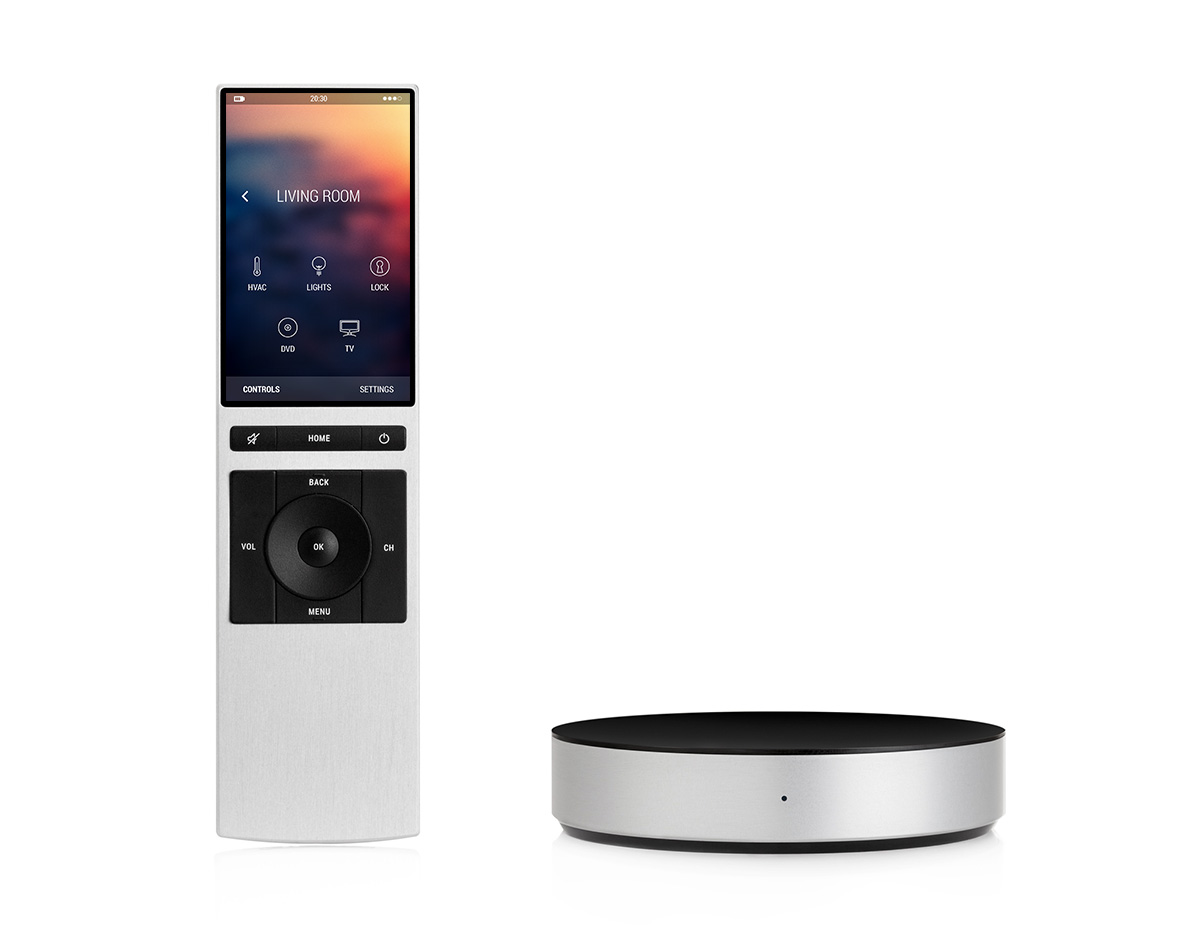
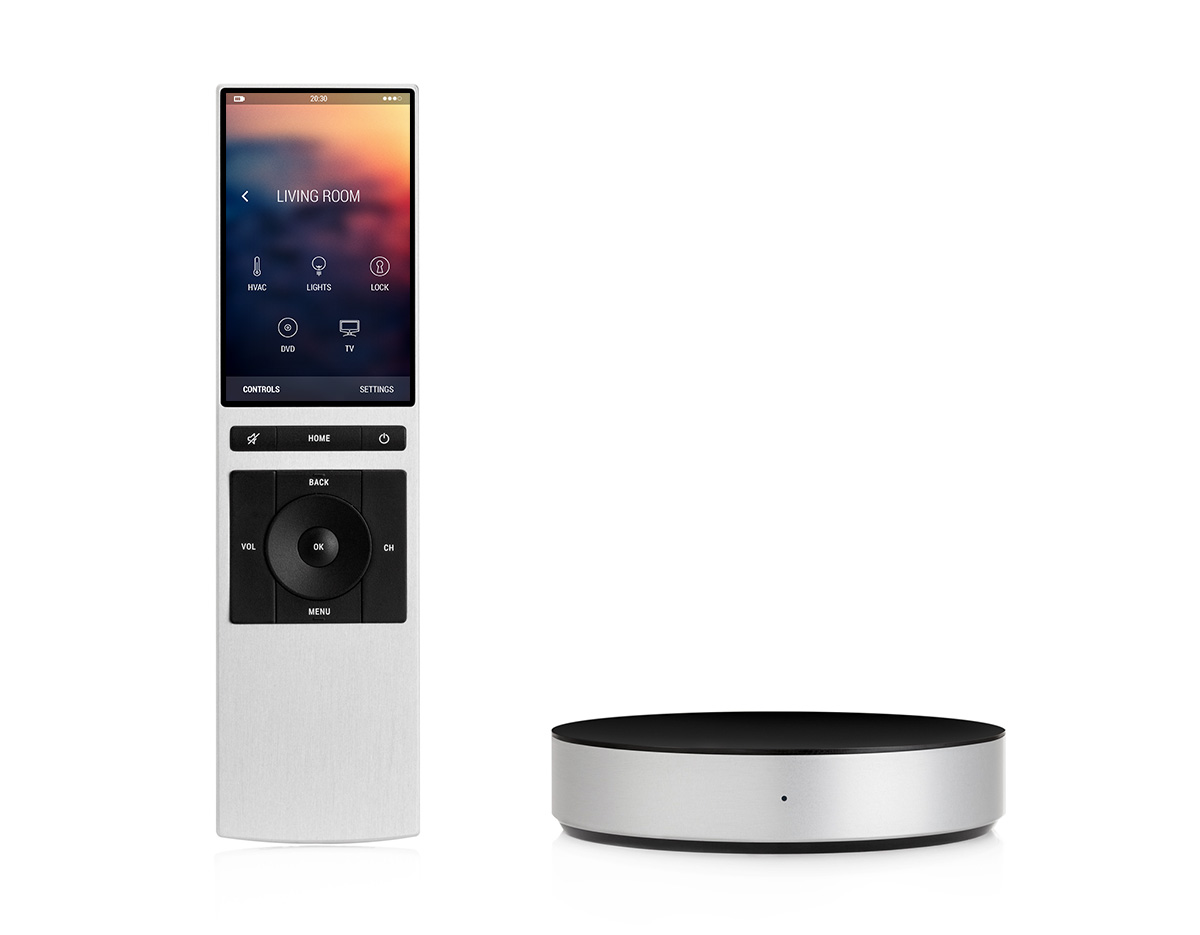
| Short Description | NEEO is a smart home system, consisting of the NEEO Brain and the NEEO Thinking Remote. It’s the simplest way to connect and control all the devices in your home. |
|---|
| Long Description | Having to use several remotes and apps for our smart home gadgets and AV-devices in our homes is cumbersome, inconvenient and overwhelming. We believe the interaction with our daily technology should feel natural, simple and magical. That is why we have created NEEO. To control everything from one place. Instantly.
The NEEO Thinking Remote is the most instant interface to control your AV devices and smart home gadgets. No need for multiple remotes or smart phone apps. The solid and long lasting anodized aluminium case protects against damage, resists fingerprints and feels just right thanks to its premium surface finish. It has just the buttons which are absolutely needed, designed for an optimal tactile experience. The amazing 291ppi touch screen display facilitates richest browsing and control. The remote comes with an embedded hand recognition technology for personal profiles, parental controls and more.
The NEEO Brain connects to all of the devices in our homes and makes them available on the NEEO Thinking Remote or the NEEO app. Built in support for all smart home languages and protocols allows full control of your smart devices and gadgets out of the box. Via Wi-Fi, Bluetooth, Z-Wave, ZigBee, 6LowPan and incredibly strong IR blasters embedded in one device, NEEO simplifies control for more than 50’000 AV and home automation products. The high-end antenna, hardware and case design as well as built in redundancy systems guarantee frictionless communication between the devices, facilitating a smooth user experience. |
|---|
| Brand | NEEO AG |
|---|
| Product Identifier | 6336-BRAIN-00008 |
|---|
| OEM Version | HW: 1 FW: 4.33:01.00 |
|---|
| Hardware Platform | ZM5202 |
|---|
| Z-Wave Version | 6.61.00 |
|---|
| Library Type | CONTROLLER_STATIC |
|---|
| Device Type | Central Controller |
|---|
| Role Type | ROLE_TYPE_CONTROLLER_CENTRAL_STATIC |
|---|
| Manufacturer ID | 0x0241 |
|---|
| Product Type ID | 0x0001 |
|---|
| Product ID | 0x0001 |
|---|
| User Icon | 0x0100 |
|---|
| Installer Icon | 0x0100 |
|---|
| Frequency Plans | EU: 869.85MHz, 868.40MHz |
|---|
| Categories | All Controllers, Gateway Controller |
|---|
| Countries / Regions | European Union |
|---|
| Supported Command Classes | | Identifier | Name | Key | Version |
|---|
| COMMAND_CLASS_POWERLEVEL | Powerlevel | 0x73 | 1 | | COMMAND_CLASS_APPLICATION_STATUS | Application Status | 0x22 | 1 | | COMMAND_CLASS_CRC_16_ENCAP | CRC16 Encapsulation | 0x56 | 1 | | COMMAND_CLASS_SECURITY | Security S0 | 0x98 | 1 | | COMMAND_CLASS_VERSION_V2 | Version V2 | 0x86 | 2 | | COMMAND_CLASS_DEVICE_RESET_LOCALLY | Device Reset Locally | 0x5A | 1 | | COMMAND_CLASS_ZWAVEPLUS_INFO_V2 | Z-Wave Plus Info V2 | 0x5E | 2 | | COMMAND_CLASS_ASSOCIATION_V2 | Association V2 | 0x85 | 2 | | COMMAND_CLASS_ASSOCIATION_GRP_INFO | Association Group Info | 0x59 | 1 | | COMMAND_CLASS_MANUFACTURER_SPECIFIC | Manufacturer Specific | 0x72 | 1 | | COMMAND_CLASS_MANUFACTURER_SPECIFIC_V2 | Manufacturer Specific V2 | 0x72 | 2 |
|
|---|
| Controlled Command Classes | | Identifier | Name | Key | Version |
|---|
| COMMAND_CLASS_SWITCH_BINARY_V2 | Switch Binary V2 | 0x25 | 2 | | COMMAND_CLASS_POWERLEVEL | Powerlevel | 0x73 | 1 | | COMMAND_CLASS_MULTI_CHANNEL_ASSOCIATION_V3 | Multi-Channel Association V3 | 0x8E | 3 | | COMMAND_CLASS_BASIC | Basic | 0x20 | 1 | | COMMAND_CLASS_CRC_16_ENCAP | CRC16 Encapsulation | 0x56 | 1 | | COMMAND_CLASS_SECURITY | Security S0 | 0x98 | 1 | | COMMAND_CLASS_VERSION_V2 | Version V2 | 0x86 | 2 | | COMMAND_CLASS_WAKE_UP_V2 | Wake Up V2 | 0x84 | 2 | | COMMAND_CLASS_ASSOCIATION_V2 | Association V2 | 0x85 | 2 | | COMMAND_CLASS_SENSOR_MULTILEVEL_V10 | Sensor Multilevel V10 | 0x31 | 10 | | COMMAND_CLASS_MULTI_CHANNEL_V4 | Multi-Channel V4 | 0x60 | 4 | | COMMAND_CLASS_SWITCH_MULTILEVEL_V4 | Switch Multilevel V4 | 0x26 | 4 | | COMMAND_CLASS_MANUFACTURER_SPECIFIC_V2 | Manufacturer Specific V2 | 0x72 | 2 | | COMMAND_CLASS_NOTIFICATION_V4 | Notification V4 | 0x71 | 4 | | COMMAND_CLASS_METER_V4 | Meter V4 | 0x32 | 4 |
|
|---|
| Documents | |
|---|
| Features | | Feature | Values |
|---|
| Firmware Updatable | | Value |
|---|
| Updatable by Consumer via Internet |
| | Communications Connections | | Value |
|---|
| Ethernet (Wired) | | Ethernet (Wireless/WiFi) |
| | Communications Protocol | | Value |
|---|
| Manufacturer Proprietary Protocol |
| | Sensors | | Value |
|---|
| Luminance | | General Purpose | | Power | | Target Temperature |
|
|
|---|
| Association Groups | | Group Number | Maximum Nodes Supported | End Point ID | Description |
|---|
| 1 | 5 | 0 | Z-Wave Plus Lifeline |
|
|---|
| Texts | | ID | Description | Value |
|---|
| 3 | Learn Mode (adding another controller) | 1. Open the settings
2. Click on „NEEO Brain“
3. In the „Z-Wave“ section click „Advanced actions“
4. Click on „Include in existing Network“ | | 23 | Controller Inclusion | 1. Open the settings
2. Click on „Devices“
3. Click on „Add a device“
4. Search for the desired device and select it
5. Click the „Include device“ button and follow the instructions | | 24 | Controller Exclusion | 1. Open the settings
2. Click on the device to remove
3. Choose „Delete“ in the context menu
4. Click on the „Exclude“ button and follow the instructions | | 5 | Factory Reset | If this controller is the primary controller for your network, resetting it will result in the nodes in your network being orphaned and it will be necessary after the reset to exclude and re-include all of the nodes in the network. If this cont- roller is being used as a secondary controller in the network, use this procedure to reset this controller only in the event that the network primary controller is missing or otherwise inoperable.
1. Open the settings
2. Click on „NEEO Brain“
3. Click on „Remove all data (reset)“ and follow the instructions |
|
|---|
| Supports NWI | Yes |
|---|
| Supports Explorer Frames | Yes |
|---|