Product Recognition | |
|---|
Certification Number | ZC10-17115829 |
|---|
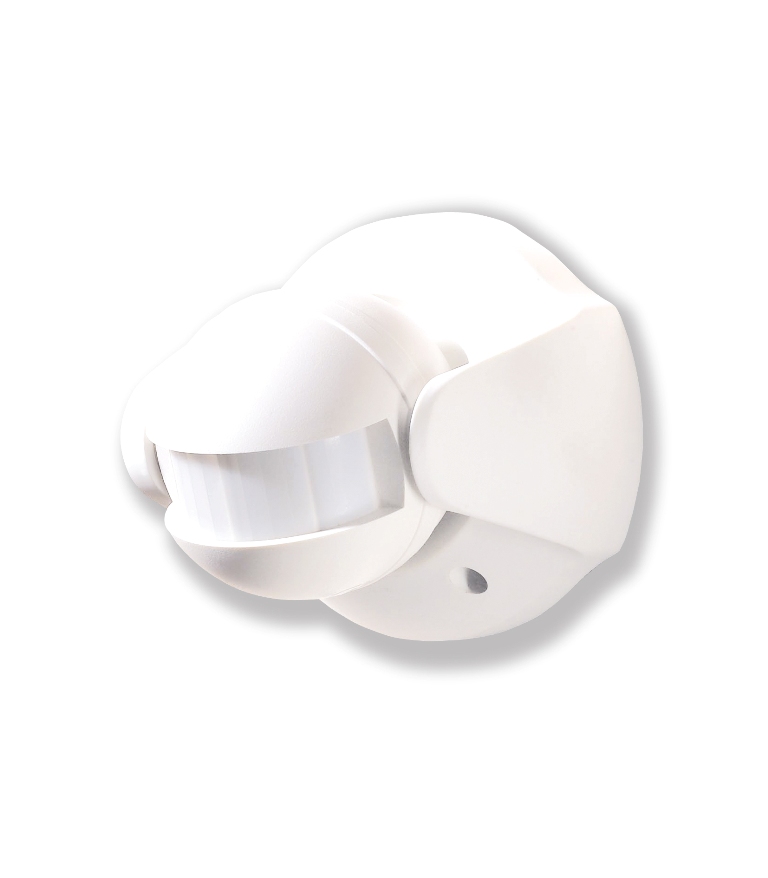
Name | Outdoor Motion Detector |
|---|
Short Description | Everspring SP816 Z-Wave Outdoor Motion Detector |
|---|
Long Description | The SP816 Outdoor Motion Detector is a Z-Wave Plus enabled device which built S2 security and is fully compatible with any Z-Wave enabled network. The device can be set up in a Z-wave network to communicate directly with other end devices such as lighting controllers, or to report directly to a Z-wave controller.
This motion detector is primarily designed for outdoor lighting control application. It features a PIR motion detector to detect movement in a protected area and a lux sensor for determining brightness of its surroundings. It comes with a built in timer to set the duration for light turn on. The lux level and the timer can be set through knobs on the device itself.
If the PIR detects motion when lux level falls below a preset setting, the device will transmit a signal to turn on the outdoor lighting (or indirectly through gateway) and then later turns it off when its timer has elapsed.
This device can also be used as a basic motion sensor for indoor security application. |
|---|
Brand | Everspring |
|---|
Product Identifier | SP816-1 |
|---|
OEM Version | HW: 1 FW: 1.01:02.01 |
|---|
Hardware Platform | SD3502 |
|---|
Z-Wave Version | 6.71.01 |
|---|
Library Type | SLAVE_ENHANCED_232 |
|---|
Device Type | Notification Sensor |
|---|
Role Type | ROLE_TYPE_SLAVE_SLEEPING_REPORTING |
|---|
Manufacturer ID | 0x0060 |
|---|
Product Type ID | 0x0001 |
|---|
Product ID | 0x0005 |
|---|
User Icon | 0x0C07 |
|---|
Installer Icon | 0x0C07 |
|---|
Frequency Plans | EU: 869.85MHz, 868.40MHz |
|---|
Categories | Sensors |
|---|
Countries / Regions | European Union |
|---|
Supported Command Classes | Identifier | Name | Key | Version |
|---|
COMMAND_CLASS_FIRMWARE_UPDATE_MD_V4 | Firmware Update Meta-Data V4 | 0x7A | 4 | COMMAND_CLASS_POWERLEVEL | Powerlevel | 0x73 | 1 | COMMAND_CLASS_BATTERY | Battery | 0x80 | 1 | COMMAND_CLASS_SECURITY | Security S0 | 0x98 | 1 | COMMAND_CLASS_TRANSPORT_SERVICE_V2 | Transport Service V2 | 0x55 | 2 | COMMAND_CLASS_VERSION_V2 | Version V2 | 0x86 | 2 | COMMAND_CLASS_WAKE_UP_V2 | Wake Up V2 | 0x84 | 2 | COMMAND_CLASS_DEVICE_RESET_LOCALLY | Device Reset Locally | 0x5A | 1 | COMMAND_CLASS_ZWAVEPLUS_INFO_V2 | Z-Wave Plus Info V2 | 0x5E | 2 | COMMAND_CLASS_ASSOCIATION_V2 | Association V2 | 0x85 | 2 | COMMAND_CLASS_ASSOCIATION_GRP_INFO | Association Group Info | 0x59 | 1 | COMMAND_CLASS_SECURITY_2 | Security S2 | 0x9F | 1 | COMMAND_CLASS_SUPERVISION | Supervision | 0x6C | 1 | COMMAND_CLASS_MANUFACTURER_SPECIFIC_V2 | Manufacturer Specific V2 | 0x72 | 2 | COMMAND_CLASS_NOTIFICATION_V4 | Notification V4 | 0x71 | 4 |
|
|---|
Controlled Command Classes | Identifier | Name | Key | Version |
|---|
COMMAND_CLASS_BASIC | Basic | 0x20 | 1 | COMMAND_CLASS_SUPERVISION | Supervision | 0x6C | 1 |
|
|---|
S2 Classes | S2_UNAUTHENTICATED, S2_AUTHENTICATED |
|---|
Documents | Category | Description | File |
|---|
Manual_Primary_Lang | Product or Owner's Manual | |
|
|---|
Features | Feature | Values |
|---|
Color | | Sensors | Value |
|---|
Motion/No Motion (Binary) |
| Battery Type | | Battery Quantity | | Supported Notification Types | | IP (Ingress Protection) Rated | | Outdoor Use | |
|
|---|
Association Groups | Group Number | Maximum Nodes Supported | End Point ID | Description |
|---|
1 | 1 | 0 | Association with 1 node. | 2 | 4 | 0 | Association with 4 nodes. |
|
|---|
Texts | ID | Description | Value |
|---|
5 | Factory Reset | Please use this procedure only when the network primary controller is missing or otherwise inoperable.
1. Press the link button 3 times within 1.5 seconds to put the unit into exclusion mode.
2. Within 1 second of step 1, press the tamper switch again and hold until LED is off (about 5 seconds).
3. Node ID is excluded. The device reverts to factory default state and will be in auto-inclusion mode for 4 minutes. | 1 | Inclusion | 1. Put the Z-Wave Controller into inclusion mode.
2. Press the tamper switch 3 times within 1.5 seconds to put the unit into inclusion mode. | 2 | Exclusion | 1. Put the Z-Wave Controller into exclusion mode.
2. Press the tamper switch 3 times within 1.5 seconds to put the unit into exclusion mode. | 4 | Device Wake-Up | After it has been included into a Z-Wave network, the detector will go to sleep but will send a Wakeup Notification Command periodically at preset period to the controller. The Motion detector will stay awake for 10 seconds at least and then go back to sleep to conserve battery life.
The time interval between Wakeup Notification Commands can be set in the Wakeup Command Class based on the range values below:
Minimum Wake Up Interval 600s (10 minutes)
Maximum Wake Up Interval 86400s (1 day)
Default Wake Up Interval 14400s (4 hours)
Wake Up Interval Step Seconds 600s (10 minutes) |
|
|---|
Supported Notification Types | Notification Type | Event / State |
|---|
Home Security | (Refer to parameters): State idle |
|
|---|
Supported Multilevel Sensors | Multilevel Sensor Type |
|---|
General purpose |
|
|---|
Supports NWI | Yes |
|---|
Supports Explorer Frames | Yes |
|---|