Product Recognition | |
|---|
Certification Number | ZC10-18076195 |
|---|
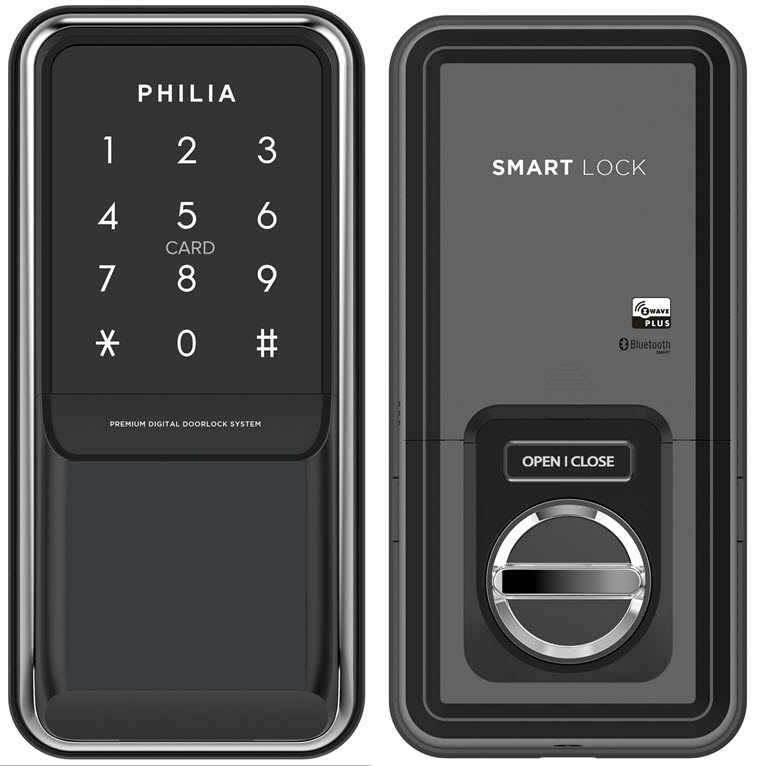
Name | Philia Door Lock |
|---|
Short Description | Philia Door Lock that can be used conveniently with Z-Wave and Bluetooth. |
|---|
Long Description | The PDS-100 is a door lock that can be conveniently used with Z-Wave and Bluetooth.
You can control the door lock directly from a phone via the Bluetooth function in close range, check the status of the door lock on the outside by connection to the Z-Wave hub as well as control door locks and check status via Google Home or Amazon Alexa. |
|---|
Brand | Philia |
|---|
Product Identifier | PDS-100 |
|---|
OEM Version | HW: 1 FW: 1.00:01.00 |
|---|
Hardware Platform | ZM5101 |
|---|
Z-Wave Version | 6.71.03 |
|---|
Library Type | SLAVE_ENHANCED_232 |
|---|
Device Type | Door Lock - Keypad |
|---|
Role Type | ROLE_TYPE_SLAVE_SLEEPING_LISTENING |
|---|
Manufacturer ID | 0x0366 |
|---|
Product Type ID | 0x0001 |
|---|
Product ID | 0x0001 |
|---|
User Icon | 0x0300 |
|---|
Installer Icon | 0x0300 |
|---|
Frequency Plans | US: 916.00MHz, 908.40MHz |
|---|
Categories | Locks |
|---|
Countries / Regions | United States of America |
|---|
Supported Command Classes | Identifier | Name | Key | Version |
|---|
COMMAND_CLASS_FIRMWARE_UPDATE_MD_V4 | Firmware Update Meta-Data V4 | 0x7A | 4 | COMMAND_CLASS_POWERLEVEL | Powerlevel | 0x73 | 1 | COMMAND_CLASS_USER_CODE | User Code | 0x63 | 1 | COMMAND_CLASS_DOOR_LOCK_V2 | Door Lock V2 | 0x62 | 2 | COMMAND_CLASS_BATTERY | Battery | 0x80 | 1 | COMMAND_CLASS_SECURITY | Security S0 | 0x98 | 1 | COMMAND_CLASS_TRANSPORT_SERVICE_V2 | Transport Service V2 | 0x55 | 2 | COMMAND_CLASS_VERSION_V2 | Version V2 | 0x86 | 2 | COMMAND_CLASS_DEVICE_RESET_LOCALLY | Device Reset Locally | 0x5A | 1 | COMMAND_CLASS_ZWAVEPLUS_INFO_V2 | Z-Wave Plus Info V2 | 0x5E | 2 | COMMAND_CLASS_ASSOCIATION_V2 | Association V2 | 0x85 | 2 | COMMAND_CLASS_ASSOCIATION_GRP_INFO | Association Group Info | 0x59 | 1 | COMMAND_CLASS_NOTIFICATION_V8 | Notification V8 | 0x71 | 8 | COMMAND_CLASS_SECURITY_2 | Security S2 | 0x9F | 1 | COMMAND_CLASS_SUPERVISION | Supervision | 0x6C | 1 | COMMAND_CLASS_MANUFACTURER_SPECIFIC_V2 | Manufacturer Specific V2 | 0x72 | 2 |
|
|---|
S2 Classes | S2_ACCESS_CONTROL |
|---|
Documents | Category | Description | File |
|---|
Manual_Primary_Lang | Product or Owner's Manual | |
|
|---|
Features | Feature | Values |
|---|
Supported Notification Types | | Battery Quantity | | Battery Type | | Communications Connections | | Color | | Door Lock Type | |
|
|---|
Association Groups | Group Number | Maximum Nodes Supported | End Point ID | Description |
|---|
1 | 5 | 0 | Z-Wave Plus Lifeline | 2 | 5 | 0 | Doorlock Op Group |
|
|---|
Texts | ID | Description | Value |
|---|
5 | Factory Reset | Please proceed with the door lock open.
1. Open the battery cover of the indoor body and press the [R] button for 9 seconds.
2. Press the [1][2][3][6][5][4][7] button after pressing the [R] button.
Please use this procedure only when the network primary controller is missing or otherwise inoperable. | 1 | Inclusion | Please proceed with the door lock open.
1. Set the controller in inclusion mode.
2. Open the battery cover of the indoor body and press the [R] button for 7 seconds.
3. Press the [1][4][7] button after pressing the [R] button. | 2 | Exclusion | Please proceed with the door lock open.
1. Set the controller in exclusion mode.
2. Open the battery cover of the indoor body and press the [R] button for 7 seconds.
3. Press the [3][6][7] button after pressing the [R] button. |
|
|---|
Supported Notification Types | Notification Type | Event / State |
|---|
Access Control | (Refer to parameters): State idle |
|
|---|
Supports NWI | Yes |
|---|
Supports Explorer Frames | Yes |
|---|
Is Flirs | Yes |
|---|