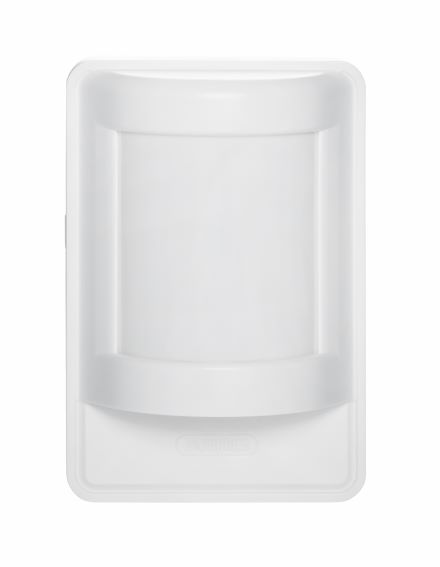
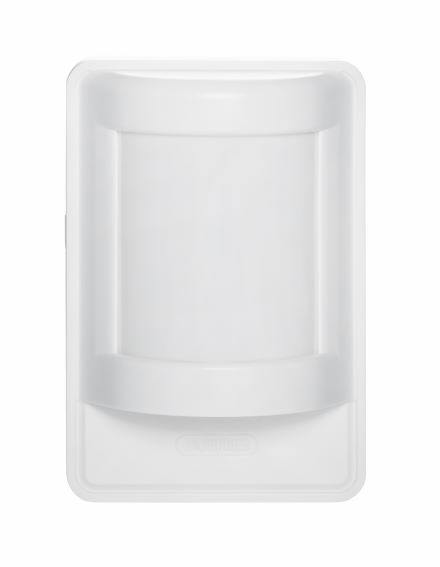
Product Recognition | |
|---|
Certification Number | ZC12-20040053 |
|---|
Name | PIR Sensor Lux |
|---|
Short Description | In addition to the classic motion detection, this sensor also provides information on the lighting condition (bright/dark). |
|---|
Long Description | In addition to the classic motion detection, this sensor also provides information on the lighting condition (bright/dark). This means that lighting can be automated in a really smart way: e.g. the light only turns on when it is dark in the room.
In addition, the sensitivity can be flexibly adjusted and the detector is pet-immune if desired.
PIR supports 80° viewing angle and up to 8m range. |
|---|
Brand | ABUS |
|---|
Product Identifier | PLBW10100 |
|---|
Product Line | Performance Line |
|---|
OEM Version | HW: 1 FW: 1.58 |
|---|
Hardware Platform | ZGM130 |
|---|
Z-Wave Version | 7.12.2 |
|---|
Library Type | SLAVE_ENHANCED_232 |
|---|
Device Type | Notification Sensor |
|---|
Role Type | ROLE_TYPE_SLAVE_SLEEPING_REPORTING |
|---|
Manufacturer ID | 0x0403 |
|---|
Product Type ID | 0x0002 |
|---|
Product ID | 0x0007 |
|---|
User Icon | 0x0C07 |
|---|
Installer Icon | 0x0C07 |
|---|
Frequency Plans | EU: 869.85MHz, 868.40MHz |
|---|
Categories | Security Systems |
|---|
Countries / Regions | European Union |
|---|
Supported Command Classes | Identifier | Name | Key | Version |
|---|
COMMAND_CLASS_CONFIGURATION_V4 | Configuration V4 | 0x70 | 4 | COMMAND_CLASS_SENSOR_MULTILEVEL_V5 | Sensor Multilevel V5 | 0x31 | 5 | COMMAND_CLASS_POWERLEVEL | Powerlevel | 0x73 | 1 | COMMAND_CLASS_MULTI_CHANNEL_ASSOCIATION_V4 | Multi-Channel Association V4 | | 0 | COMMAND_CLASS_INDICATOR_V3 | Indicator V3 | 0x87 | 3 | COMMAND_CLASS_BATTERY | Battery | 0x80 | 1 | COMMAND_CLASS_SECURITY | Security S0 | 0x98 | 1 | COMMAND_CLASS_TRANSPORT_SERVICE_V2 | Transport Service V2 | 0x55 | 2 | COMMAND_CLASS_VERSION_V2 | Version V2 | 0x86 | 2 | COMMAND_CLASS_WAKE_UP_V2 | Wake Up V2 | 0x84 | 2 | COMMAND_CLASS_DEVICE_RESET_LOCALLY | Device Reset Locally | 0x5A | 1 | COMMAND_CLASS_ZWAVEPLUS_INFO_V2 | Z-Wave Plus Info V2 | 0x5E | 2 | COMMAND_CLASS_ASSOCIATION_V2 | Association V2 | 0x85 | 2 | COMMAND_CLASS_FIRMWARE_UPDATE_MD_V5 | Firmware Update Meta-Data V5 | 0x7A | 5 | COMMAND_CLASS_ASSOCIATION_GRP_INFO_V3 | Association Group Information V3 | 0x59 | 3 | COMMAND_CLASS_NOTIFICATION_V8 | Notification V8 | 0x71 | 8 | COMMAND_CLASS_BASIC_V2 | Basic V2 | 0x20 | 2 | COMMAND_CLASS_SECURITY_2 | Security S2 | 0x9F | 1 | COMMAND_CLASS_SUPERVISION | Supervision | 0x6C | 1 | COMMAND_CLASS_MANUFACTURER_SPECIFIC_V2 | Manufacturer Specific V2 | 0x72 | 2 |
|
|---|
S2 Classes | S2_UNAUTHENTICATED, S2_AUTHENTICATED |
|---|
Documents | Category | Description | File |
|---|
Manual_Primary_Lang | Product Manual | |
|
|---|
Association Groups | Group Number | Maximum Nodes Supported | End Point ID | Group Name | Description |
|---|
1 | 5 | 0 | Lifeline | The Lifeline Association is automatically established between the Z-Wave controller and the device during inclusion and defines what information is exchanged between the Z-Wave controller and the device. | 2 | 5 | 0 | on/off control | When the motion alarm is triggered, it sends a BASIC SET On / Off command to the nodes of group 2 |
|
|---|
Configuration Parameters | Parameter Number | Name | Description | Format | Size | Min Value | Max Value | Default Value | Parameter Values |
|---|
17 | Pet Immunity Active / Deactive | Activate/deactivate the pet immunity. | 2 | 1 | 0 | 1 | 0 | From | To | Description |
|---|
0 | 0 | Pet immunity is deactivated | 1 | 1 | Pet immunity is activated |
| 10 | Threshold value battery alarm | LowBatAlarm Percentage value from when the low battery alarm should be transmitted. | 2 | 1 | 5 | 50 | 10 | From | To | Description |
|---|
5 | 50 | Adjustable from 5 - 50 in percent |
|
|
|---|
Texts | ID | Description | Value |
|---|
8 | Where to find S2 DSK on product | The DSK code (Device-Specific Key) is the device-specific key of your device and is required for secure inclusion (teach-in) via S2 on the Z-Wave controller. The first 5 digits of the DSK code can be found on the QR Code on the back of the product. Please enter them in the inclusion process when prompted. Alternatively, you can transfer the entire DSK code that you find on the enclosed DSK card to the Z-Wave controller via QR Code Scan. Please keep the DSK card in a safe place!
Hint:
We recommend the secure S2 inclusion (must be supported by the Z-Wave controller) Please enter the 5 digits of the DSK code (bottom of the device) or the entire DSK code (QR code) when prompted. | 1 | Classic Inclusion | Activate the inclusion mode (teach-in mode) on the Z-Wave controller. (for more details, please refer to the Z-Wave controller's user manual)
Press the "+" button (Add / Inclusion) in your Z-Wave app and follow the instructions to set the Z-Wave controller to inclusion mode.
Keep the device within reach of the Z-Wave controller.
Remove the safety strip from the battery compartment. We recommend using only the original Duracell battery supplied.
Press the Link button 3 times quickly (within 1.5 seconds) to start the inclusion on the device.
The LED starts flashing red for up to 60 seconds
The successful inclusion is displayed in the app or on the Z-Wave controller and the status LED on the device lights up red for 2 seconds.
Repeat the inclusion process if it was not successful.
If a new attempt fails as well, first carry out a factory reset on the device, see 2.5. | 2 | Classic Exclusion | Activate the exclusion mode (learn mode) on the Z-Wave controller. (for more details, please refer to the Z-Wave controller's user manual)
Press the "-" button (Remove / Exclusion) in your Z-Wave app and follow the instructions to set the Z-Wave controller to Exclusion mode.
Press the Link button 3 times quickly (within 1.5 seconds) to start the exclusion on the device. The LED starts flashing red for up to 60 seconds
Successful exclusion is displayed in the app or on the Z-Wave controller and the status LED on the device lights up red for 2 seconds. | 4 | Wake-Up Procedure | Press the Link button once to wake up the device. It will then establish a connection to the Z-Wave controller and transmit the current status. | 5 | Factory Reset Procedure | Press and hold the Link button for at least 5 seconds. Release the button when the red LED stops blinking and lights up continuously. The device is now reset to factory settings.
Hint:
Please use this procedure only if the primary network controller is missing or otherwise not functional.
If the device is set to factory default, the status is set to "not included" and the association settings and possible configurations are reset to default. | 17 | Dynamic Capabilities | N/A |
|
|---|
Supported Notification Types | Notification Type | Event / State |
|---|
Home Security | (Refer to parameters): State idle | Home Security | Cover status: Tampering, product cover removed | Home Security | Motion sensor status: Motion detection | Power Management | (Refer to parameters): State idle | Power Management | Battery maintenance status: Replace battery soon | Power Management | Battery maintenance status: Replace battery now | Light sensor | (Refer to parameters): State idle | Light sensor | Light detection status: Light detected |
|
|---|
Supported Multilevel Sensors | Multilevel Sensor Type |
|---|
Illuminance |
|
|---|
Supports NWI | Yes |
|---|
Supports Explorer Frames | Yes |
|---|
Supports SmartStart | Yes |
|---|
Radio Range Z-Wave (m) | 40 |
|---|