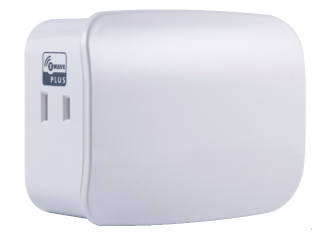
Product Recognition | |
|---|
Certification Number | ZC10-20036902 |
|---|
Name | Plug-in Dimmer (Dual Plug Simultaneous Control) |
|---|
Short Description | Transform any home into a smart home with the Resideo Z-Wave Smart Lighting Control Lamp Module with Dimmer Control. |
|---|
Long Description | Transform any home into a smart home with the Resideo Z-Wave Smart Lighting Control Lamp Module with Dimmer Control. The lamp module enables wireless control of on/off and dim functions for standard incandescent table and floor lamps, as well as dimmable fluorescent, LED and CFL fixtures and more! Use the dimmer control to customize the lighting output and create the perfect ambiance for any room. The space-saving horizontal module plugs into a standard wall receptacle without blocking the second outlet or obstructing placement of furniture. It provides a Z-Wave enabled outlet for the lamp you would like to control and one always-on, simultaneous control AC outlet for other electrical appliances. Take control of your home lighting with Resideo Z-Wave Smart Controls! |
|---|
Brand | Resideo |
|---|
Product Identifier | 39446 / ZW3107 |
|---|
Product Line | Resideo Smart Lighting Controls |
|---|
OEM Version | HW: 255 FW: 5.21 |
|---|
Hardware Platform | ZM5202 |
|---|
Z-Wave Version | 6.51.08 |
|---|
Library Type | SLAVE_ENHANCED_232 |
|---|
Device Type | Light Dimmer Switch |
|---|
Role Type | ROLE_TYPE_SLAVE_ALWAYS_ON |
|---|
Manufacturer ID | 0x041B |
|---|
Product Type ID | 0x5044 |
|---|
Product ID | 0x3033 |
|---|
User Icon | 0x0600 |
|---|
Installer Icon | 0x0600 |
|---|
Frequency Plans | US: 916.00MHz, 908.40MHz |
|---|
Categories | All Lighting Devices, Dimming Lighting Devices |
|---|
Countries / Regions | United States of America |
|---|
Supported Command Classes | Identifier | Name | Key | Version |
|---|
COMMAND_CLASS_SCENE_ACTUATOR_CONF | Scene Actuator Conf | 0x2C | 1 | COMMAND_CLASS_POWERLEVEL | Powerlevel | 0x73 | 1 | COMMAND_CLASS_SWITCH_ALL | Switch All | 0x27 | 1 | COMMAND_CLASS_BASIC | Basic | 0x20 | 1 | COMMAND_CLASS_CONFIGURATION | Configuration | 0x70 | 1 | COMMAND_CLASS_CRC_16_ENCAP | CRC16 Encapsulation | 0x56 | 1 | COMMAND_CLASS_SWITCH_MULTILEVEL_V2 | Switch Multilevel V2 | 0x26 | 2 | COMMAND_CLASS_VERSION_V2 | Version V2 | 0x86 | 2 | COMMAND_CLASS_DEVICE_RESET_LOCALLY | Device Reset Locally | 0x5A | 1 | COMMAND_CLASS_ZWAVEPLUS_INFO_V2 | Z-Wave Plus Info V2 | 0x5E | 2 | COMMAND_CLASS_ASSOCIATION_V2 | Association V2 | 0x85 | 2 | COMMAND_CLASS_ASSOCIATION_GRP_INFO | Association Group Info | 0x59 | 1 | COMMAND_CLASS_SCENE_ACTIVATION | Scene Activation | 0x2B | 1 | COMMAND_CLASS_FIRMWARE_UPDATE_MD_V2 | Firmware Update Meta-Data V2 | 0x7A | 2 | COMMAND_CLASS_MANUFACTURER_SPECIFIC_V2 | Manufacturer Specific V2 | 0x72 | 2 |
|
|---|
Controlled Command Classes | Identifier | Name | Key | Version |
|---|
COMMAND_CLASS_BASIC | Basic | 0x20 | 1 |
|
|---|
Documents | Category | Description | File |
|---|
Manual_Primary_Lang | Product Manual | |
|
|---|
Features | Feature | Values |
|---|
Switch Load Capacity Watts | | Firmware Updatable | Value |
|---|
Updatable by Consumer by RF |
| Switch Type | Value |
|---|
Push Button Illuminated |
|
|
|---|
Association Groups | Group Number | Maximum Nodes Supported | End Point ID | Group Name | Description |
|---|
1 | 5 | 0 | Lifeline | Supports Device Reset Locally and receives unsolicited status updates. | 2 | 5 | 0 | Single Press | Association Group 2 supports Basic Set and is controlled by single pressing the button. | 3 | 5 | 0 | Double Press | Association Group 3 supports Basic Set and is controlled by double pressing the button. |
|
|---|
Configuration Parameters | Parameter Number | Name | Description | Format | Size | Min Value | Max Value | Default Value | Parameter Values |
|---|
3 | Parameter 3 | Invert/disable LED (Adjusts when the indicator LED is turned ON, OFF or disabled) | 1 | 1 | 0 | 2 | 1 | From | To | Description |
|---|
0 | 0 | LED ON / Device Off | 1 | 1 | (Default) LED On / Device On | 2 | 2 | Disable LED |
| 6 | Parameter 6 | Dim up/down rate | 1 | 1 | 0 | 1 | 0 | From | To | Description |
|---|
0 | 0 | (Default) = Dim up/down the light to the specified level quickly by command except value 0 and FF | 1 | 1 | 1 = Dim up/down the light to the specified level slowly by command except value 0 and FF |
| 7 | Parameter 7 | Dim rate steps when using Z-Wave controller (Adjusts the number of steps the light level will stop on when dimming) | 1 | 1 | 1 | 99 | 3 | From | To | Description |
|---|
1 | 99 | Valid Values | 3 | 3 | Default - 3 steps |
| 8 | Parameter 8 | Dim rate timing when using Z-Wave controller (Adjusts the timing of each step in 10ms increments) | 1 | 2 | 1 | 255 | 1 | From | To | Description |
|---|
1 | 1 | 10ms per step | 1 | 255 | Valid Values |
| 9 | Parameter 9 | Dim rate steps when manually controlled (Adjusts the number of steps the light level will stop on when dimming | 1 | 1 | 1 | 99 | 3 | From | To | Description |
|---|
1 | 99 | Valid Values | 3 | 3 | Default - 3 steps |
| 11 | Parameter 11 | Dim rate steps when receiving all-ON/OFF command (Adjusts the number of steps the light level will stop on when dimming) | 1 | 1 | 1 | 99 | 3 | From | To | Description |
|---|
1 | 99 | Valid Values | 3 | 3 | Default - 3 steps |
| 10 | Parameter 10 | Dim rate timing when manually controlled (Adjusts the timing of each step in 10ms increments) | 1 | 2 | 1 | 255 | 1 | From | To | Description |
|---|
1 | 1 | 10ms per step | 1 | 255 | Valid Values |
|
|
|---|
Texts | ID | Description | Value |
|---|
1 | Classic Inclusion | ADDING YOUR DEVICE TO A Z-WAVE NETWORK
1. Follow the instructions for your Z-Wave certified
controller to add a device to the Z-Wave network.
2. Once the controller is ready to add your device, press
and release the manual/program button on the smart
dimmer. Repeat as necessary to add the dimmer to
the network.
You have complete control | 2 | Classic Exclusion | TO REMOVE AND RESET THE DEVICE
1. Follow the instructions for your Z-Wave certified
controller to remove a device from the Z-Wave network.
2. Once the controller is ready to remove your device, press
and release the manual/program button on the smart
dimmer to remove it from the network. | 5 | Factory Reset Procedure | TO RETURN YOUR DIMMER TO FACTORY DEFAULTS
1. If plugged in, unplug the dimmer from the receptacle
2. Press and hold the top button, plug the device in and
continue to hold for at least 3 seconds.
NOTE: This should only be used in the event your network’s
primary controller is missing or otherwise inoperable. |
|
|---|
Supports NWI | Yes |
|---|
Supports Explorer Frames | Yes |
|---|
Radio Range Z-Wave (m) | 40 |
|---|