| Product Recognition | |
|---|
| Certification Number | ZC10-17045539 |
|---|
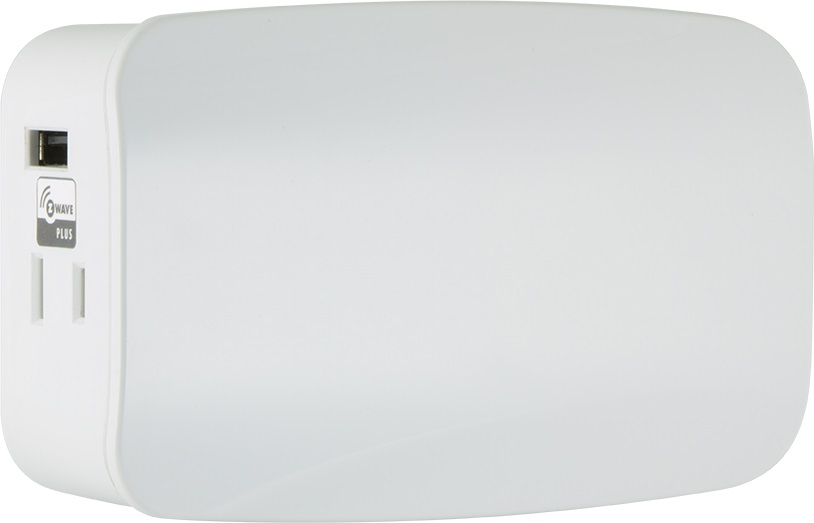
| Name | Plug-in Dual Smart Dimmer, With USB Charging |
|---|
| Short Description | Transform any home into a smart home with the GE Z-Wave Plug-in Dual Smart Dimmer With 3.4A USB Charging. |
|---|
| Long Description | Transform any home into a smart home with the GE Z-Wave Plug-in Dual Smart Dimmer With 3.4A USB Charging. This module enable wireless control on on/off and dim functions for standard incandescent table and floor lamps, as well as dimmable fluorescent, LED and CFL fixtures and more ! Use the dimming control to customize the lighting output and create the perfect ambiance for any room. The space-saving horizontal module plugs into a standard wall receptacle without blocking the second outlet or obstructing placement of furniture. This module also enables you to have independent or simultaneous control of each outlet! Take control of your home lighting with GE Z-Wave Smart Lighting Controls! |
|---|
| Brand | GE |
|---|
| Product Identifier | 28175/ZW3106 |
|---|
| OEM Version | HW: 255 FW: 5.21 |
|---|
| Hardware Platform | ZM5202 |
|---|
| Z-Wave Version | 6.51.08 |
|---|
| Library Type | SLAVE_ENHANCED_232 |
|---|
| Device Type | Light Dimmer Switch |
|---|
| Role Type | ROLE_TYPE_SLAVE_ALWAYS_ON |
|---|
| Manufacturer ID | 0x0063 |
|---|
| Product Type ID | 0x5044 |
|---|
| Product ID | 0x3132 |
|---|
| User Icon | 0x0600 |
|---|
| Installer Icon | 0x0600 |
|---|
| Frequency Plans | US: 916.00MHz, 908.40MHz |
|---|
| Categories | All Lighting Devices, Dimming Lighting Devices |
|---|
| Countries / Regions | United States of America |
|---|
| Supported Command Classes | | Identifier | Name | Key | Version |
|---|
| COMMAND_CLASS_SCENE_ACTUATOR_CONF | Scene Actuator Conf | 0x2C | 1 | | COMMAND_CLASS_POWERLEVEL | Powerlevel | 0x73 | 1 | | COMMAND_CLASS_MULTI_CHANNEL_ASSOCIATION_V3 | Multi-Channel Association V3 | 0x8E | 3 | | COMMAND_CLASS_SWITCH_ALL | Switch All | 0x27 | 1 | | COMMAND_CLASS_BASIC | Basic | 0x20 | 1 | | COMMAND_CLASS_CONFIGURATION | Configuration | 0x70 | 1 | | COMMAND_CLASS_CRC_16_ENCAP | CRC16 Encapsulation | 0x56 | 1 | | COMMAND_CLASS_SWITCH_MULTILEVEL_V2 | Switch Multilevel V2 | 0x26 | 2 | | COMMAND_CLASS_VERSION_V2 | Version V2 | 0x86 | 2 | | COMMAND_CLASS_DEVICE_RESET_LOCALLY | Device Reset Locally | 0x5A | 1 | | COMMAND_CLASS_ZWAVEPLUS_INFO_V2 | Z-Wave Plus Info V2 | 0x5E | 2 | | COMMAND_CLASS_ASSOCIATION_V2 | Association V2 | 0x85 | 2 | | COMMAND_CLASS_ASSOCIATION_GRP_INFO | Association Group Info | 0x59 | 1 | | COMMAND_CLASS_MULTI_CHANNEL_V4 | Multi-Channel V4 | 0x60 | 4 | | COMMAND_CLASS_SCENE_ACTIVATION | Scene Activation | 0x2B | 1 | | COMMAND_CLASS_FIRMWARE_UPDATE_MD_V2 | Firmware Update Meta-Data V2 | 0x7A | 2 | | COMMAND_CLASS_MANUFACTURER_SPECIFIC_V2 | Manufacturer Specific V2 | 0x72 | 2 |
|
|---|
| Controlled Command Classes | | Identifier | Name | Key | Version |
|---|
| COMMAND_CLASS_BASIC | Basic | 0x20 | 1 |
|
|---|
| Documents | | Category | Description | File |
|---|
| Manual_Primary_Lang | Product or Owner's Manual | Binder1.pdf |
|
|---|
| Features | | Feature | Values |
|---|
| Firmware Updatable | | Value |
|---|
| Updatable by Consumer by RF |
| | Loads Controlled | |
|
|---|
| Association Groups | | Group Number | Maximum Nodes Supported | End Point ID | Description |
|---|
| 1 | 5 | 0 | Z-Wave Plus Lifeline | | 2 | 5 | 0 | Group 2 supports Basic Set and is controlled with the local load | | 3 | 5 | 0 | Group 3 supports Basic Set and is controlled by double pressing the On or Off button |
|
|---|
| Configuration Parameters | | Parameter Number | Name | Description | Format | Size | Min Value | Max Value | Default Value | Parameter Values |
|---|
| 11 | When Receiving an All-On or All-Off Command | Number of steps or levels | 0 | 1 | 0 | 0 | 1 | | From | To | Description |
|---|
| 1 | 99 | Number of steps or levels |
| | 3 | LED Light | When shipped from the factory, the LED is set to turn ON when the connected light is turned ON. This is the default setting and can be changed if your primary controller supports the node configuration function. To make the LED turn ON when the light is turned Off, change parameter 3’s value to “0”. To turn the LED OFF at all times, change parameter 3’s value to 2. • Parameter No: 3 • Length: 1 Byte • Valid Values = 0, 1 or 2 (default 1) | 0 | 1 | 0 | 0 | 1 | | From | To | Description |
|---|
| 2 | 2 | LED Light Always OFF | | 0 | 1 | LED Light On when deivce is Off |
| | 7 | When receiving a Z-Wave Dimmer Command End Point 1 | Z-Wave Dim Command End Point 1 Number of Steps or Levels | 0 | 1 | 0 | 0 | 1 | | From | To | Description |
|---|
| 1 | 99 | Number of Steps or levels |
| | 8 | When receiving a Z-Wave Dimmer Command End Point 1 | Timing of the steps | 0 | 1 | 0 | 0 | 3 | | From | To | Description |
|---|
| 1 | 255 | Timing of the steps |
| | 9 | Manual Control Dimming End Point 2 | Number of steps or levels | 0 | 1 | 0 | 0 | 1 | | From | To | Description |
|---|
| 1 | 99 | number of steps or levels |
| | 10 | Manual Control Dimming End Point 2 | Timing of the steps | 0 | 1 | 0 | 0 | 3 | | From | To | Description |
|---|
| 1 | 255 | TIming of the steps |
|
|
|---|
| Texts | | ID | Description | Value |
|---|
| 1 | Inclusion | 1. Follow the instructions for your Z-wave certified controller to
add the device to the Z-wave network.
2. Once the controller is ready to add your smart switch,
single press and release the manual/program button on the
smart switch to add it in the network.
3. Once your controller has confirmed that the smart switch
has been added, refresh the Z-wave network to optimize
performance. | | 2 | Exclusion | 1. Follow the instructions for your Z-wave certified controller to
remove a device from the Z-wave network.
2. Once the controller is ready to remove your device, press and
release the manual/program button on the smart switch to
remove it from the network. | | 5 | Factory Reset | 1. If plugged in, unplug the Switch from the receptacle.
2. Press and hold the top button for at least 3 seconds while you
plug the switch into a receptacle.
Note: This should only be used in the event your network’s
primary controller is missing or otherwise inoperable. |
|
|---|
| Supports NWI | Yes |
|---|
| Supports Explorer Frames | Yes |
|---|