Product Recognition | |
|---|
Certification Number | ZC10-19106779 |
|---|
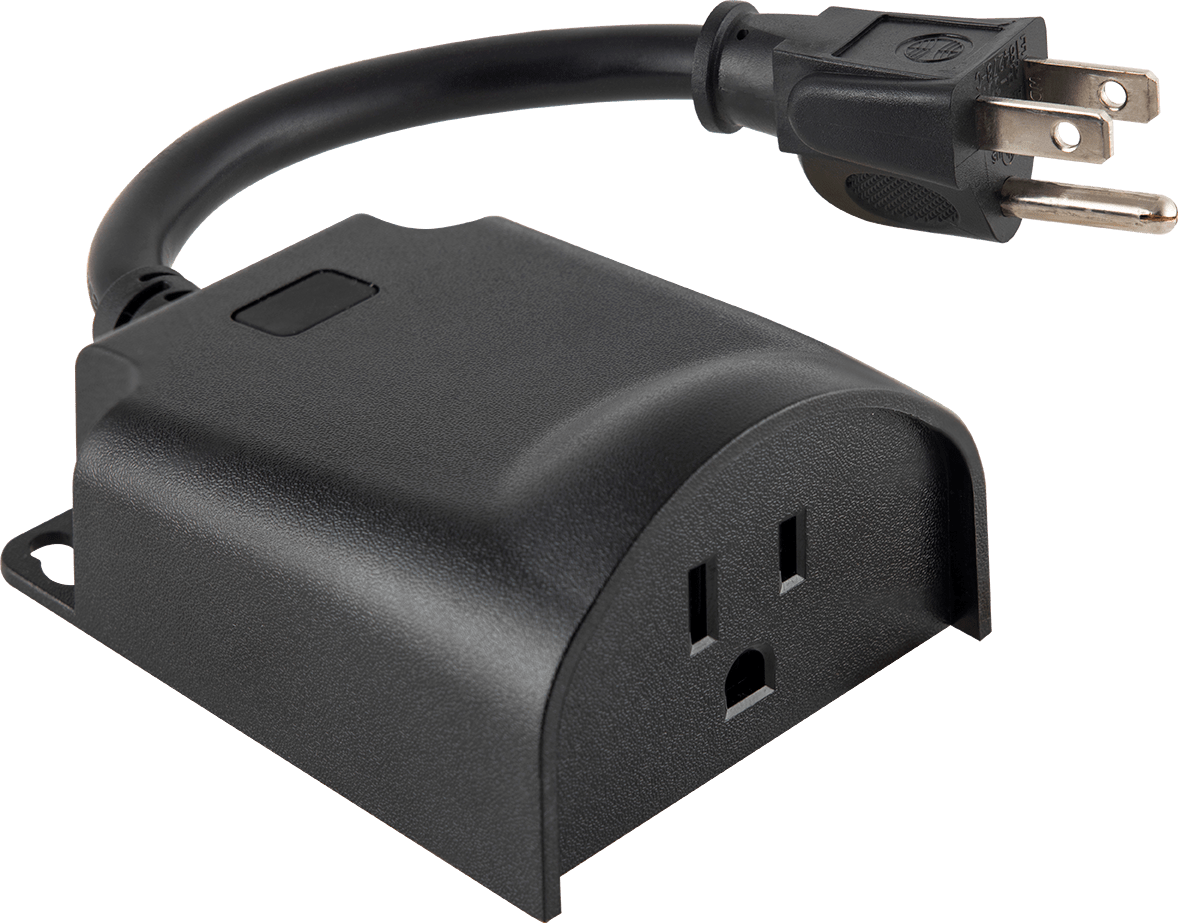
Name | Plug-in Outdoor Smart Switch |
|---|
Short Description | New Plug-in Outdoor Smart Switch is equipped with S2 and SmartStart which allows for easy and secure inclusion. |
|---|
Long Description | New Plug-in Outdoor Smart Switch is equipped with S2 and SmartStart which allows for easy and secure inclusion. |
|---|
Brand | Jasco |
|---|
Product Identifier | 14325/ZW4203 |
|---|
Product Line | Plug-in Outdoor Switch |
|---|
OEM Version | HW: 255 FW: 5.52 |
|---|
Hardware Platform | ZM5202 |
|---|
Z-Wave Version | 6.81.03 |
|---|
Library Type | SLAVE_ENHANCED_232 |
|---|
Device Type | On/Off Power Switch |
|---|
Role Type | ROLE_TYPE_SLAVE_ALWAYS_ON |
|---|
Manufacturer ID | 0x0063 |
|---|
Product Type ID | 0x4F50 |
|---|
Product ID | 0x3035 |
|---|
User Icon | 0x0700 |
|---|
Installer Icon | 0x0704 |
|---|
Frequency Plans | US: 916.00MHz, 908.40MHz |
|---|
Categories | All Lighting Devices, On/Off Switches/Devices |
|---|
Countries / Regions | United States of America |
|---|
Supported Command Classes | Identifier | Name | Key | Version |
|---|
COMMAND_CLASS_CONFIGURATION_V4 | Configuration V4 | 0x70 | 4 | COMMAND_CLASS_FIRMWARE_UPDATE_MD_V4 | Firmware Update Meta-Data V4 | 0x7A | 4 | COMMAND_CLASS_SCENE_ACTUATOR_CONF | Scene Actuator Conf | 0x2C | 1 | COMMAND_CLASS_SWITCH_BINARY_V2 | Switch Binary V2 | 0x25 | 2 | COMMAND_CLASS_POWERLEVEL | Powerlevel | 0x73 | 1 | COMMAND_CLASS_APPLICATION_STATUS | Application Status | 0x22 | 1 | COMMAND_CLASS_TRANSPORT_SERVICE_V2 | Transport Service V2 | 0x55 | 2 | COMMAND_CLASS_DEVICE_RESET_LOCALLY | Device Reset Locally | 0x5A | 1 | COMMAND_CLASS_ZWAVEPLUS_INFO_V2 | Z-Wave Plus Info V2 | 0x5E | 2 | COMMAND_CLASS_ASSOCIATION_V2 | Association V2 | 0x85 | 2 | COMMAND_CLASS_ASSOCIATION_GRP_INFO | Association Group Info | 0x59 | 1 | COMMAND_CLASS_BASIC_V2 | Basic V2 | 0x20 | 2 | COMMAND_CLASS_SECURITY_2 | Security S2 | 0x9F | 1 | COMMAND_CLASS_VERSION_V3 | Version V3 | 0x86 | 3 | COMMAND_CLASS_CENTRAL_SCENE_V3 | Central Scene V3 | 0x5B | 3 | COMMAND_CLASS_SUPERVISION | Supervision | 0x6C | 1 | COMMAND_CLASS_SCENE_ACTIVATION | Scene Activation | 0x2B | 1 | COMMAND_CLASS_MANUFACTURER_SPECIFIC_V2 | Manufacturer Specific V2 | 0x72 | 2 |
|
|---|
Controlled Command Classes | Identifier | Name | Key | Version |
|---|
COMMAND_CLASS_BASIC_V2 | Basic V2 | 0x20 | 2 |
|
|---|
S2 Classes | S2_UNAUTHENTICATED, S2_AUTHENTICATED |
|---|
Documents | Category | Description | File |
|---|
Adv_Manual | Advanced Information Product Manual | | Manual_Primary_Lang | Product Manual | |
|
|---|
Features | Feature | Values |
|---|
Color | | Z-Wave Scene Type | |
|
|---|
Association Groups | Group Number | Maximum Nodes Supported | End Point ID | Group Name | Description |
|---|
2 | 5 | 0 | Association Group 2 | Association Group 2 supports Basic Set and is controlled by pressing the ON/OFF button with the local load | 3 | 5 | 0 | Association Group 3 | Association Group 3 supports Basic Set and is controlled by double pressing the button | 1 | 5 | 0 | Association Group 1 | Association Group 1 supports Lifeline and Binary Switch Report |
|
|---|
Configuration Parameters | Parameter Number | Name | Format | Size | Min Value | Max Value | Default Value | Parameter Values |
|---|
3 | LED Indicator Configuration | 2 | 1 | 0 | 3 | 1 | From | To | Description |
|---|
0 | 0 | LED ON when device is OFF, LED is OFF when device is ON | 1 | 1 | (Default) - LED ON when device is ON, LED is OFF when device is OFF | 2 | 2 | LED always OFF | 3 | 3 | LED always ON |
|
|
|---|
Texts | ID | Description | Value |
|---|
5 | Factory Reset Procedure | 1. If plugged in, unplug the switch from the receptacle.
2. Press and hold the manual/program button for at least 3 seconds while you plug the switch into a receptacle.
Note: This should only be used if your network’s primary controller is missing or otherwise inoperable. | 6 | Other Special Features | How to cycle through LED indicator options: Press button 10 times quickly.
1. LED is ON when the load is ON (indicates the switch is ON) (default)
2. LED is always OFF
3. LED is always ON (illuminates switch in the dark)
4. LED is ON when the load is of (guide light in the dark) | 2 | Classic Exclusion | 1. Follow the instructions for your Z-Wave certified controller to remove a device from the Z-Wave network.
2. Once the controller is ready to remove your device, press and release the manual/program button on the smart switch to remove it from the network. | 8 | Where to find S2 DSK on product | If prompted by the controller to enter the S2 security code, refer to the QR code/security number on the side of the box or the QR code label on the product (see Figure 1). | 1 | Classic Inclusion | 1. Follow the instructions for your Z-Wave certified controller to add the smart switch to the Z-Wave network.
2. Once the controller is ready to add your outdoor smart switch, press and release the manual/program button on the smart switch.
3. The controller’s app will indicate if it has discovered the switch. If prompted by the controller to enter the S2 security code, refer to the QR code/security number on the side of the box or the QR code label on the product (see Figure 1). Enter the 5-digit code. |
|
|---|
Supports NWI | Yes |
|---|
Supports Explorer Frames | Yes |
|---|
Supports SmartStart | Yes |
|---|
Radio Range Z-Wave (m) | 40 |
|---|