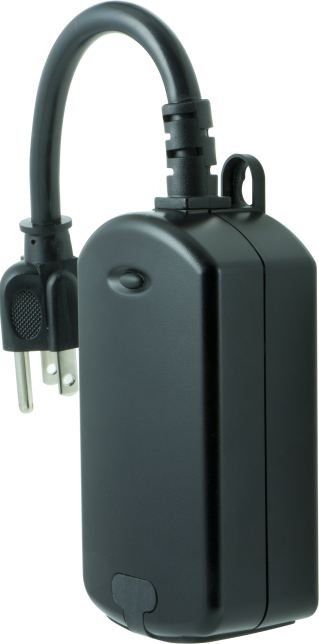
Product Recognition | |
|---|
Certification Number | ZC10-17115858 |
|---|
Name | Plug-in Outdoor Switch |
|---|
Short Description | Transform any home into a smart home with the Honeywell Z-Wave Outdoor Switch. |
|---|
Long Description | Transform any home into a smart home with the Honeywell Z-Wave Outdoor Switch. The lighting control enables wireless control of on/off functions for outdoor applications, and is compatible with incandescent, LED, Xenon, Halogen, fluorescent and compact fluorescent bulbs. The weather-resistant housing with a protective outlet cover safeguards the outlet from dirt and debris when not in use. The discreet black color blends in with any outdoor environment. Perfect for decorative or seasonal lighting, fountains and other outdoor plug-in appliances. Take control of your home lighting with Honeywell Z-Wave Smart Controls! |
|---|
Brand | Honeywell |
|---|
Product Identifier | 39346 / ZW4201 |
|---|
OEM Version | HW: 255 FW: 5.21 |
|---|
Hardware Platform | ZM5202 |
|---|
Z-Wave Version | 6.51.10 |
|---|
Library Type | SLAVE_ENHANCED_232 |
|---|
Device Type | On/Off Power Switch |
|---|
Role Type | ROLE_TYPE_SLAVE_ALWAYS_ON |
|---|
Manufacturer ID | 0x0039 |
|---|
Product Type ID | 0x4F50 |
|---|
Product ID | 0x3032 |
|---|
User Icon | 0x0700 |
|---|
Installer Icon | 0x0700 |
|---|
Frequency Plans | US: 916.00MHz, 908.40MHz |
|---|
Categories | All Lighting Devices, On/Off Switches/Devices |
|---|
Countries / Regions | United States of America |
|---|
Supported Command Classes | Identifier | Name | Key | Version |
|---|
COMMAND_CLASS_SCENE_ACTUATOR_CONF | Scene Actuator Conf | 0x2C | 1 | COMMAND_CLASS_POWERLEVEL | Powerlevel | 0x73 | 1 | COMMAND_CLASS_SWITCH_ALL | Switch All | 0x27 | 1 | COMMAND_CLASS_SWITCH_BINARY | Switch Binary | 0x25 | 1 | COMMAND_CLASS_BASIC | Basic | 0x20 | 1 | COMMAND_CLASS_CRC_16_ENCAP | CRC16 Encapsulation | 0x56 | 1 | COMMAND_CLASS_VERSION_V2 | Version V2 | 0x86 | 2 | COMMAND_CLASS_DEVICE_RESET_LOCALLY | Device Reset Locally | 0x5A | 1 | COMMAND_CLASS_ZWAVEPLUS_INFO_V2 | Z-Wave Plus Info V2 | 0x5E | 2 | COMMAND_CLASS_ASSOCIATION_V2 | Association V2 | 0x85 | 2 | COMMAND_CLASS_ASSOCIATION_GRP_INFO | Association Group Info | 0x59 | 1 | COMMAND_CLASS_SCENE_ACTIVATION | Scene Activation | 0x2B | 1 | COMMAND_CLASS_FIRMWARE_UPDATE_MD_V2 | Firmware Update Meta-Data V2 | 0x7A | 2 | COMMAND_CLASS_MANUFACTURER_SPECIFIC_V2 | Manufacturer Specific V2 | 0x72 | 2 |
|
|---|
Controlled Command Classes | Identifier | Name | Key | Version |
|---|
COMMAND_CLASS_BASIC | Basic | 0x20 | 1 |
|
|---|
Documents | Category | Description | File |
|---|
Manual_Primary_Lang | Product or Owner's Manual | |
|
|---|
Features | Feature | Values |
|---|
Color | | Switch Type | | Switch Load Capacity Watts | | Firmware Updatable | Value |
|---|
Updatable by Consumer by RF |
| Outdoor Use | |
|
|---|
Association Groups | Group Number | Maximum Nodes Supported | End Point ID | Description |
|---|
1 | 5 | 0 | Z-Wave Plus Lifeline | 2 | 5 | 0 | Supports Basic Set and is controlled with the local load. | 3 | 5 | 0 | Supports Basic Set and is controlled by double pressing on/off button. |
|
|---|
Texts | ID | Description | Value |
|---|
2 | Exclusion | 1. Follow the instructions for your Z-Wave certified controller to exclude a device from the Z-Wave network.
2. Once the controller is ready to Exclude your device, press and release the manual/program button on the smart switch to exclude it from the network. | 5 | Factory Reset | TO RETURN YOUR SWITCH TO FACTORY DEFAULTS
1. If plugged in, unplug the device from the receptacle.
2. Press and hold the top button, plug the device in,
and continue to hold for at least 3 seconds.
Note: This should only be used in the event your network’s
primary controller is missing or otherwise inoperable. | 1 | Inclusion | 1. Follow the instructions for your Z-Wave certified controller to include the smart switch to the Z-Wave network.
2. Once the controller is ready to include your outdoor smart switch, press and release the manual/program button on the smart switch to include it in the network.
3. Once your controller has confirmed that the smart switch has been included, refresh the Z-Wave network to optimize performance. |
|
|---|
Supports NWI | Yes |
|---|
Supports Explorer Frames | Yes |
|---|