Product Recognition | |
|---|
Certification Number | ZC10-20086958 |
|---|
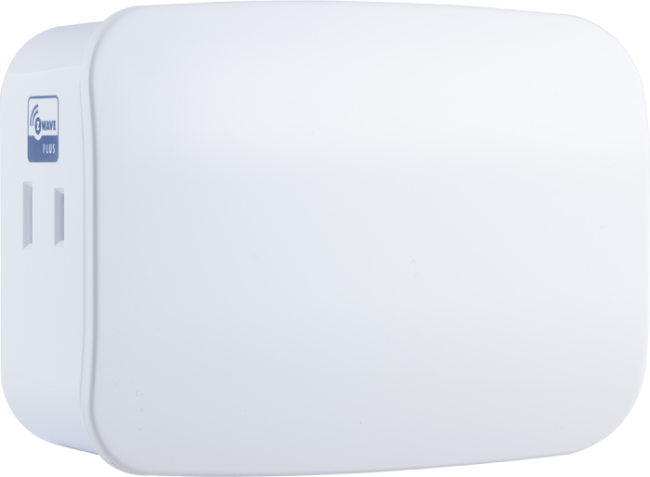
Name | Plug-in Smart Dimmer (Dual Plug with Pass through Outlet) |
|---|
Short Description | Transform any home into a smart home with the Jasco Z-Wave Smart Lighting Control Lamp Module with Dimmer Control |
|---|
Long Description | Transform any home into a smart home with the Jasco Z-Wave Smart Lighting Control Lamp Module with Dimmer Control. The lamp module enables wireless control of on/off and dim functions for standard incandescent table and floor lamps, as well as dimmable fluorescent, LED and CFL fixtures and more! Use the dimmer control to customize the lighting output and create the perfect ambiance for any room. The space-saving horizontal module plugs into a standard wall receptacle without blocking the second outlet or obstructing placement of furniture. It provides a Z-Wave enabled outlet for the lamp you would like to control and one always-on, standard pass-through AC outlet for other electrical appliances. Take control of your home lighting with Jasco Z-Wave Smart Lighting Controls! |
|---|
Brand | Jasco |
|---|
Product Identifier | 55252/ ZW3105 |
|---|
Product Line | Wireless Lighting Controls |
|---|
OEM Version | HW: 255 FW: 5.50 |
|---|
Hardware Platform | ZM5202 |
|---|
Z-Wave Version | 6.82.00 |
|---|
Library Type | SLAVE_ENHANCED_232 |
|---|
Device Type | Light Dimmer Switch |
|---|
Role Type | ROLE_TYPE_SLAVE_ALWAYS_ON |
|---|
Manufacturer ID | 0x0063 |
|---|
Product Type ID | 0x5044 |
|---|
Product ID | 0x3134 |
|---|
User Icon | 0x0600 |
|---|
Installer Icon | 0x0601 |
|---|
Frequency Plans | US: 916.00MHz, 908.40MHz |
|---|
Categories | Hospitality, All Lighting Devices, Dimming Lighting Devices, Lighting Accessories |
|---|
Countries / Regions | United States of America |
|---|
Supported Command Classes | Identifier | Name | Key | Version |
|---|
COMMAND_CLASS_CONFIGURATION_V4 | Configuration V4 | 0x70 | 4 | COMMAND_CLASS_POWERLEVEL | Powerlevel | 0x73 | 1 | COMMAND_CLASS_APPLICATION_STATUS | Application Status | 0x22 | 1 | COMMAND_CLASS_TRANSPORT_SERVICE_V2 | Transport Service V2 | 0x55 | 2 | COMMAND_CLASS_DEVICE_RESET_LOCALLY | Device Reset Locally | 0x5A | 1 | COMMAND_CLASS_ZWAVEPLUS_INFO_V2 | Z-Wave Plus Info V2 | 0x5E | 2 | COMMAND_CLASS_ASSOCIATION_V2 | Association V2 | 0x85 | 2 | COMMAND_CLASS_ASSOCIATION_GRP_INFO | Association Group Info | 0x59 | 1 | COMMAND_CLASS_SWITCH_MULTILEVEL_V4 | Switch Multilevel V4 | 0x26 | 4 | COMMAND_CLASS_BASIC_V2 | Basic V2 | 0x20 | 2 | COMMAND_CLASS_SECURITY_2 | Security S2 | 0x9F | 1 | COMMAND_CLASS_VERSION_V3 | Version V3 | 0x86 | 3 | COMMAND_CLASS_CENTRAL_SCENE_V3 | Central Scene V3 | 0x5B | 3 | COMMAND_CLASS_SUPERVISION | Supervision | 0x6C | 1 | COMMAND_CLASS_MANUFACTURER_SPECIFIC_V2 | Manufacturer Specific V2 | 0x72 | 2 |
|
|---|
S2 Classes | S2_UNAUTHENTICATED, S2_AUTHENTICATED |
|---|
Documents | Category | Description | File |
|---|
Manual_Primary_Lang | Product Manual | |
|
|---|
Features | Feature | Values |
|---|
Firmware Updatable | Value |
|---|
Updatable by Consumer by RF |
| Loads Controlled | | Switch Load Capacity Watts | | Z-Wave Scene Type | |
|
|---|
Association Groups | Group Number | Maximum Nodes Supported | End Point ID | Group Name | Description |
|---|
1 | 5 | 0 | Lifeline | Z-Wave Plus Lifeline | 2 | 5 | 0 | Single Press | Association Group 2 supports Basic Set and is controlled with the local load | 3 | 5 | 0 | Double Press | Association Group 3 supports Basic Set and is controlled by double pressing the button |
|
|---|
Configuration Parameters | Parameter Number | Name | Description | Format | Size | Min Value | Max Value | Default Value | Parameter Values |
|---|
3 | LED Light | 0 = LED ON when light is ON (Default) 1 = LED ON when light is OFF 2 = LED is always OFF 3 = LED is always ON | 1 | 1 | 0 | 3 | 0 | From | To | Description |
|---|
0 | 0 | LED On when load is On, LED Off when load is Off (Default) | 1 | 1 | LED ON/device OFF | 2 | 2 | Always OFF | 3 | 3 | Always ON |
| 7 | Dim Rate Adjustments (From Z-Wave Controller) | Number of steps or levels | 1 | 1 | 1 | 99 | 99 | From | To | Description |
|---|
1 | 99 | Number of Steps for dim rate |
| 8 | Dim Rate Adjustments (From Z-Wave Controller) | Timing of Steps | 1 | 2 | 1 | 255 | 255 | From | To | Description |
|---|
1 | 255 | How fast dimming occurs |
| 9 | Dim Rate Adjustments (When Manually Controlled) | Number of steps or levels | 1 | 1 | 1 | 99 | 99 | From | To | Description |
|---|
1 | 99 | Step values |
| 10 | Dim Rate Adjustments (When Manually Controlled) | Timing of Steps | 1 | 2 | 1 | 255 | 255 | From | To | Description |
|---|
1 | 255 | Dim Speed |
| 11 | Dim Rate Adjustments (When Receiving All-On/Off Commands) | Number of levels or steps | 1 | 1 | 1 | 99 | 99 | From | To | Description |
|---|
1 | 99 | Step values |
|
|
|---|
Texts | ID | Description | Value |
|---|
2 | Classic Exclusion | 1. Follow the instructions for your Z-Wave certified controller to remove a device from the Z-Wave
network.
2. Once the controller is ready to remove your device, press and release the manual/program button on the smart dimmer. | 5 | Factory Reset Procedure | 1. If plugged in, unplug the dimmer from the receptacle.
2. Press and hold the top button for at least there seconds while you plug the dimmer into a receptacle. | 8 | Where to find S2 DSK on product | If prompted by the controller to enter the S2 security code, refer to the QR code/security number on the side of the box or the QR code label on the product (see Figure 1). | 1 | Classic Inclusion | 1. Follow the instructions for your Z-Wave certified controller to add a device to the Z-Wave network.
2. Once the controller is ready to add your device, press the program button of the smart dimmer |
|
|---|
Supports NWI | Yes |
|---|
Supports Explorer Frames | Yes |
|---|
Supports SmartStart | Yes |
|---|
Radio Range Z-Wave (m) | 40 |
|---|