
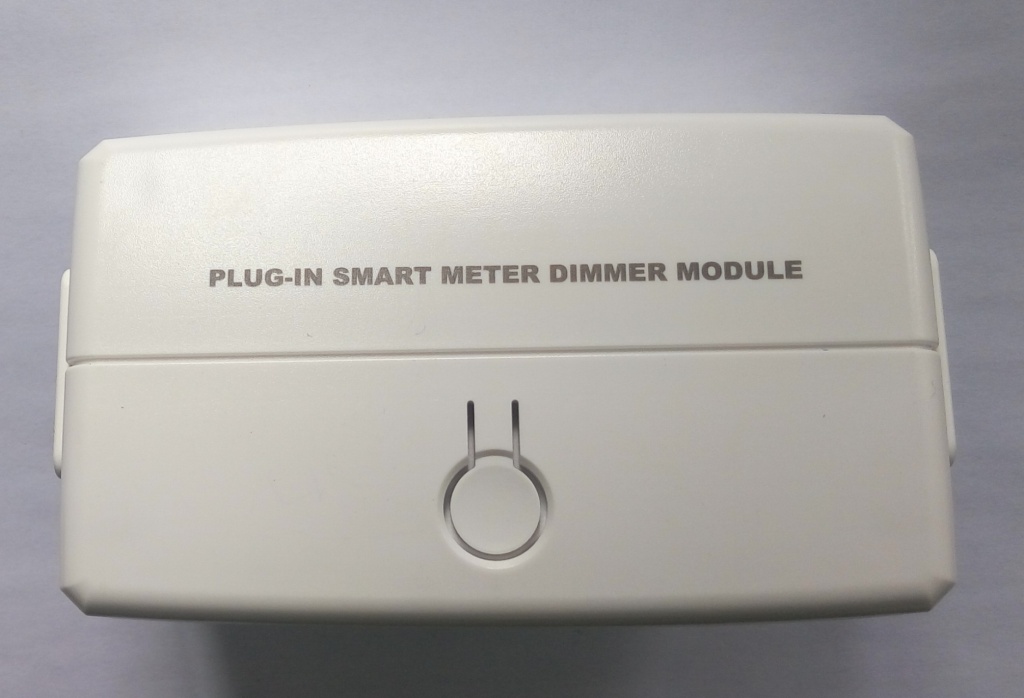
| Product Recognition | |
|---|
| Certification Number | ZC10-16065120 |
|---|
| Name | Plug-in Smart Meter Dimmer Module |
|---|
| Short Description | Plug-in Smart Meter Dimmer Module, with power measure. |
|---|
| Long Description | This ZWN-323 Dimming Module is a Z-Wave enabled device and is fully interoperable with other Z-Wave certified device. In a Z-Wave network, ZWN-323M enable you to remotely ON/OFF&Dim control a Z-Wave controlled outlet for the lamp and always-on AC outlet for other device. ZWN-323M also acts as a repeater, retransmitting the RF signal from one device to another until the intended device is reached. With a horizontal design, the ZWN-323M plug-in dimmer module will not block other nearby AC outlets. The ZWN-323M Smart Meter Module enables you to measure the energy usage of your appliance. When added to a Z-Wave network, the Smart Meter Module reports real time data to your gateway or controller. It can also display actual consumption (in W) and the accumulated power used (in kWh) in the user interface of the gateway/remote. Please use the gateway installation manual for specific instructions on measuring the module. |
|---|
| Brand | Enerwave Green Automation |
|---|
| Product Identifier | ZWN-323M |
|---|
| OEM Version | HW: 1 FW: 5.10 |
|---|
| Hardware Platform | ZM5202 |
|---|
| Z-Wave Version | 6.51.07 |
|---|
| Library Type | SLAVE_ROUTING |
|---|
| Device Type | Light Dimmer Switch |
|---|
| Role Type | ROLE_TYPE_SLAVE_ALWAYS_ON |
|---|
| Manufacturer ID | 0x011A |
|---|
| Product Type ID | 0x0111 |
|---|
| Product ID | 0x0202 |
|---|
| User Icon | 0x0600 |
|---|
| Installer Icon | 0x0600 |
|---|
| Frequency Plans | US: 916.00MHz, 908.40MHz |
|---|
| Categories | Energy Meters, All Lighting Devices, Dimming Lighting Devices |
|---|
| Countries / Regions | United States of America |
|---|
| Documents | |
|---|
| Features | | Feature | Values |
|---|
| Supported Meter Type | | | Switch Type | |
|
|---|
| Association Groups | | Group Number | Maximum Nodes Supported | End Point ID | Description |
|---|
| 1 | 1 | 0 | Z-Wave Plus Lifeline: Send device reset locally notification | | 2 | 5 | 0 | StatusReport: Send basic report | | 3 | 5 | 0 | PowerReport: Send meter power report |
|
|---|
| Configuration Parameters | | Parameter Number | Name | Description | Format | Size | Min Value | Max Value | Default Value | Parameter Values |
|---|
| 1 | LEDdirect | synchronization of outlet power and LED indicator | 0 | 1 | 0 | 0 | 0 | | From | To | Description |
|---|
| 0 | 0 | Power on, LED off | | 1 | 1 | Power on, LED on |
|
|
|---|
| Texts | | ID | Description | Value |
|---|
| 1 | Inclusion | While the gateway/remote is in the adding mode and the blue LED blinks on
the ZWN-323M, flicks the program button 3 times in the 1.5 second. The gateway
or remote will verify the adding, assign a node ID number for the module . | | 2 | Exclusion | While the gateway or remote in the removing mode, flicks the program button
3 times in the 1.5 second. The gateway or remote will verify the deleting,
remove the module from the current Z-Wave network, and the LED will blink
when the module is on power. | | 5 | Factory Reset | Flicks the program button 3 times in the 1.5 second then press once and
hold for 2 second.the device will send a device reset locally notification to controller. Then clear all of information for the network, and restore factory defaults, and reset the module. Use this procedure only in the event that
the network primary controller is missing or otherwise inoperable. |
|
|---|
| Supported / Controlled Meter Types | | Meter Type | Rate Type | Description |
|---|
| Electric meter | Import | Electric Meter Consumption |
|
|---|
| Supports NWI | Yes |
|---|
| Supports Explorer Frames | Yes |
|---|