
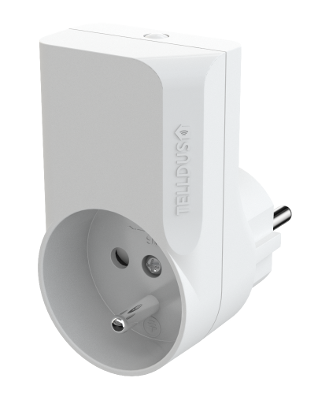
| Product Recognition | |
|---|
| Certification Number | ZC10-16015003 |
|---|
| Name | Plug-in Switch (French) |
|---|
| Short Description | Plug-in Switch |
|---|
| Long Description | The slim design makes this plugin switch fit almost everywhere. You can even have two switches connected into a standard 2-way wall outlet at the same time. It has a repeater function for the Z-Wave network so you can extend the range of your smart home system. Easy to install and to include in the powerful Telldus Live! system. Control lights and other electronic devices up to 2300 W (resistive load). Option to turn off indication LED. 500 chip, Z-Wave Plus. |
|---|
| Brand | Telldus |
|---|
| Product Identifier | TZWP-101 |
|---|
| OEM Version | HW: 1 FW: 1.00 |
|---|
| Hardware Platform | ZM5202 |
|---|
| Z-Wave Version | 6.51.06 |
|---|
| Library Type | SLAVE_ENHANCED_232 |
|---|
| Device Type | On/Off Power Switch |
|---|
| Role Type | ROLE_TYPE_SLAVE_ALWAYS_ON |
|---|
| Manufacturer ID | 0x0176 |
|---|
| Product Type ID | 0x0003 |
|---|
| Product ID | 0x0002 |
|---|
| User Icon | 0x0700 |
|---|
| Installer Icon | 0x0701 |
|---|
| Frequency Plans | EU: 869.85MHz, 868.40MHz |
|---|
| Categories | All Lighting Devices, On/Off Switches/Devices |
|---|
| Countries / Regions | European Union |
|---|
| Controlled Command Classes | | Identifier | Name | Key | Version |
|---|
| COMMAND_CLASS_BASIC | Basic | 0x20 | 1 |
|
|---|
| Documents | | Category | Description | File |
|---|
| Manual_Primary_Lang | Product or Owner's Manual | manual.pdf |
|
|---|
| Association Groups | | Group Number | Maximum Nodes Supported | End Point ID | Description |
|---|
| 1 | 1 | 0 | Z-Wave Plus Lifeline | | 2 | 10 | 0 | The plug will send Basic Set control signals to the nodes in this group whenever the status of the plug changes. |
|
|---|
| Configuration Parameters | | Parameter Number | Name | Description | Format | Size | Min Value | Max Value | Default Value | Parameter Values |
|---|
| 3 | LED indicator intensity | Set the intensity of the LED indicator | 0 | 1 | 0 | 0 | 255 | | From | To | Description |
|---|
| 0 | 255 | intensity | | 0 | 0 | |
| | 1 | Countdown timer | Number of minutes before it auto-shuts down. | 0 | 1 | 0 | 0 | 0 | | From | To | Description |
|---|
| 0 | 0 | Disabled | | 0 | 254 | Minutes |
| | 2 | Remember device status after power failure. | Define how the plug will react after the power supply is back on. | 0 | 1 | 0 | 0 | 1 | | From | To | Description |
|---|
| 0 | 0 | Always off | | 1 | 1 | Remember status | | 2 | 2 | Always on |
|
|
|---|
| Texts | | ID | Description | Value |
|---|
| 1 | Inclusion | Tripple click the button on the device | | 2 | Exclusion | Tripple click the button on the device | | 5 | Factory Reset | Press and hold the button until the LED starts flashing white (approx. 6 seconds).
Press the button once more, short.
The device will now reset to factory defaults. The LED will now flash, indicating that it’s no longer added in any Z-Wave network.
Please note! Only use the reset procedure when the primary controller is missing or inoperable. |
|
|---|
| Supports NWI | Yes |
|---|
| Supports Explorer Frames | Yes |
|---|