
| Product Recognition | |
|---|
| Certification Number | ZC10-17015409 |
|---|
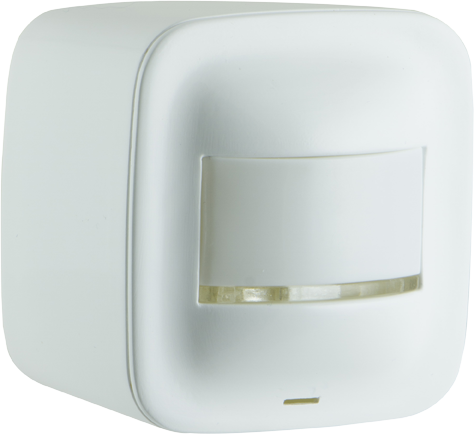
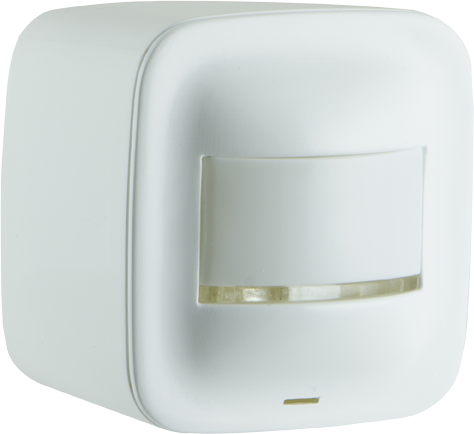
| Name | Portable Smart Multi Sensor |
|---|
| Short Description | Make the move toward convenience with the Z-Wave Portable Smart Motion Sensor for your home. |
|---|
| Long Description | Make the move toward convenience with the Z-Wave Portable Smart Motion Sensor for your home. This Z-Wave compatible device boosts the safety and intelligence of your home by working with your home’s gateway to wirelessly trigger scenes and send alerts to your smartphone or tablet whenever motion, light or temperature change is detected. The discreet, versatile design of the sensor makes it suitable for any indoor space, with a detection range up to 180 degrees and up to 45 feet away. Depending on your room size, the sensor also offers three different motion-detecting sensitivity levels: low, medium and high. The sensor sits perfectly on a shelf, table, counter or desk, and can also be mounted to wall or ceiling by using the included mounting hardware. This sensor can be powered with the included batteries (up to two years of battery life) or via Micro USB cable (sold separately). Smart controls require a standalone Z-Wave remote or supported Z-Wave hub, including SmartThings, Wink, Staples Connect, Harmony Home, Piper, ADT Pulse, Vera, and Nexia. This product guaranteed with a 2-year limited warranty. |
|---|
| Brand | GE |
|---|
| Product Identifier | 35211/ZW6302B |
|---|
| OEM Version | HW: 255 FW: 5.21 |
|---|
| Hardware Platform | ZM5101 |
|---|
| Z-Wave Version | 6.51.07 |
|---|
| Library Type | SLAVE_ENHANCED_232 |
|---|
| Device Type | Notification Sensor |
|---|
| Role Type | ROLE_TYPE_SLAVE_SLEEPING_REPORTING |
|---|
| Manufacturer ID | 0x0063 |
|---|
| Product Type ID | 0x4953 |
|---|
| Product ID | 0x3033 |
|---|
| User Icon | 0x0D00 |
|---|
| Installer Icon | 0x0D00 |
|---|
| Frequency Plans | US: 916.00MHz, 908.40MHz |
|---|
| Categories | Sensors |
|---|
| Countries / Regions | United States of America |
|---|
| Supported Command Classes | | Identifier | Name | Key | Version |
|---|
| COMMAND_CLASS_POWERLEVEL | Powerlevel | 0x73 | 1 | | COMMAND_CLASS_BATTERY | Battery | 0x80 | 1 | | COMMAND_CLASS_CONFIGURATION | Configuration | 0x70 | 1 | | COMMAND_CLASS_SENSOR_MULTILEVEL_V7 | Sensor Multilevel V7 | 0x31 | 7 | | COMMAND_CLASS_VERSION_V2 | Version V2 | 0x86 | 2 | | COMMAND_CLASS_WAKE_UP_V2 | Wake Up V2 | 0x84 | 2 | | COMMAND_CLASS_DEVICE_RESET_LOCALLY | Device Reset Locally | 0x5A | 1 | | COMMAND_CLASS_ZWAVEPLUS_INFO_V2 | Z-Wave Plus Info V2 | 0x5E | 2 | | COMMAND_CLASS_ASSOCIATION_V2 | Association V2 | 0x85 | 2 | | COMMAND_CLASS_ASSOCIATION_GRP_INFO | Association Group Info | 0x59 | 1 | | COMMAND_CLASS_FIRMWARE_UPDATE_MD_V2 | Firmware Update Meta-Data V2 | 0x7A | 2 | | COMMAND_CLASS_MANUFACTURER_SPECIFIC_V2 | Manufacturer Specific V2 | 0x72 | 2 | | COMMAND_CLASS_NOTIFICATION_V4 | Notification V4 | 0x71 | 4 |
|
|---|
| Controlled Command Classes | | Identifier | Name | Key | Version |
|---|
| COMMAND_CLASS_BASIC | Basic | 0x20 | 1 |
|
|---|
| Documents | |
|---|
| Features | | Feature | Values |
|---|
| Battery Quantity | | | Battery Type | | | Firmware Updatable | | Value |
|---|
| Updatable by Consumer by RF |
| | Sensors | | Value |
|---|
| Motion/No Motion (Binary) | | Air Temperature | | Luminance |
|
|
|---|
| Association Groups | | Group Number | Maximum Nodes Supported | End Point ID | Description |
|---|
| 1 | 5 | 0 | Z-Wave Plus Lifeline |
|
|---|
| Configuration Parameters | | Parameter Number | Name | Description | Format | Size | Min Value | Max Value | Default Value | Parameter Values |
|---|
| 24 | Temperature and Light Sensor Sensing Frequency Setting | Change the temperature and light sensor detection frequency | 0 | 1 | 0 | 0 | 60 | | From | To | Description |
|---|
| 5 | 60 | 5 min to 60 min |
| | 6 | Enable and Disable the PIR Sensor | Enable and disable the PIR sensor | 0 | 1 | 0 | 0 | 1 | | From | To | Description |
|---|
| 1 | 1 | Enable | | 0 | 0 | Disable |
|
|
|---|
| Texts | | ID | Description | Value |
|---|
| 5 | Factory Reset | 1. Press the button 10 times within 6 seconds
(interval between 2 presses of the button
cannot be longer than 1 second).
2. The blue LED will blink for 3 seconds. | | 1 | Inclusion | 1. Follow the instructions for your Z-Wave certified
controller to add the device in the Z-Wave network.
2. Once the controller is ready to add your
motion sensor, press and release the button
on the sensor to add it in the network.
3. The blue LED will activate for 3 seconds to
confirm it has been included in the network. | | 2 | Exclusion | 1. Follow the instructions for your Z-Wave certified controller
to remove the device from the Z-Wave network.
2. Once the controller is ready to remove your
motion sensor, press and release the button on
the sensor to exclude it from the network.
3. The LED will blink for 3 seconds at a time.
NOTE: If the sensor’s power source is changed
after initial setup (ex: USB power instead of
battery power), the sensor must be excluded
from the network and then re-included. |
|
|---|
| Supported Multilevel Sensors | | Multilevel Sensor Type |
|---|
| Air temperature | | 0x02 | | Illuminance |
|
|---|
| Supports NWI | Yes |
|---|
| Supports Explorer Frames | Yes |
|---|