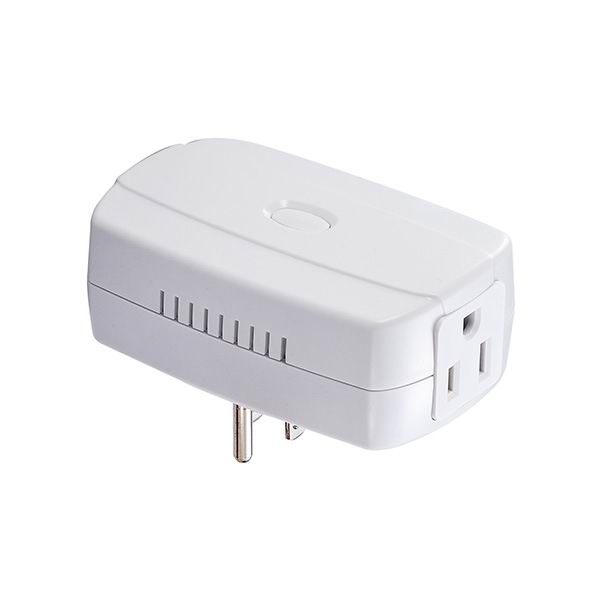
Product Recognition | |
|---|
Certification Number | ZC10-16105296 |
|---|
Name | Power Monitor |
|---|
Short Description | ZL7261US-5 is a power monitor which sends the energy consumption to the controller when it requests. With special design, this module won’t interfere the other power outlet when plug into the AC outlet. This module also acts as repeater (supporting FLiRS). |
|---|
Long Description | ZL7261US-5 will send On/Off signal to the appliance that attached to this module by receiving Z-Wave TM signal from controller or manual switch. It also sends the energy consumption to the controller when it requests.
* Plug Connection
* Auto Inclusion
* 3 Steps LED Indication: Green /Orange/ Red
* Max. Current: 15A
* Input Voltage: 90 ~ 230 VAC
* Power Monitor Range: Watt: 0.1W ~2200W@220VAC |
|---|
Brand | Vision |
|---|
Product Identifier | ZL7261US-5 |
|---|
OEM Version | HW: 1 FW: 16.09:33.00 |
|---|
Hardware Platform | ZM5202 |
|---|
Z-Wave Version | 6.51.09 |
|---|
Library Type | SLAVE_ENHANCED |
|---|
Device Type | On/Off Power Switch |
|---|
Role Type | ROLE_TYPE_SLAVE_ALWAYS_ON |
|---|
Manufacturer ID | 0x0109 |
|---|
Product Type ID | 0x201A |
|---|
Product ID | 0x1AA5 |
|---|
User Icon | 0x0700 |
|---|
Installer Icon | 0x0700 |
|---|
Frequency Plans | US: 916.00MHz, 908.40MHz |
|---|
Categories | Energy Meters, All Lighting Devices, On/Off Switches/Devices |
|---|
Countries / Regions | United States of America |
|---|
Supported Command Classes | Identifier | Name | Key | Version |
|---|
COMMAND_CLASS_POWERLEVEL | Powerlevel | 0x73 | 1 | COMMAND_CLASS_SWITCH_ALL | Switch All | 0x27 | 1 | COMMAND_CLASS_APPLICATION_STATUS | Application Status | 0x22 | 1 | COMMAND_CLASS_SWITCH_BINARY | Switch Binary | 0x25 | 1 | COMMAND_CLASS_BASIC | Basic | 0x20 | 1 | COMMAND_CLASS_CONFIGURATION | Configuration | 0x70 | 1 | COMMAND_CLASS_SECURITY | Security S0 | 0x98 | 1 | COMMAND_CLASS_VERSION_V2 | Version V2 | 0x86 | 2 | COMMAND_CLASS_DEVICE_RESET_LOCALLY | Device Reset Locally | 0x5A | 1 | COMMAND_CLASS_ZWAVEPLUS_INFO_V2 | Z-Wave Plus Info V2 | 0x5E | 2 | COMMAND_CLASS_ASSOCIATION_V2 | Association V2 | 0x85 | 2 | COMMAND_CLASS_ASSOCIATION_GRP_INFO | Association Group Info | 0x59 | 1 | COMMAND_CLASS_FIRMWARE_UPDATE_MD_V2 | Firmware Update Meta-Data V2 | 0x7A | 2 | COMMAND_CLASS_MANUFACTURER_SPECIFIC_V2 | Manufacturer Specific V2 | 0x72 | 2 | COMMAND_CLASS_METER_V4 | Meter V4 | 0x32 | 4 |
|
|---|
Documents | Category | Description | File |
|---|
Manual_Primary_Lang | Product or Owner's Manual | |
|
|---|
Features | Feature | Values |
|---|
Color | | Electric Load Type | | Firmware Updatable | Value |
|---|
Updatable by Professional/Technician |
| Switch Load Capacity Current | | Supported Meter Type | |
|
|---|
Association Groups | Group Number | Maximum Nodes Supported | End Point ID | Description |
|---|
1 | 5 | 0 | Z-Wave Plus Lifeline |
|
|---|
Configuration Parameters | Parameter Number | Name | Description | Format | Size | Min Value | Max Value | Default Value | Parameter Values |
|---|
1 | Auto report timing | User can set preferred auto report time from 60 to 255 seconds | 0 | 1 | 0 | 0 | 60 | From | To | Description |
|---|
60 | 255 | seconds |
| 2 | Report when Watt change | User can set preferred watt different level when watts changed. | 0 | 2 | 0 | 0 | 50 | From | To | Description |
|---|
5 | 3600 | Watts |
|
|
|---|
Texts | ID | Description | Value |
|---|
1 | Inclusion | For “Inclusion” in (adding to) a network: Put the Z-Wave TM Interface Controller into “inclusion” mode, and following its instruction to add the ZL7261 into your controller. To get in the “Inclusion” mode, by power up to get included for first time, or press the Program switch 3 times within 2 seconds to be included. | 2 | Exclusion | For “Exclusion” from (removing from) a network: Set up the Z-Wave TM Interface Controller into “exclusion” mode, and following its instruction to delete the ZL7261 from your controller. Press the Program Switch 3 times within 2 seconds to be excluded. | 5 | Factory Reset | Reset: Press the Program Switch then power on (plug-in) and hold for 5 seconds before release the switch. Only use this procedure when the primary controller is lost or otherwise inoperable. |
|
|---|
Supported / Controlled Meter Types | Meter Type | Rate Type | Description |
|---|
Electric meter | Import | Electric Meter Consumption |
|
|---|
Supports NWI | Yes |
|---|
Supports Explorer Frames | Yes |
|---|
Radio Range Z-Wave (m) | 40 |
|---|