Product Recognition | |
|---|
Certification Number | ZC12-20040041 |
|---|
Name | Receptacle |
|---|
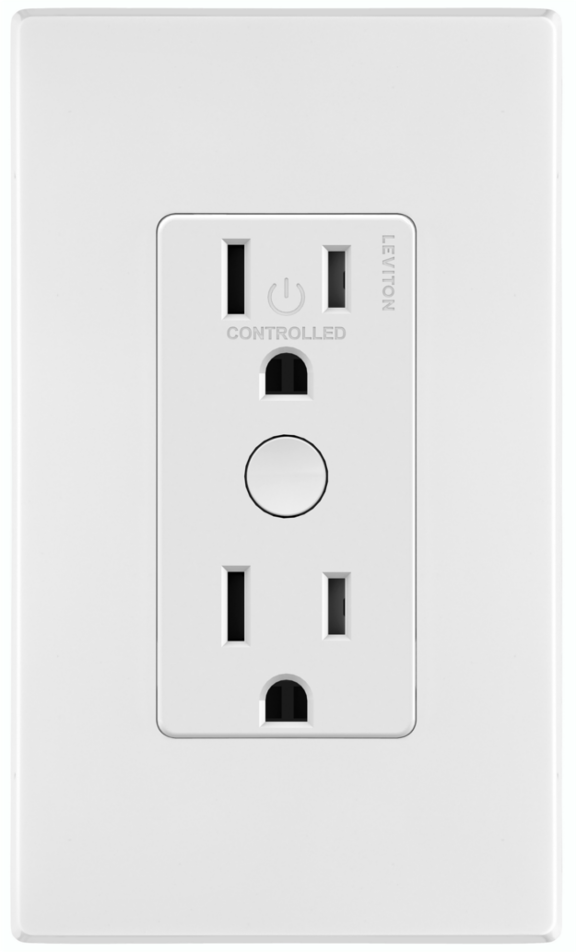
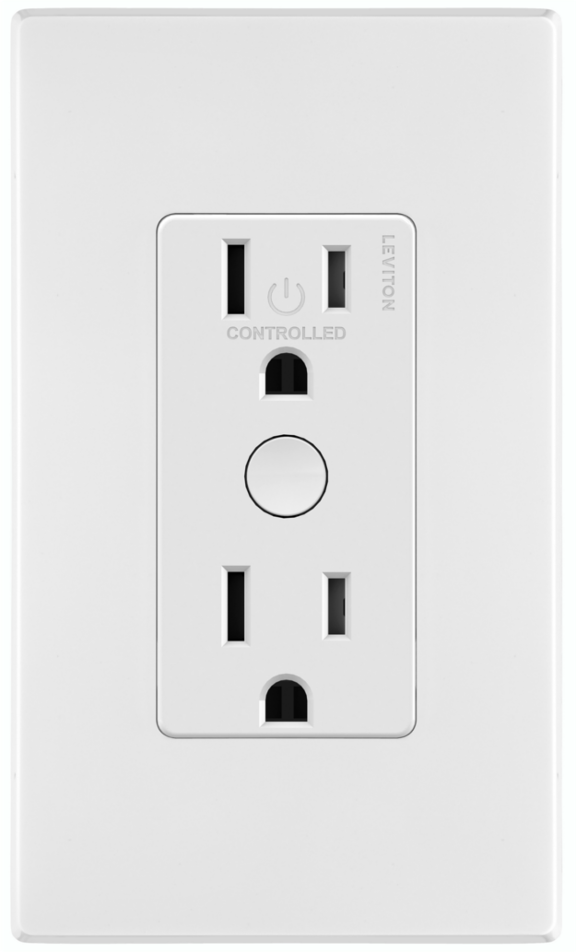
Short Description | Tamper Resistant Split 120VAC Duplex Receptacle with hidden LED, Top controlled, bottom always on. |
|---|
Long Description | Tamper Resistant Split 120VAC Duplex Receptacle with white face plate and hidden LED, Top controlled, bottom always on. Color change kits are available to change to Light Almond, Ivory, Black, Brown, Gray. Shallow depth and screw terminals allow for easy installation. Built in LED can be configured to be off, on when the outlet is on or a finder LED to turn the outlet on in the dark. |
|---|
Brand | Leviton |
|---|
Product Identifier | ZW15R |
|---|
Product Line | Decora Smart |
|---|
OEM Version | HW: 1 FW: 1.07 |
|---|
Hardware Platform | ZGM130 |
|---|
Z-Wave Version | 7.12.2 |
|---|
Library Type | SLAVE_ENHANCED_232 |
|---|
Device Type | Binary Switch |
|---|
Role Type | ROLE_TYPE_SLAVE_ALWAYS_ON |
|---|
Manufacturer ID | 0x001D |
|---|
Product Type ID | 0x0037 |
|---|
Product ID | 0x0002 |
|---|
User Icon | 0x0702 |
|---|
Installer Icon | 0x0702 |
|---|
Frequency Plans | US: 916.00MHz, 908.40MHz |
|---|
Categories | All Lighting Devices, On/Off Switches/Devices, Lighting Accessories |
|---|
Countries / Regions | United States of America |
|---|
Supported Command Classes | Identifier | Name | Key | Version |
|---|
COMMAND_CLASS_CONFIGURATION_V4 | Configuration V4 | 0x70 | 4 | COMMAND_CLASS_SCENE_ACTUATOR_CONF | Scene Actuator Conf | 0x2C | 1 | COMMAND_CLASS_SWITCH_BINARY_V2 | Switch Binary V2 | 0x25 | 2 | COMMAND_CLASS_POWERLEVEL | Powerlevel | 0x73 | 1 | COMMAND_CLASS_MULTI_CHANNEL_ASSOCIATION_V3 | Multi-Channel Association V3 | 0x8E | 3 | COMMAND_CLASS_INDICATOR_V3 | Indicator V3 | 0x87 | 3 | COMMAND_CLASS_SECURITY | Security S0 | 0x98 | 1 | COMMAND_CLASS_TRANSPORT_SERVICE_V2 | Transport Service V2 | 0x55 | 2 | COMMAND_CLASS_DEVICE_RESET_LOCALLY | Device Reset Locally | 0x5A | 1 | COMMAND_CLASS_ZWAVEPLUS_INFO_V2 | Z-Wave Plus Info V2 | 0x5E | 2 | COMMAND_CLASS_ASSOCIATION_V2 | Association V2 | 0x85 | 2 | COMMAND_CLASS_FIRMWARE_UPDATE_MD_V5 | Firmware Update Meta-Data V5 | 0x7A | 5 | COMMAND_CLASS_ASSOCIATION_GRP_INFO_V3 | Association Group Information V3 | 0x59 | 3 | COMMAND_CLASS_BASIC_V2 | Basic V2 | 0x20 | 2 | COMMAND_CLASS_SECURITY_2 | Security S2 | 0x9F | 1 | COMMAND_CLASS_VERSION_V3 | Version V3 | 0x86 | 3 | COMMAND_CLASS_SUPERVISION | Supervision | 0x6C | 1 | COMMAND_CLASS_SCENE_ACTIVATION | Scene Activation | 0x2B | 1 | COMMAND_CLASS_MANUFACTURER_SPECIFIC_V2 | Manufacturer Specific V2 | 0x72 | 2 |
|
|---|
S2 Classes | S2_UNAUTHENTICATED, S2_AUTHENTICATED |
|---|
Documents | Category | Description | File |
|---|
Manual_Primary_Lang | Get Started Guide in English | |
|
|---|
Features | Feature | Values |
|---|
Switch Load Capacity Volt-Ampere | | Neutral Wire Required | | Z-Wave Scene Type | | Firmware Updatable | Value |
|---|
Updatable by Consumer by RF |
| Electric Load Type | Value |
|---|
Incandescent | MLV (Magnetic) | Inductive (e.g. Motor) |
|
|
|---|
Association Groups | Group Number | Maximum Nodes Supported | End Point ID | Group Name | Profile | Description |
|---|
1 | 5 | 0 | Lifeline | 0x0001 | Lifeline Group 1 |
|
|---|
Configuration Parameters | Parameter Number | Name | Description | Format | Size | Min Value | Max Value | Default Value | Parameter Values |
|---|
7 | Locator Status | Locator LED Status | 2 | 1 | 0 | 255 | 0 | From | To | Description |
|---|
0 | 0 | LED Off | 254 | 254 | Status Mode | 255 | 255 | Locater Mode |
|
|
|---|
Texts | ID | Description | Value |
|---|
8 | Where to find S2 DSK on product | Page 8 | 2 | Classic Exclusion | Exclusion From A Z-Wave Network
When removing an outlet from a Z-Wave network, best practice is to use the exclusion command found in the Z-Wave controller.
1. To enter programming mode, hold the button for 7 seconds. The status light will turn amber, release and the status light will blink.
2. Follow Z-Wave controller directions to enter exclusion mode
3. Tap the button 1 time. The status light will quickly flash green.
4. The Z-Wave controller will remove the device from the network | 1 | Classic Inclusion | Classic Inclusion To A Z-Wave Network
For older controllers Classic Inclusion is supported. Depending on the age of the controller the controller will need to be 3 to 35 feet from the device when including.
1. To enter programming mode, hold the button for 7 seconds. The status light will turn amber, release and the status light will blink.
2. Follow the Z-Wave controller instructions to enter exclusion mode.
3. Tap the top of the button one time. The status light will quickly flash green.
4. The Z-Wave controller will confirm successful exclusion from the network. | 5 | Factory Reset Procedure | Factory Default
When removing an outlet from a network it is best practice to use the exclusion process. In situations where a device needs to be returned to factory default follow the following steps. A reset should only be used when a controller is inoperable or missing.
1. Hold the button for 7 seconds, the status light will turn amber. Continue holding the button for another 7 seconds (total of 14 seconds). The status light will quickly flash red/amber.
2. Release the button and the device will reset. |
|
|---|
Supports NWI | Yes |
|---|
Supports Explorer Frames | Yes |
|---|
Supports SmartStart | Yes |
|---|
Radio Range Z-Wave (m) | 40 |
|---|