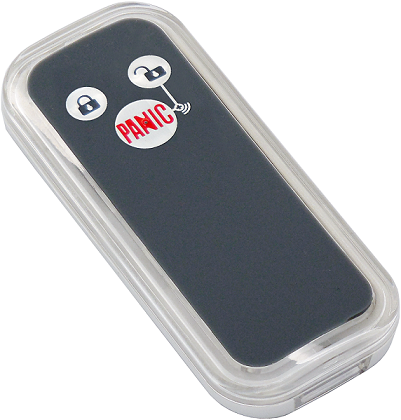
Product Recognition | |
|---|
Certification Number | ZC10-15070018 |
|---|
Name | Remote |
|---|
Short Description | The Remote PSR03-A is a simple control can control AV device through Z-Wave-to-IR extender, and it can also controls 2 lighting groups ON/OFF via basic set, based on Z-Wave™ technology. |
|---|
Long Description | The Remote PSR03-A is a simple control can control AV device through Z-Wave-to-IR extender, and it can also controls 2 lighting groups ON/OFF via basic set, based on Z-Wave™ technology.
It is a Z-Wave™ plus product, it supports the security, OTA... Those newest features of the Z-Wave™ technology. Z-Wave™ is a wireless communication protocol designed for home automation, specifically to remotely control applications in residential and light commercial environments. The technology uses a low-power RF radio embedded or retrofitted into home electronics devices and systems, such as lighting, home access control, entertainment systems and household appliances. |
|---|
Brand | Philio |
|---|
Product Identifier | PSR03-A |
|---|
OEM Version | 01 |
|---|
Hardware Platform | SD3502 |
|---|
Z-Wave Version | 6.51.06 |
|---|
Library Type | SLAVE_ENHANCED_232_NOFLIRS_NOMR |
|---|
Device Type | Remote Control - AV |
|---|
Role Type | ROLE_TYPE_SLAVE_PORTABLE |
|---|
Manufacturer ID | 0x013C |
|---|
Product Type ID | 0x0008 |
|---|
Product ID | 0x0026 |
|---|
Frequency Plans | EU: 869.85MHz, 868.40MHz |
|---|
Categories | All Controllers, Handheld Controller |
|---|
Countries / Regions | European Union |
|---|
Controlled Command Classes | Identifier | Name | Key | Version |
|---|
COMMAND_CLASS_SIMPLE_AV_CONTROL | Simple AV Control | 0x94 | 1 | COMMAND_CLASS_BASIC | Basic | 0x20 | 1 |
|
|---|
Documents | Category | Description | File |
|---|
Manual_Primary_Lang | Product or Owner's Manual | |
|
|---|
Association Groups | Group Number | Maximum Nodes Supported | End Point ID | Description |
|---|
1 | 4 | 0 | Z-Wave Plus Lifeline | 2 | 4 | 0 | Lighting group 1 | 3 | 4 | 0 | Lighting group 2 |
|
|---|
Configuration Parameters | Parameter Number | Name | Description | Format | Size | Min Value | Max Value | Default Value | Parameter Values |
|---|
2 | Basic Set Level | Setting the BASIC command value to turn on the light. The 0xFF(-1) means turn on the light. For dimmer equipment 1 to 100 means the light strength. 0 means turn off the light. | 0 | 1 | 0 | 0 | -1 | From | To | Description |
|---|
-1 | -1 | -1 (0xFF) means turn the light on | 0 | 0 | Turn off the light | 1 | 99 | Set the light to level 1-99, 99 is full brightness |
| 7 | Customer Function | Customer function switch, using bit control. Bit0: Switch AV control/Lighting group control. (0: AV control, 1: lighting group control) | 0 | 1 | 0 | 0 | 0 | From | To | Description |
|---|
0 | 0 | AV Control | 1 | 1 | Lighting Group Control |
| 82 | Association Group 2 Basic Set Level | Setting the BASIC command value to turn on the light in the association group 2. 0 means using the value of configuration 2 to set. | 0 | 1 | 0 | 0 | 0 | From | To | Description |
|---|
-1 | -1 | BASIC Command On (0xFF) | 0 | 0 | Use the value set by configuration parameter 2. | 1 | 99 | Setting the BASIC command value to turn on the light in the association group 2. |
| 83 | Association Group 3 Basic Set Level | Setting the BASIC command value to turn on the light in the association group 3. 0 means using the value of configuration 2 to set. | 0 | 1 | 0 | 0 | 0 | From | To | Description |
|---|
-1 | -1 | BASIC Command On (0xFF) | 0 | 0 | Use the value set by configuration parameter 2. | 1 | 99 | Setting the BASIC command value to turn on the light in the association group 3. |
|
|
|---|
Texts | ID | Description | Value |
|---|
23 | Controller Inclusion | 1. Have Z-Wave™ Controller entered add mode.
2. Hold down the central key, then press the top-right key three times within 1.5 seconds to enter the add mode.
3. After add successful, the device will wake to receive the setting command from Z-Wave ™ Controller about 20 seconds. | 24 | Controller Exclusion | 1. Have Z-Wave ™ Controller entered remove mode.
2. Hold down the central key, then press the top-right
key three times within 1.5 seconds to enter the
remove mode.
Node ID has been excluded. | 5 | Factory Reset | Notice: Use this procedure only in the event that the primary controller is lost or otherwise inoperable.
1. Hold down the central key, then press the top-right key four times within 1.5 seconds and do not release the top-right key in the 4 th pressed, and the LED will light ON.
2. After 3 seconds the LED will turn OFF, after that within 2 seconds, release the keys. If successful, the LED will light ON one second. Otherwise, the LED will flash once.
3. IDs are remove and all settings will reset to factory
default. | 4 | Device Wake-Up | After the device adding to the network, it will wake-up once per day in default. When it wake-up it will broadcast the “Wake Up Notification” message to the network, and wake-up 10 seconds for receive the setting commands. The wake-up interval minimum setting is 30 minutes, and maximum setting is 120 hours. And the interval step is 30 minutes. If the user want to wake-up the device immediately, please press the button once. The device will wake-up 10 seconds. |
|
|---|
Supports NWI | Yes |
|---|
Supports Explorer Frames | Yes |
|---|