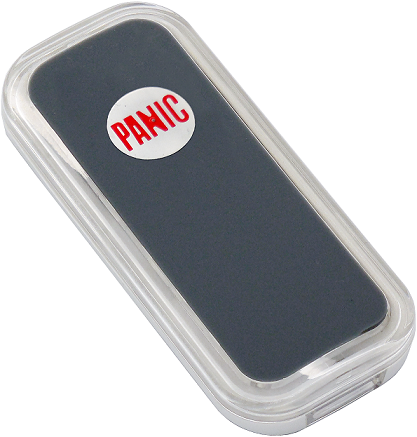
Product Recognition | |
|---|
Certification Number | ZC10-16010005 |
|---|
Name | Remote |
|---|
Short Description | The Remote PSR03-C is a simple alarm reporter, based on Z-Wave™ technology. |
|---|
Long Description | The Remote PSR03-C is a simple alarm reporter, based on Z-Wave™ technology.
It is a Z-Wave™ plus product, it supports the security, OTA... Those newest features of the Z-Wave™ technology. Z-Wave™ is a wireless communication protocol designed for home automation, specifically to remotely control applications in residential and light commercial environments. The technology uses a low-power RF radio embedded or retrofitted into home electronics devices and systems, such as lighting, home access control, entertainment systems and household appliances. |
|---|
Brand | Philio |
|---|
Product Identifier | PSR03-C |
|---|
OEM Version | 01 |
|---|
Hardware Platform | SD3502 |
|---|
Z-Wave Version | 6.51.06 |
|---|
Library Type | SLAVE_ENHANCED_232 |
|---|
Device Type | Notification Sensor |
|---|
Role Type | ROLE_TYPE_SLAVE_SLEEPING_REPORTING |
|---|
Manufacturer ID | 0x013C |
|---|
Product Type ID | 0x0008 |
|---|
Product ID | 0x0027 |
|---|
Frequency Plans | EU: 869.85MHz, 868.40MHz |
|---|
Categories | Sensors |
|---|
Countries / Regions | European Union |
|---|
Documents | Category | Description | File |
|---|
Manual_Primary_Lang | Product or Owner's Manual | |
|
|---|
Association Groups | Group Number | Maximum Nodes Supported | End Point ID | Description |
|---|
1 | 4 | 0 | Z-Wave Plus Lifeline |
|
|---|
Configuration Parameters | Parameter Number | Name | Description | Format | Size | Min Value | Max Value | Default Value | Parameter Values |
|---|
2 | Basic Set Level | Setting the BASIC command value to turn on the light. The 0xFF(-1) means turn on the light. For dimmer equipment 1 to 100 means the light strength. 0 means turn off the light. | 0 | 1 | 0 | 0 | -1 | From | To | Description |
|---|
0 | 0 | Turn off the light | -1 | -1 | -1 (0xFF) means turn the light on | 1 | 99 | Set the light to level 1-99, 99 is full brightness |
|
|
|---|
Texts | ID | Description | Value |
|---|
1 | Inclusion | 1. Have Z-Wave™ Controller entered add mode.
2. Press the key three times within 1.5 seconds to enter the add mode.
3. After add successful, the device will wake to receive the setting command from Z-Wave ™ Controller about 20 seconds. | 2 | Exclusion | 1. Have Z-Wave ™ Controller entered remove mode.
2. Press the key three times within 1.5 seconds to enter the
remove mode.
Node ID has been excluded. | 4 | Device Wake-Up | After the device adding to the network, it will wake-up once per day in default. When it wake-up it will broadcast the “Wake Up Notification” message to the network, and wake-up 10 seconds for receive the setting commands. The wake-up interval minimum setting is 30 minutes, and maximum setting is 120 hours. And the interval step is 30 minutes. If the user want to wake-up the device immediately, please press the button once. The device will wake-up 10 seconds. | 5 | Factory Reset | Notice: Use this procedure only in the event that the primary controller is lost or otherwise inoperable.
1. Press the key three times,and do not release the key in the 4 th pressed, and the LED will light ON.
2. After 3 seconds the LED will turn OFF, after that within 2 seconds, release the keys. If successful, the LED will light ON one second. Otherwise, the LED will flash once.
3. IDs are remove and all settings will reset to factory
default. |
|
|---|
Supports NWI | Yes |
|---|
Supports Explorer Frames | Yes |
|---|
Radio Range Z-Wave (m) | 40 |
|---|