Product Recognition | |
|---|
Certification Number | ZC10-19096747 |
|---|
Name | Ring Keypad EU |
|---|
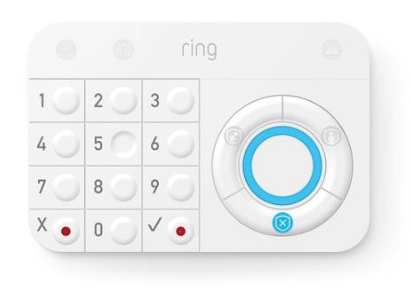
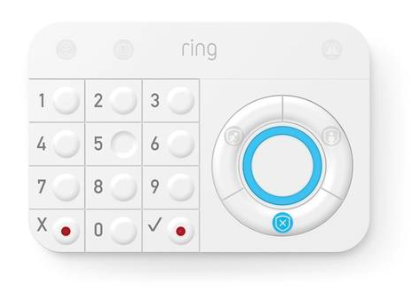
Short Description | Ring Alarm features a Z-Wave keypad, which will act as an arming station for the Ring Alarm system. In addition to smartphone and web apps, the keypad provides users with an alternative interface for their alarm system. |
|---|
Long Description | Ring Alarm features a Z-Wave keypad, will act as an arming station for the Ring Alarm system. In addition to smartphone and web apps, the keypad provides users with an alternative interface for their alarm system. The keypad allows the user to arm and disarm their system, view system status and receive visual and audio feedback regarding system status and events. Designed for convenience, the keypad can be mounted on the wall or left on a tabletop. Additionally, a rechargeable battery and AC power option provide users with the flexibility to use the keypad in ways which work best for each individual. This keypad gives users a home arming station without having to worry about wiring, picking the right location, complicated hardware installation or making modifications to their homes.
The keypad will include an interactive button interface, an informational display, a speaker, various LED lights, wall mount option, battery power, AC power option, and additional features to extend control of the Ring Protect system beyond the user’s mobile device and web applications. The keypad is intended to be used as a “dumb” terminal and will be non-programmable for end users. |
|---|
Brand | Ring |
|---|
Product Identifier | 4AK1E9-0EU0 |
|---|
Product Line | Keypad |
|---|
OEM Version | HW: 4 FW: 1.06:01.05 |
|---|
Hardware Platform | ZM5101 |
|---|
Z-Wave Version | 6.81.04 |
|---|
Library Type | SLAVE_ENHANCED_232 |
|---|
Device Type | Entry Control Keypad |
|---|
Role Type | ROLE_TYPE_SLAVE_SLEEPING_LISTENING |
|---|
Manufacturer ID | 0x0346 |
|---|
Product Type ID | 0x0101 |
|---|
Product ID | 0x0202 |
|---|
User Icon | 0x2001 |
|---|
Installer Icon | 0x2001 |
|---|
Frequency Plans | EU: 869.85MHz, 868.40MHz |
|---|
Categories | Security Systems |
|---|
Countries / Regions | European Union |
|---|
Supported Command Classes | Identifier | Name | Key | Version |
|---|
COMMAND_CLASS_ENTRY_CONTROL | Entry Control | 0x6F | 1 | COMMAND_CLASS_FIRMWARE_UPDATE_MD_V4 | Firmware Update Meta-Data V4 | 0x7A | 4 | COMMAND_CLASS_POWERLEVEL | Powerlevel | 0x73 | 1 | COMMAND_CLASS_BATTERY | Battery | 0x80 | 1 | COMMAND_CLASS_CONFIGURATION | Configuration | 0x70 | 1 | COMMAND_CLASS_INDICATOR | Indicator | 0x87 | 1 | COMMAND_CLASS_SECURITY | Security S0 | 0x98 | 1 | COMMAND_CLASS_TRANSPORT_SERVICE_V2 | Transport Service V2 | 0x55 | 2 | COMMAND_CLASS_VERSION_V2 | Version V2 | 0x86 | 2 | COMMAND_CLASS_DEVICE_RESET_LOCALLY | Device Reset Locally | 0x5A | 1 | COMMAND_CLASS_ZWAVEPLUS_INFO_V2 | Z-Wave Plus Info V2 | 0x5E | 2 | COMMAND_CLASS_ASSOCIATION_V2 | Association V2 | 0x85 | 2 | COMMAND_CLASS_ASSOCIATION_GRP_INFO | Association Group Info | 0x59 | 1 | COMMAND_CLASS_NOTIFICATION_V8 | Notification V8 | 0x71 | 8 | COMMAND_CLASS_SECURITY_2 | Security S2 | 0x9F | 1 | COMMAND_CLASS_SUPERVISION | Supervision | 0x6C | 1 | COMMAND_CLASS_MANUFACTURER_SPECIFIC_V2 | Manufacturer Specific V2 | 0x72 | 2 |
|
|---|
S2 Classes | S2_ACCESS_CONTROL |
|---|
Documents | Category | Description | File |
|---|
Manual_Primary_Lang | Product Manual | | Manual_English | Product Manual in English | |
|
|---|
Features | Feature | Values |
|---|
Firmware Updatable | Value |
|---|
Updatable by Consumer via Internet |
| Color | |
|
|---|
Association Groups | Group Number | Maximum Nodes Supported | End Point ID | Group Name | Profile | Description |
|---|
1 | 1 | 0 | Lifeline | 0x0001 | 1. Notification Report.
Keypad will send Notification Report to the associated nodes when AC power / PIR sensor is triggered /system software failure.
2. Entry Control Notification.
Keypad will send Entry Control Notification to the associated nodes when the mode button is triggered.
3. Battery Report.
Keypad will send Battery Report when the battery level is low and the battery report’s value is 0xFF or Hearbeat.
4. Device Reset Locally Notification |
|
|---|
Configuration Parameters | Parameter Number | Name | Description | Format | Size | Min Value | Max Value | Default Value | Parameter Values |
|---|
2 | Parameter 2 | Z-Wave Sleep Timeout: Time to wait after receiving ZW for more OTA messages. Available settings: 1-5 seconds | 1 | 1 | 1 | 5 | 1 | From | To | Description |
|---|
1 | 5 | Z-Wave Sleep Timeout |
| 3 | Parameter 3 | Co-Proc Is Alive: Base Station check to see if the co-proc is operational. 0 = No 1 = Yes | 1 | 1 | 0 | 1 | 1 | From | To | Description |
|---|
0 | 1 | Co-Proc Is Alive |
| 7 | Parameter 7 | Power Mode: Set the battery power saving mode for the keypad. 0=Extended Battery Life 1=Normal Battery Life | 1 | 1 | 0 | 1 | 0 | From | To | Description |
|---|
0 | 1 | Power Mode |
| 9 | Parameter 9 | Key Backlight Brightness: Adjusts the brightness of the keypad backlight Available settings: 0-100% | 1 | 1 | 0 | 100 | 100 | From | To | Description |
|---|
0 | 100 | Key Backlight Brightness |
| 10 | Parameter 10 | Key Tone Volume: Volume, Tone Time, Frequency Available settings: 0-10 | 1 | 1 | 1 | 8 | 8 | From | To | Description |
|---|
1 | 8 | Key Tone Volume |
| 11 | Parameter 11 | Ambient Light Sensor Level: Light threshold where keypad will stop backlighting if higher than Available settings: 0-100 | 1 | 1 | 0 | 100 | 5 | From | To | Description |
|---|
0 | 100 | Ambient Light Sensor Level: |
| 17 | Parameter 17 | Fast Blink Rate: LSB = 0.1 sec Fast Rate Type to blink the LEDs Available settings: 1-100 | 1 | 1 | 1 | 100 | 5 | From | To | Description |
|---|
1 | 100 | Fast Blink Rate |
| 23 | Parameter 23 | Read Only! | 1 | 4 | 0 | 0 | 0 | From | To | Description |
|---|
0 | 0 | Bit mask data for supported languages |
| 24 | Parameter 24 | Read Only! | 1 | 4 | 0 | 0 | 0 | From | To | Description |
|---|
0 | 0 | Audio File Version |
| 1 | Parameter 1 | Battery Report Interval: Default Heartbeat check in time. Available settings: 70-1440 mins. | 1 | 2 | 70 | 1440 | 70 | From | To | Description |
|---|
70 | 1440 | Battery Report Interval |
|
|
|---|
Texts | ID | Description | Value |
|---|
8 | Where to find S2 DSK on product | When prompted for the QR Code or PIN, you can find them on the back of the Keypad, or on the box, or on a card inside the box. | 2 | Classic Exclusion | Exclusion Instructions:
1. Initiate remove keypad flow in the Ring Alarm mobile application – Select the settings icon from device details page and choose “Remove Device”
2. Press and hold “1” key for three seconds
3. When the exclusion process is complete, the LED on the keypad will be solid blue, then go out
4. Test the Keypad. Any button presses would not beep | 4 | Wake-Up Procedure | Doesn't apply to this device - Wake up is not supported | 5 | Factory Reset Procedure | Factory Default Instructions
1. Press and hold “5” key and using a pointed end of a paperclip, gently press and release reset button via the reset pinhole found at the back of the keypad
2. Red network LED at the top left-hand corner will start to blink rapidly
3. Wait for the red LED to stop blinking then release the “5” key
Use this procedure only in the event that the network primary controller is missing or otherwise inoperable. | 1 | Classic Inclusion | Classic Inclusion Steps:
1. Initiate add keypad flow in the Ring Alarm mobile application – Follow the guided add flow instructions provided in the application
2. Select add manually and enter the 5 digit DSK pin found on the package of the keypad or the QR code found on the back of the keypad
3. Plugin the keypad to line power
4. Press and hold “1” key for three seconds
5. When the inclusion process is complete, the LED on the keypad will be solid blue, then go out.
6. Test the Keypad. Any button presses would beep |
|
|---|
Supported Notification Types | Notification Type | Event / State |
|---|
Heat Alarm | Heat sensor status: Overheat detected | Home Security | (Refer to parameters): State idle | Home Security | Motion sensor status: Motion detection | Power Management | (Refer to parameters): State idle | Power Management | Power status: Power has been applied | Power Management | Mains status: AC mains disconnected | Power Management | Mains status: AC mains re-connected | Power Management | Battery load status: Battery is charging | System | SW status: System software failure |
|
|---|
Supports NWI | Yes |
|---|
Supports Explorer Frames | Yes |
|---|
Is Flirs | Yes |
|---|
Supports SmartStart | Yes |
|---|