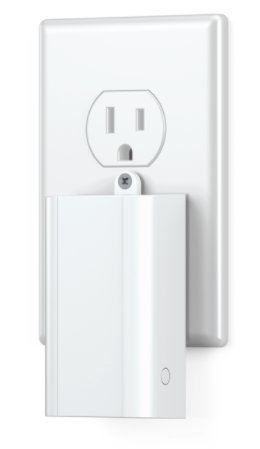
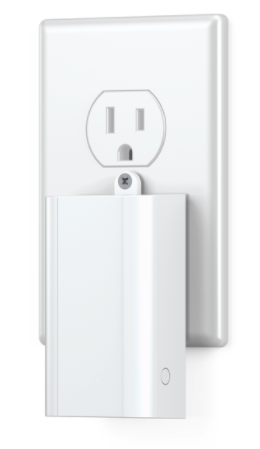
Product Recognition | |
|---|
Certification Number | ZC10-18066142 |
|---|
Name | Ring Range Extender |
|---|
Short Description | Ring Z-Wave network extender is used to increase the range and reliability of the Z-Wave network. |
|---|
Long Description | The Ring Protect security system is Ring’s entry into the DIY security solution space intended to provide customers with a Ring-branded, unique and simplified home security system. Ring Protect features a Z-Wave network extender which will be used to increase the range and reliability of the Z-Wave network. The network extender will be included in the professionally monitored alarm system. |
|---|
Brand | Ring |
|---|
Product Identifier | Range Extender |
|---|
OEM Version | HW: 1 FW: 1.02 |
|---|
Hardware Platform | ZM5101 |
|---|
Z-Wave Version | 6.71.01 |
|---|
Library Type | SLAVE_ENHANCED_232 |
|---|
Device Type | Repeater |
|---|
Role Type | ROLE_TYPE_SLAVE_ALWAYS_ON |
|---|
Manufacturer ID | 0x0346 |
|---|
Product Type ID | 0x0401 |
|---|
Product ID | 0x0101 |
|---|
User Icon | 0x1B00 |
|---|
Installer Icon | 0x1B00 |
|---|
Frequency Plans | US: 916.00MHz, 908.40MHz |
|---|
Categories | Network Devices |
|---|
Countries / Regions | United States of America |
|---|
Supported Command Classes | Identifier | Name | Key | Version |
|---|
COMMAND_CLASS_FIRMWARE_UPDATE_MD_V4 | Firmware Update Meta-Data V4 | 0x7A | 4 | COMMAND_CLASS_POWERLEVEL | Powerlevel | 0x73 | 1 | COMMAND_CLASS_BATTERY | Battery | 0x80 | 1 | COMMAND_CLASS_CONFIGURATION | Configuration | 0x70 | 1 | COMMAND_CLASS_SECURITY | Security S0 | 0x98 | 1 | COMMAND_CLASS_TRANSPORT_SERVICE_V2 | Transport Service V2 | 0x55 | 2 | COMMAND_CLASS_VERSION_V2 | Version V2 | 0x86 | 2 | COMMAND_CLASS_DEVICE_RESET_LOCALLY | Device Reset Locally | 0x5A | 1 | COMMAND_CLASS_ZWAVEPLUS_INFO_V2 | Z-Wave Plus Info V2 | 0x5E | 2 | COMMAND_CLASS_ASSOCIATION_V2 | Association V2 | 0x85 | 2 | COMMAND_CLASS_ASSOCIATION_GRP_INFO | Association Group Info | 0x59 | 1 | COMMAND_CLASS_SECURITY_2 | Security S2 | 0x9F | 1 | COMMAND_CLASS_SUPERVISION | Supervision | 0x6C | 1 | COMMAND_CLASS_MANUFACTURER_SPECIFIC_V2 | Manufacturer Specific V2 | 0x72 | 2 | COMMAND_CLASS_NOTIFICATION_V4 | Notification V4 | 0x71 | 4 |
|
|---|
S2 Classes | S2_UNAUTHENTICATED, S2_AUTHENTICATED |
|---|
Documents | Category | Description | File |
|---|
Manual_Primary_Lang | Product or Owner's Manual | |
|
|---|
Features | Feature | Values |
|---|
Firmware Updatable | Value |
|---|
Updatable by Manufacturer |
| Battery Type | Value |
|---|
Rechargeable Battery |
| Color | | Supported Notification Types | |
|
|---|
Association Groups | Group Number | Maximum Nodes Supported | End Point ID | Description |
|---|
1 | 5 | 0 | Z-Wave Plus Lifeline
Group 1 is the “Lifeline” group, which can hold five devices. The Range Extender repeats all signals it receives to this group. The Range Extender also sends this group Battery Reports, Power Management notifications, and a Device Reset Locally notification to remove itself from the Z-Wave network. |
|
|---|
Configuration Parameters | Parameter Number | Name | Description | Format | Size | Min Value | Max Value | Default Value | Parameter Values |
|---|
1 | Battery Report | This parameter sets how often the device sends battery reports to the Main Controller. It can be set to any value from 5 ~ 70 minutes in 1 minute increments. | 0 | 1 | 0 | 0 | 46 | From | To | Description |
|---|
4 | 46 | minutes |
|
|
|---|
Texts | ID | Description | Value |
|---|
1 | Inclusion | Ring Range Extender can be added via SmartStart or via classic inclusion mode –
SmartStart Inclusion Steps:
1. Initiate add range extender flow in the Ring Alarm mobile application – Follow the guided add flow instructions provided in the application
2. Scan the QR code found on the package of the range extender or the QR code found on the back of the range extender
3. Plug in the range extender to line power
4. When the inclusion process in complete, the LED on the range extender will be solid blue, then go out.
Classic Inclusion Steps:
1. Initiate add range extender flow in the Ring Alarm mobile application – Follow the guided add flow instructions provided in the application
2. Select add manually and enter the 5 digit DSK pin found on the package of the range extender or the QR code found on the back of the range extender
3. Plug in the range extender to line power
4. Press and hold the push button for three seconds and release
5. When the inclusion process in complete, the LED on the range extender will be solid blue, then go out. | 5 | Factory Reset | Factory Default Instructions
1. Press and hold the push button
2. Blue LED will start to blink rapidly
3. Wait for the blue LED to stop blinking then release the push button
Use this procedure only in the event that the network primary controller is missing or otherwise inoperable. | 2 | Exclusion | Exclusion Instructions:
1. Initiate remove range extender flow in the Ring Alarm mobile application – Select the settings icon from device details page and choose “Remove Device”
2. Press and hold the push button for three seconds
3. When the exclusion process in complete, the LED on the range extender will be solid blue, then go out. |
|
|---|
Supported Notification Types | Notification Type | Event / State |
|---|
Power Management | (Refer to parameters): State idle |
|
|---|
Supports NWI | Yes |
|---|
Supports Explorer Frames | Yes |
|---|
Supports SmartStart | Yes |
|---|