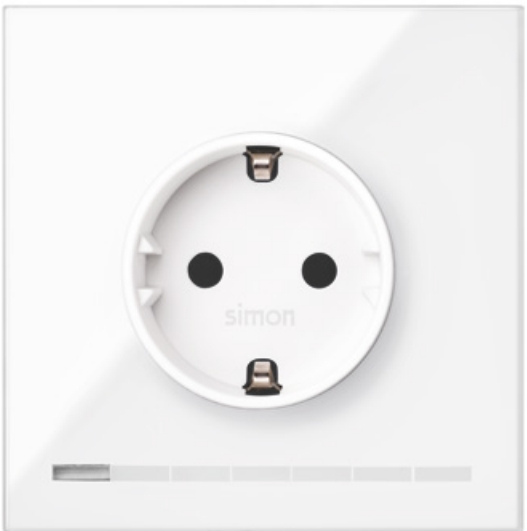
Product Recognition | |
|---|
Certification Number | ZC10-19076674 |
|---|
Name | S100 IO Socket 10A (China) |
|---|
Short Description | Simon Socket iO is a socket that allows increase the installation functions and features. |
|---|
Long Description | Socket iO is ready to operate with Z-Wave controllers and configured to be managed by Simon100 iO APP using the HUB plug iO for getting a better user experience. allowing the control of the socket and LEDs integrated.
Available colors Black and White.
visit http://www.simon.es/simon100/ to learn more about Simon 100 iO. |
|---|
Brand | Simon |
|---|
Product Identifier | 10002038-13X |
|---|
OEM Version | HW: 1 FW: 4.24:68.49 |
|---|
Hardware Platform | ZM5202 |
|---|
Z-Wave Version | 6.51.07 |
|---|
Library Type | SLAVE_ENHANCED |
|---|
Device Type | On/Off Power Switch |
|---|
Role Type | ROLE_TYPE_SLAVE_ALWAYS_ON |
|---|
Manufacturer ID | 0x0267 |
|---|
Product Type ID | 0x0009 |
|---|
Product ID | 0x0000 |
|---|
User Icon | 0x0702 |
|---|
Installer Icon | 0x0702 |
|---|
Frequency Plans | CN: 868.40MHz |
|---|
Categories | Energy Meters, All Lighting Devices, On/Off Switches/Devices |
|---|
Countries / Regions | China |
|---|
Supported Command Classes | Identifier | Name | Key | Version |
|---|
COMMAND_CLASS_FIRMWARE_UPDATE_MD_V4 | Firmware Update Meta-Data V4 | 0x7A | 4 | COMMAND_CLASS_POWERLEVEL | Powerlevel | 0x73 | 1 | COMMAND_CLASS_SWITCH_BINARY | Switch Binary | 0x25 | 1 | COMMAND_CLASS_BASIC | Basic | 0x20 | 1 | COMMAND_CLASS_VERSION_V2 | Version V2 | 0x86 | 2 | COMMAND_CLASS_DEVICE_RESET_LOCALLY | Device Reset Locally | 0x5A | 1 | COMMAND_CLASS_ZWAVEPLUS_INFO_V2 | Z-Wave Plus Info V2 | 0x5E | 2 | COMMAND_CLASS_ASSOCIATION_V2 | Association V2 | 0x85 | 2 | COMMAND_CLASS_ASSOCIATION_GRP_INFO_V3 | Association Group Information V3 | 0x59 | 3 | COMMAND_CLASS_CONFIGURATION_V2 | Configuration V2 | 0x70 | 2 | COMMAND_CLASS_MANUFACTURER_SPECIFIC_V2 | Manufacturer Specific V2 | 0x72 | 2 | COMMAND_CLASS_METER_V4 | Meter V4 | 0x32 | 4 |
|
|---|
Documents | Category | Description | File |
|---|
Manual_Primary_Lang | Product or Owner's Manual | |
|
|---|
Features | Feature | Values |
|---|
Neutral Wire Required | | Firmware Updatable | Value |
|---|
Updatable by Professional/Technician |
| Supported Meter Type | | Switch Load Capacity Current | | Switch Type | |
|
|---|
Association Groups | Group Number | Maximum Nodes Supported | End Point ID | Description |
|---|
1 | 3 | 0 | Z-Wave Plus Lifeline
COMMAND_CLASS_BASIC_REPORT
It is sent to the associated nodes when the load
changes state:
ON -> 0xFF
OFF -> 0x00
COMMAND_CLASS_METER_REPORT_V4
It is sent to the associated nodes when the power
consumed varies more than 10%
“Electric meter”, “Consumed”, “Watts”, Size 4, Precision 1, Value (W)
COMMAND_CLASS_DEVICE_RESET_LOCALLY_NOTIFICATION
The associated nodes are sent when the device is
removed from the Z-Wave network |
|
|---|
Configuration Parameters | Parameter Number | Name | Description | Format | Size | Min Value | Max Value | Default Value | Parameter Values |
|---|
2 | Custom Consumption Limit | Allows to set a power consumption limit in Watts | 0 | 2 | 0 | 0 | 0 | From | To | Description |
|---|
0 | 0 | Disables custom consumption limit | 1 | 65535 | Sets the power in Watts that is supported |
| 3 | Beacon | Enables or disables the beacon function | 0 | 1 | 0 | 0 | 0 | From | To | Description |
|---|
0 | 0 | Disables beacon function | 1 | 99 | Set the intensity of the beacon LEDs |
| 10 | On Timed | Sets the delay time to turn on the device | 0 | 1 | 0 | 0 | 0 | From | To | Description |
|---|
0 | 0 | Disables timing | 1 | 127 | 1 second (0x01) to 127 seconds (0x7F) in 1 second resolution | 128 | 255 | 1 minute (0x80) to 127 minutes (0xFE) in 1 minute resolution |
| 11 | OFF Timed | Sets the time the device stays on | 0 | 1 | 0 | 0 | 0 | From | To | Description |
|---|
0 | 0 | Disables timing | 1 | 127 | 1 second (0x01) to 127 seconds (0x7F) in 1 second resolution | 128 | 255 | 1 minute (0x80) to 127 minutes (0xFE) in 1 minute resolution |
| 17 | Post Reset State | Controls the state of the load after a reset action | 0 | 1 | 0 | 0 | 255 | From | To | Description |
|---|
0 | 0 | Restart with the relay disabled. | 255 | 255 | Recover the previous state. |
| 1 | Central LED | Allows to turn ON or OFF the central LED | 0 | 1 | 0 | 0 | 0 | From | To | Description |
|---|
0 | 0 | Turns the LED OFF | 255 | 255 | Turns the LED ON |
|
|
|---|
Texts | ID | Description | Value |
|---|
5 | Factory Reset | When the pushbutton is released after a press of (30sec<T) the device will perform a factory default values operation, excluding it from network and reset the configuration parameters.
Main LED will perform 1 Blink with 5 sec.
Please use this procedure only when the network primary controller is missing or otherwise inoperable. | 1 | Inclusion | When the pushbutton is released after a press of (2sec<T<30sec) the device will send a NIF to include from Z-Wave network or perform an association with other Z-Wave device.
Central LED will Blink with 0,3 sec period to inform that NIF can be send after release of pushbutton.
This process does not perform a default reset of configurations.
Central LED will Blink with 0,3 sec period to inform that NIF can be send after release of pushbutton. | 2 | Exclusion | When the pushbutton is released after a press of (2sec<T<30sec) the device will send a NIF to exclude from Z-Wave network or perform an association with other Z-Wave device.
Main LED will Blink with 0,3 sec period to inform that NIF can be send after release of pushbutton.
This process does not perform a default reset of configurations.
Main LED will Blink with 0,3 sec period to inform that NIF can be send after release of pushbutton. |
|
|---|
Supports NWI | Yes |
|---|
Supports Explorer Frames | Yes |
|---|
Radio Range Z-Wave (m) | 40 |
|---|