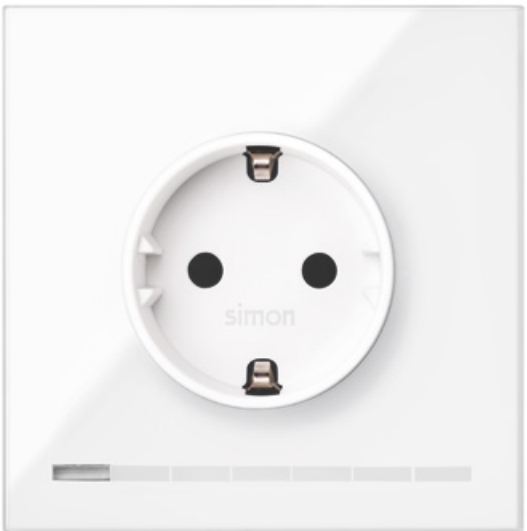
Product Recognition | |
|---|
Certification Number | ZC10-18026012 |
|---|
Name | S100 Socket iO |
|---|
Short Description | Simon Socket iO is a socket that allows increase the installation functions and features. |
|---|
Long Description | Socket iO is ready to operate with Z-Wave controllers and configured to be managed by Simon100 iO APP using the HUB plug iO for getting a better user experience. allowing the control of the socket and LEDs integrated.
Available colors Black and White.
visit http://www.simon.es/simon100/ to learn more about Simon 100 iO. |
|---|
Brand | Simon |
|---|
Product Identifier | 10002041-13X |
|---|
OEM Version | HW: 1 FW: 4.24:68.49 |
|---|
Hardware Platform | ZM5202 |
|---|
Z-Wave Version | 6.51.07 |
|---|
Library Type | SLAVE_ENHANCED |
|---|
Device Type | On/Off Power Switch |
|---|
Role Type | ROLE_TYPE_SLAVE_ALWAYS_ON |
|---|
Manufacturer ID | 0x0267 |
|---|
Product Type ID | 0x0009 |
|---|
Product ID | 0x0000 |
|---|
User Icon | 0x0702 |
|---|
Installer Icon | 0x0702 |
|---|
Frequency Plans | EU: 869.85MHz, 868.40MHz |
|---|
Categories | All Lighting Devices, On/Off Switches/Devices |
|---|
Countries / Regions | European Union |
|---|
Supported Command Classes | Identifier | Name | Key | Version |
|---|
COMMAND_CLASS_FIRMWARE_UPDATE_MD_V4 | Firmware Update Meta-Data V4 | 0x7A | 4 | COMMAND_CLASS_POWERLEVEL | Powerlevel | 0x73 | 1 | COMMAND_CLASS_SWITCH_BINARY | Switch Binary | 0x25 | 1 | COMMAND_CLASS_BASIC | Basic | 0x20 | 1 | COMMAND_CLASS_VERSION_V2 | Version V2 | 0x86 | 2 | COMMAND_CLASS_DEVICE_RESET_LOCALLY | Device Reset Locally | 0x5A | 1 | COMMAND_CLASS_ZWAVEPLUS_INFO_V2 | Z-Wave Plus Info V2 | 0x5E | 2 | COMMAND_CLASS_ASSOCIATION_V2 | Association V2 | 0x85 | 2 | COMMAND_CLASS_ASSOCIATION_GRP_INFO_V3 | Association Group Information V3 | 0x59 | 3 | COMMAND_CLASS_CONFIGURATION_V2 | Configuration V2 | 0x70 | 2 | COMMAND_CLASS_MANUFACTURER_SPECIFIC_V2 | Manufacturer Specific V2 | 0x72 | 2 | COMMAND_CLASS_METER_V4 | Meter V4 | 0x32 | 4 |
|
|---|
Documents | Category | Description | File |
|---|
Manual_Primary_Lang | Product or Owner's Manual | |
|
|---|
Features | Feature | Values |
|---|
Firmware Updatable | Value |
|---|
Updatable by Professional/Technician |
| Neutral Wire Required | | Supported Meter Type | | Switch Type | |
|
|---|
Association Groups | Group Number | Maximum Nodes Supported | End Point ID | Description |
|---|
1 | 3 | 0 | Z-Wave Plus Lifeline
Reports Meter Watts consumption when load consumption changes more than 10%.
Report Basic commands when load state changes. |
|
|---|
Configuration Parameters | Parameter Number | Name | Description | Format | Size | Min Value | Max Value | Default Value | Parameter Values |
|---|
11 | Activation Time | Sets the time when the load will be turned off after it is activated. This configuration must be set in Hexadecimal values. 0x00 disables the delay. 0x01 to 0x7F time is set in seconds from 1 to 127 0x80 to 0xEF time is set in minutes from 1 to 127 | 0 | 1 | 0 | 0 | 0 | From | To | Description |
|---|
0 | 0 | Time is disabled | 1 | 127 | Time is set in seconds from 1 to 127 | 128 | 254 | Time is set in minutes from 1 to 127 |
| 17 | PostReset State | Sets the device state after a reset. | 0 | 1 | 0 | 0 | 255 | From | To | Description |
|---|
1 | 255 | After a reset the load recovers the last value | 0 | 0 | After a reset the load starts Off |
| 1 | Association LED | Activates the Central LED. Configuration Used by Masters iO in order to identify the devices associated to their Group2 during manual association process. | 0 | 1 | 0 | 0 | 0 | From | To | Description |
|---|
0 | 0 | Turns Central LED OFF | 1 | 255 | Turns Central LED ON |
| 3 | Beacon | Sets the beacon intensity, turning ON all Device LEDs al percentage set in this configuration. | 0 | 1 | 0 | 0 | 0 | From | To | Description |
|---|
1 | 99 | Sets the intensity of the beacon LEDs | 0 | 0 | Disables the beacon |
| 1 | Limit power consumption | Limits the load power that can me connected to the socket in order to protect installation or global power consumption. | 0 | 2 | 0 | 0 | 0 | From | To | Description |
|---|
1 | 3680 | Limit power consumption to X Watts | 0 | 0 | Disables custom |
| 10 | Delay ON | Sets a delay from activation request until the activation is performed. This configuration must be set in Hexadecimal values. 0x00 disables the delay. 0x01 to 0x7F sets the delay in seconds from 1 to 127 0x80 to 0xEF sets the delay in minutes from 1 to 127 | 0 | 1 | 0 | 0 | 0 | From | To | Description |
|---|
0 | 0 | Delay is disabled | 1 | 127 | Sets the delay in seconds from 1 to 127 | 256 | 254 | Sets the delay in minutes from 1 to 127 |
|
|
|---|
Texts | ID | Description | Value |
|---|
5 | Factory Reset | When the pushbutton is released after a press of (30sec<T) the device will perform a factory default values operation, excluding it from network and reset the configuration parameters.
Main LED will perform 1 Blink with 5 sec.
Please use this procedure only when the network primary controller is missing or otherwise inoperable. | 1 | Inclusion | When the pushbutton is released after a press of (2sec<T<30sec) the device will send a NIF to include from Z-Wave network or perform an association with other Z-Wave device.
Central LED will Blink with 0,3 sec period to inform that NIF can be send after release of pushbutton.
This process does not perform a default reset of configurations.
Central LED will Blink with 0,3 sec period to inform that NIF can be send after release of pushbutton. | 2 | Exclusion | When the pushbutton is released after a press of (2sec<T<30sec) the device will send a NIF to exclude from Z-Wave network or perform an association with other Z-Wave device.
Main LED will Blink with 0,3 sec period to inform that NIF can be send after release of pushbutton.
This process does not perform a default reset of configurations.
Main LED will Blink with 0,3 sec period to inform that NIF can be send after release of pushbutton. |
|
|---|
Supported / Controlled Meter Types | Meter Type | Rate Type | Description |
|---|
Electric meter | Import | Electric Meter Consumption |
|
|---|
Supports NWI | Yes |
|---|
Supports Explorer Frames | Yes |
|---|