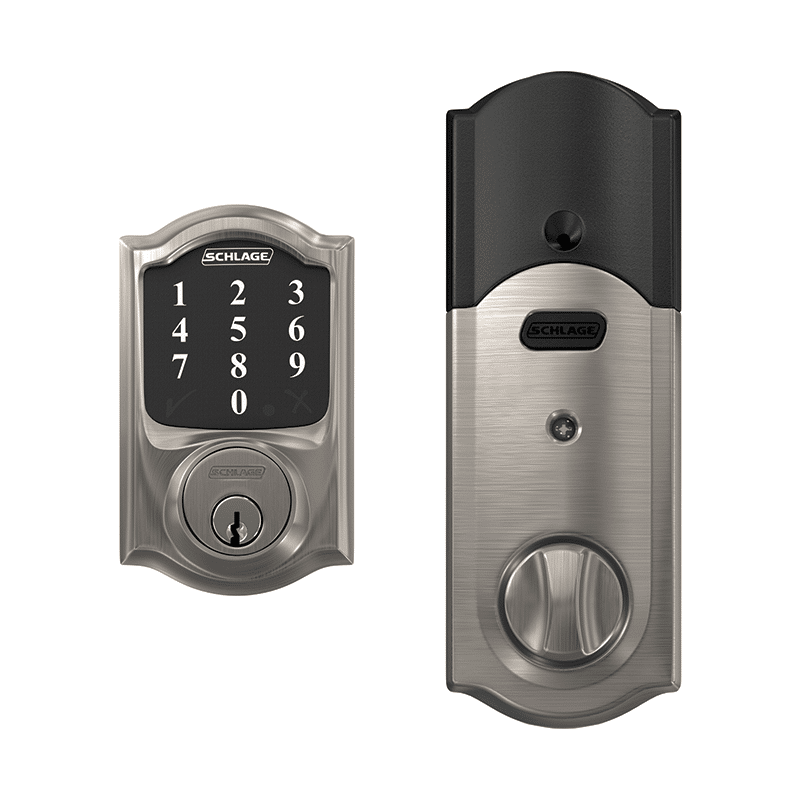
Product Recognition | |
|---|
Certification Number | ZC10-25050001 |
|---|
Name | Schlage Connect Smart Deadbolt |
|---|
Short Description | Schlage Connect Smart Deadbolt Lock is a battery powered electronic lock with Z-Wave Plus Communication capability supporting SmartStart. |
|---|
Description | The Schlage Connect™ Smart Deadbolt combines advanced features and compatibility with your home automation or security system, allowing you to control your lock from anywhere and freeing you from the hassles of lost keys, getting locked out, or hiding a spare for friends and family.
The lock comes preprogrammed with two access codes and can hold up to 30 unique codes for family members and trusted friends. The fingerprint-resistant touchscreen helps access codes stay private, minimizing tell-tale wear that can tip off possible intruders.
The Schlage Connect Smart Deadbolt is battery-powered with a low battery warning that gives you weeks of advanced notice before it runs out. With guaranteed fit on standard doors, it’s easy for homeowners to install in minutes with just a screwdriver. The touchscreen continues to work in the event of a power outage, so you don’t have to worry about getting locked out – plus, a back-up key is included with the lock for peace of mind.
The Schlage Connect Smart Deadbolt incorporates Z-Wave Plus S2 technology, an enhanced security protocol that features an additional layer of AES encryption of wireless signals. The Z-Wave technology allows you to integrate your exterior door locks with other Z-Wave smart home devices, such as cameras, motion detectors, lights and thermostats, bringing the safety, simplicity and style of Schlage to your smart home. |
|---|
Brand | Schlage |
|---|
Identifier | BE468ZP |
|---|
Product Line | Schlage Connect |
|---|
OEM Version | HW: 03 FW: 04.00:12.04 |
|---|
Hardware Platform | ZM5101A-CME3 |
|---|
Z-Wave Version | 6.85.02 |
|---|
Library Type | END_NODE_ROUTING |
|---|
Device Type | Door Lock - Keypad |
|---|
Role Type | ROLE_TYPE_SLAVE_SLEEPING_LISTENING |
|---|
Manufacturer ID | 0x003B |
|---|
Product Type ID | 0x0001 |
|---|
Product ID | 0x0468 |
|---|
User Icon | 0x0300 |
|---|
Installer Icon | 0x0300 |
|---|
Radio Range Z-Wave (m) | 40 |
|---|
Frequency Plans | US: 916.00MHz, 908.40MHz |
|---|
Categories | Locks |
|---|
Countries / Regions | Canada, Mexico, United States of America |
|---|
Supported Command Classes | Identifier | Name | Key | Version |
|---|
COMMAND_CLASS_ANTITHEFT_V2 | Anti-theft V2 | 0x5D | 2 | COMMAND_CLASS_BASIC | Basic | 0x20 | 1 | COMMAND_CLASS_CONFIGURATION | Configuration | 0x70 | 1 | COMMAND_CLASS_DOOR_LOCK_V2 | Door Lock V2 | 0x62 | 2 | COMMAND_CLASS_NOTIFICATION_V8 | Notification V8 | 0x71 | 8 | COMMAND_CLASS_SCHEDULE_ENTRY_LOCK_V3 | Schedule Entry Lock V3 | 0x4E | 3 | COMMAND_CLASS_TIME | Time | 0x8A | 1 | COMMAND_CLASS_USER_CODE | User Code | 0x63 | 1 | COMMAND_CLASS_ASSOCIATION_V2 | Association V2 | 0x85 | 2 | COMMAND_CLASS_ASSOCIATION_GRP_INFO | Association Group Information (AGI) | 0x59 | 1 | COMMAND_CLASS_BATTERY | Battery | 0x80 | 1 | COMMAND_CLASS_DEVICE_RESET_LOCALLY | Device Reset Locally | 0x5A | 1 | COMMAND_CLASS_FIRMWARE_UPDATE_MD_V3 | Firmware Update Meta Data V3 | 0x7A | 3 | COMMAND_CLASS_MANUFACTURER_SPECIFIC | Manufacturer Specific | 0x72 | 1 | COMMAND_CLASS_VERSION_V2 | Version V2 | 0x86 | 2 | COMMAND_CLASS_ZWAVEPLUS_INFO_V2 | Z-Wave Plus Info V2 | 0x5E | 2 | COMMAND_CLASS_SECURITY | Security 0 | 0x98 | 1 | COMMAND_CLASS_SECURITY_2 | Security 2 | 0x9F | 1 | COMMAND_CLASS_SUPERVISION | Supervision | 0x6C | 1 | COMMAND_CLASS_TRANSPORT_SERVICE_V2 | Transport Service V2 | 0x55 | 2 | COMMAND_CLASS_POWERLEVEL | Powerlevel | 0x73 | 1 |
|
|---|
Controlled Command Classes | Identifier | Name | Key | Version |
|---|
COMMAND_CLASS_TIME | Time | 0x8A | 1 | COMMAND_CLASS_SUPERVISION | Supervision | 0x6C | 1 |
|
|---|
S2 Classes | S2_ACCESS_CONTROL |
|---|
Documents | Category | File |
|---|
Manual_English | | Adv_Manual | |
|
|---|
Features | Feature | Values |
|---|
Battery Quantity | | Battery Type | | Door Lock Type | | Firmware Updatable | Value |
|---|
Updatable by Professional/Technician |
|
|
|---|
Texts | ID | Description | Value |
|---|
8 | Where to find S2 DSK on product | The DSK Code for your lock can be found on a label on the mounting plate or on the Quick Start Guide. | 1 | Classic Inclusion | Once your controller is in "Add" mode, press the button on the lock as shown below. If required, enter the 5 digit DSK Code to the controller app whenever it is requested. A yellow light will flash, then turn green when your lock has been successfully added. | 2 | Classic Exclusion | First put your controller into "Remove" mode, then remove your Schlage Connect lock as shown below.
Remove the battery cover, then press the button (as shown below) to start the process.
A yellow light will flash, then blink green 3 times when your lock has been successfully removed.
A red light indicates there was a problem removing your lock - try repeating the steps again. | 5 | Factory Reset Procedure | If you have forgotten your programming code, you can restore the default codes. If you want to move the lock to a different door, you need to restore default settings. Move the lock to the new door, and then set it up again.
Use this procedure only when the network primary controller is missing or otherwise inoperable.
Disconnect the batteries.
Press and hold down the Schlage logo. While you are pushing the logo, reconnect your batteries. |
|
|---|
Supports NWI | Yes |
|---|
Supports Explorer Frames | Yes |
|---|
Is Flirs | Yes |
|---|
Supports SmartStart | Yes |
|---|