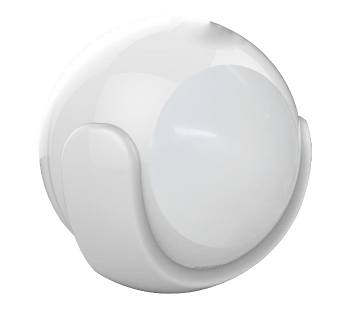
Product Recognition | |
|---|
Certification Number | ZC10-17085750 |
|---|
Name | Siterwell Motion Sensor |
|---|
Short Description | This product can be included and operated in any Z‐Wave network with other Z‐Wave certified devices from other manufacturers and/or other applications. All non‐battery operated nodes within the network will act as repeaters regardless of vendor to increase reliability of the network. |
|---|
Long Description | This product can be included and operated in any Z‐Wave network with other Z‐Wave certified devices from other manufacturers and/or other applications. All non‐battery operated nodes within the network will act as repeaters regardless of vendor to increase reliability of the network.
In the Back casing, there is a button that is used to carry out include, exclude, wake up device or reset factory default settings.
When power is first supplied, the LED will flash on and off alternately at one second intervals within 5 seconds if the detector has not been added a Z‐Wave network. Please get familiar with the terms below before starting the operations. |
|---|
Brand | Siterwell Technology |
|---|
Product Identifier | STW-W3300WU |
|---|
OEM Version | HW: 66 FW: 3.80 |
|---|
Hardware Platform | ZM5202 |
|---|
Z-Wave Version | 6.51.06 |
|---|
Library Type | SLAVE_ROUTING |
|---|
Device Type | Notification Sensor |
|---|
Role Type | ROLE_TYPE_SLAVE_SLEEPING_REPORTING |
|---|
Manufacturer ID | 0x0266 |
|---|
Product Type ID | 0x0003 |
|---|
Product ID | 0x0300 |
|---|
User Icon | 0x0C07 |
|---|
Installer Icon | 0x0C07 |
|---|
Frequency Plans | EU: 869.85MHz, 868.40MHz |
|---|
Categories | Sensors |
|---|
Countries / Regions | European Union |
|---|
Supported Command Classes | Identifier | Name | Key | Version |
|---|
COMMAND_CLASS_POWERLEVEL | Powerlevel | 0x73 | 1 | COMMAND_CLASS_BATTERY | Battery | 0x80 | 1 | COMMAND_CLASS_CONFIGURATION | Configuration | 0x70 | 1 | COMMAND_CLASS_SENSOR_BINARY_V2 | Sensor Binary V2 | 0x30 | 2 | COMMAND_CLASS_SENSOR_MULTILEVEL_V7 | Sensor Multilevel V7 | 0x31 | 7 | COMMAND_CLASS_VERSION_V2 | Version V2 | 0x86 | 2 | COMMAND_CLASS_WAKE_UP_V2 | Wake Up V2 | 0x84 | 2 | COMMAND_CLASS_DEVICE_RESET_LOCALLY | Device Reset Locally | 0x5A | 1 | COMMAND_CLASS_ZWAVEPLUS_INFO_V2 | Z-Wave Plus Info V2 | 0x5E | 2 | COMMAND_CLASS_ASSOCIATION_V2 | Association V2 | 0x85 | 2 | COMMAND_CLASS_ASSOCIATION_GRP_INFO | Association Group Info | 0x59 | 1 | COMMAND_CLASS_MANUFACTURER_SPECIFIC_V2 | Manufacturer Specific V2 | 0x72 | 2 | COMMAND_CLASS_NOTIFICATION_V4 | Notification V4 | 0x71 | 4 |
|
|---|
Controlled Command Classes | Identifier | Name | Key | Version |
|---|
COMMAND_CLASS_BASIC | Basic | 0x20 | 1 |
|
|---|
Documents | Category | Description | File |
|---|
Manual_Primary_Lang | Product or Owner's Manual | |
|
|---|
Features | Feature | Values |
|---|
Battery Quantity | | Firmware Updatable | Value |
|---|
Updatable by Manufacturer |
| Z-Wave Scene Type | | Battery Type | | Color | | Communications Connections | | Communications Protocol | | Sensors | | Supported Notification Types | |
|
|---|
Association Groups | Group Number | Maximum Nodes Supported | End Point ID | Description |
|---|
2 | 4 | 0 | GROUP 2 allows for sending control commands to associated devices such as relay module,
lighting, etc. This association group is configured through the advanced parameters no. 2, 3, 5
and 8. This Group Support:
BASIC_SET | 3 | 4 | 0 | GROUP 3 allows for Send Notification to associated devices in this group. This Group
Support: NOTIFICATION_REPORT_V4 | 4 | 4 | 0 | GROUP 4 allows for Send Sensor Binary Report to associated devices in this group. This Group
Support:
SENSOR_BINARY_REPORT_V2 | 1 | 4 | 0 | GROUP 1 is lifeline service that assigned to Sensor (Motion detector) status – Open/Close. It
enables the sensor to send reports and readings to Z‐Wave Controller or Z‐Wave Gateway
whenever the sensor is triggered. This Group Support:
NOTIFICATION_REPORT_V4
SENSOR_BINARY_REPORT_V2
SENSOR_MULTILEVEL_REPORT_V7
BATTERY_REPORT
DEVICE_RESET_LOCALLY_NOTIFICATION |
|
|---|
Configuration Parameters | Parameter Number | Name | Description | Format | Size | Min Value | Max Value | Default Value | Parameter Values |
|---|
3 | Basic Set Level | Basic Set Command will be sent where contains a value when PIR detector is triggered, the receiver will take it for consideration; for instance, if a lamp module is received the Basic Set Command of which value is decisive as to how bright of dim level of lamp module shall be. This Parameter is used to some associated devices. | 0 | 1 | 0 | 0 | 255 | From | To | Description |
|---|
0 | 0 | 0, 1 ~ 99 or 255 0 – OFF, Alarm cancelling or turning a device off 1 ~ 99 or 255 – ON (Binary Switch Device) Dim Level (Multilevel Switch Device) |
| 4 | Enabled/Disabled PIR Function | This parameter can be enabled or disabled the PIR detector detecting function. | 0 | 1 | 0 | 0 | 255 | From | To | Description |
|---|
255 | 255 | – Enable PIR Detector Function. unsigned | 0 | 0 | – Disable PIR Detector Function. unsigned |
| 5 | Lux Level Set | This parameter can be set a lux level value which determines when the light sensor is activated. If the ambient illumination level falls below this value and a person moves across or within the detected area , PIR detector will send a Z‐Wave ON command(i.e. BASIC_SET (value = parameter 3) to an associated device and activate it. | 0 | 2 | 0 | 0 | 100 | From | To | Description |
|---|
0 | 1000 | Lux .unsigned |
| 6 | Re‐trigger Interval Setting. | This Parameter can be used to adjust the interval of being re‐triggered after the PIR detector has been triggered. This Parameter value must be less than Parameter 2#. If user set this parameter to default by Configure CC, the parameter #2 will be set to default value. | 0 | 1 | 0 | 0 | 8 | From | To | Description |
|---|
1 | 8 | second .unsigned |
| 7 | Light Sensor Polling Interval | This Parameter can be set the light sensor measure ambient illumination level interval time. NOTE: This Value Must Be less than Wakeup Interval Time. | 0 | 2 | 0 | 0 | 180 | From | To | Description |
|---|
60 | 36000 | second .unsigned |
| 9 | Lux Level Report | This parameter defines by how much Lux Level must change, in lux, to be reported to the main controller. | 0 | 2 | 0 | 0 | 100 | From | To | Description |
|---|
0 | 255 | Lux. unsigned |
| 10 | Led Blink Enable | This parameter defines the Led on/off enable. If this parameter is set to ‘1’, the led blink will be enabled, the led will blink once when motion sensor detect a movement. Otherwise, the led will be turned off always. | 0 | 1 | 0 | 0 | 1 | From | To | Description |
|---|
0 | 1 | unsigned |
| 8 | Lux Level Enable | If this parameter is set to ‘1’, and when Lux level less than the value define by parameter #5, PIR detector will send a BASIC_SET command frame(i.e. BASIC_SET (value = parameter 3) to an associated device and activate it. If Lux Level greater than the value define by parameter #5, PIR detector will not send a BASIC_SET command frame. | 0 | 1 | 0 | 0 | 0 | From | To | Description |
|---|
0 | 1 | unsigned |
|
|
|---|
Texts | ID | Description | Value |
|---|
1 | Inclusion | 1.Remove the sensor cover.
2.Make sure the sensor is powered.
3.Set Z‐Wave controller or Z‐Wave gateway into inclusion mode (Refer to the controller or gateway operating manual)
4.Press the button three times within 1.5 second, the device will enter inclusion mode. And the LED will flash on and off alternately five times. | 2 | Exclusion | 1.Remove the device cover.
2.Make sure the sensor is powered.
3.Set Z‐Wave controller or Z‐Wave gateway into exclusion mode (Refer to the controller or gateway operating manual)
4.Press the button three times within 1.5 second, the device will enter exclusion mode. | 3 | Learn Mode (adding another controller) | 1. Remove the sensor cover.
2. Make sure the sensor is powered.
3. Set Z‐Wave controller or Z‐Wave gateway into inclusion mode (Refer to the controller or
gateway operating manual)
4. Press the button three times within 1.5 second, the device will enter inclusion mode. And the
LED will flash on and off alternately five times. | 5 | Factory Reset | Reset procedure will delete all information on the Z‐Wave network and Z‐Wave controller or Z‐Wave Gateway, and restore the sensor to factory default settings.
1.Remove the device cover.
2.Make sure the sensor is powered.
3.Press and hold the button for 10 seconds, Led will blink once.
4.Release the button.
Note: to use the reset procedure only when the primary controller is missing or inoperable. | 4 | Device Wake-Up | You can press the button once to wake up the device and send wakeup notification to controller. If press successfully, the LED will blink one time |
|
|---|
Supported Notification Types | Notification Type | Event / State |
|---|
Home Security | (Refer to parameters): State idle |
|
|---|
Supported Multilevel Sensors | Multilevel Sensor Type |
|---|
Illuminance |
|
|---|
Supports NWI | Yes |
|---|
Supports Explorer Frames | Yes |
|---|