Product Recognition | |
|---|
Certification Number | ZC12-20080113 |
|---|
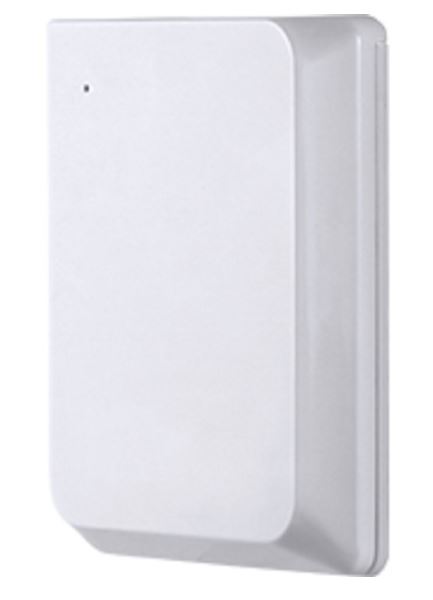
Name | Slim Smart Door/Window Sensor |
|---|
Short Description | By simply opening or closing your door or window, the sensor uses Z-Wave technology to wirelessly trigger scenes throughout your home. |
|---|
Long Description | By simply opening or closing your door or window, the sensor uses Z-Wave technology to wirelessly trigger scenes throughout your home. From your mobile device, you’re able to schedule lights to turn on as soon as you walk in and be notified of activity while you’re away. The sensor is discreetly designed to blend subtly into the frame of the door, adding the convenience of the Smart Door/Window Sensor to your home without distracting from your household decor. |
|---|
Brand | Jasco |
|---|
Product Identifier | 52249/ZW6308 |
|---|
Product Line | Wireless Lighting Controls |
|---|
OEM Version | HW: 1 FW: 7.07 |
|---|
Hardware Platform | ZGM130 |
|---|
Z-Wave Version | 7.13.5 |
|---|
Library Type | SLAVE_ENHANCED_232 |
|---|
Device Type | Notification Sensor |
|---|
Role Type | ROLE_TYPE_SLAVE_SLEEPING_REPORTING |
|---|
Manufacturer ID | 0x0063 |
|---|
Product Type ID | 0x4953 |
|---|
Product ID | 0x3336 |
|---|
User Icon | 0x0C06 |
|---|
Installer Icon | 0x0C06 |
|---|
Frequency Plans | US: 916.00MHz, 908.40MHz |
|---|
Categories | Sensors |
|---|
Countries / Regions | United States of America |
|---|
Supported Command Classes | Identifier | Name | Key | Version |
|---|
COMMAND_CLASS_CONFIGURATION_V4 | Configuration V4 | 0x70 | 4 | COMMAND_CLASS_POWERLEVEL | Powerlevel | 0x73 | 1 | COMMAND_CLASS_MULTI_CHANNEL_ASSOCIATION_V3 | Multi-Channel Association V3 | 0x8E | 3 | COMMAND_CLASS_INDICATOR_V3 | Indicator V3 | 0x87 | 3 | COMMAND_CLASS_BATTERY | Battery | 0x80 | 1 | COMMAND_CLASS_APPLICATION_STATUS | Application Status | 0x22 | 1 | COMMAND_CLASS_TRANSPORT_SERVICE_V2 | Transport Service V2 | 0x55 | 2 | COMMAND_CLASS_WAKE_UP_V2 | Wake Up V2 | 0x84 | 2 | COMMAND_CLASS_DEVICE_RESET_LOCALLY | Device Reset Locally | 0x5A | 1 | COMMAND_CLASS_ZWAVEPLUS_INFO_V2 | Z-Wave Plus Info V2 | 0x5E | 2 | COMMAND_CLASS_ASSOCIATION_V2 | Association V2 | 0x85 | 2 | COMMAND_CLASS_FIRMWARE_UPDATE_MD_V5 | Firmware Update Meta-Data V5 | 0x7A | 5 | COMMAND_CLASS_ASSOCIATION_GRP_INFO_V3 | Association Group Information V3 | 0x59 | 3 | COMMAND_CLASS_NOTIFICATION_V8 | Notification V8 | 0x71 | 8 | COMMAND_CLASS_SECURITY_2 | Security S2 | 0x9F | 1 | COMMAND_CLASS_VERSION_V3 | Version V3 | 0x86 | 3 | COMMAND_CLASS_SUPERVISION | Supervision | 0x6C | 1 | COMMAND_CLASS_MANUFACTURER_SPECIFIC_V2 | Manufacturer Specific V2 | 0x72 | 2 |
|
|---|
S2 Classes | S2_UNAUTHENTICATED, S2_AUTHENTICATED |
|---|
Documents | Category | Description | File |
|---|
Manual_Primary_Lang | Product Manual | |
|
|---|
Features | Feature | Values |
|---|
Battery Type | | Firmware Updatable | Value |
|---|
Updatable by Consumer by RF |
| Battery Quantity | |
|
|---|
Association Groups | Group Number | Maximum Nodes Supported | End Point ID | Group Name | Description |
|---|
1 | 5 | 0 | Lifeline | Z-Wave Plus Lifeline, supports device reset locally and receives unsolicited status updates. |
|
|---|
Configuration Parameters | Parameter Number | Name | Description | Format | Flag Advanced | Size | Min Value | Max Value | Default Value | Parameter Values |
|---|
1 | invert door status | invert open close door | 1 | Yes | 1 | 0 | 1 | 0 | From | To | Description |
|---|
0 | 0 | Disabled | 1 | 1 | Reverse event (Open 16, Close 17) |
| 23 | Battery RPT interval | Set the interval timer of battery report | 1 | | 2 | 5 | 1440 | 1440 | From | To | Description |
|---|
5 | 60 | 5-60 Minutes | 360 | 360 | 6 hours | 720 | 720 | 12 hours | 1440 | 1440 | Daily |
| 53 | tamper home security | Tamper remove led continuous blink you can set | 1 | | 1 | 1 | 2 | 1 | From | To | Description |
|---|
1 | 1 | Continuous Flash | 2 | 2 | Flashes once, on initial tamper only |
|
|
|---|
Texts | ID | Description | Value |
|---|
8 | Where to find S2 DSK on product | If prompted by the controller to enter the S2 security code, refer to the QR code/security number on the back of the box, or the QR code label on the product. | 1 | Classic Inclusion | 1. Follow the instructions for your Z-Wave certified controller to add the sensor in the Z-Wave network.
2. Once the controller is ready to add your sensor, ensure battery is installed with the correct polarity in the sensor and the battery tab has been removed.
3. Press and release the programming button (see Figure 2). This starts the manual add process. The red LED (see Figure 2) will begin to flash quickly as it begins the add process.
4. The red LED will activate for 3 seconds to confirm the sensor has been added in the network.
5. The controller’s app will indicate if it has discovered the sensor. If prompted by the controller to enter the S2 security code, refer to the QR code/security number on the back of the box, or the QR code label on the product (see Figure 3). Enter the 5-digit code. | 2 | Classic Exclusion | 1. Follow the instructions for your Z-Wave certified controller to remove the sensor from the Z-Wave network.
2. Once the controller is ready to remove your sensor, press and release the programming button on the sensor
1 time to remove it from the network (see Figure 4).
3. The red LED will blink 5 times to indicate it has been removed. | 4 | Wake-Up Procedure | Press the programming button once to wake device. It will go back to sleep within 3 seconds | 5 | Factory Reset Procedure | 1. Press the programming button 10 times within 6 seconds (interval between presses of the button cannot be
longer than 1 second).
2. The red LED will activate for 2 seconds, followed by 3 quick flashes. |
|
|---|
Supported Notification Types | Notification Type | Event / State |
|---|
Access Control | Door state: Window/door is open | Access Control | Door state: Window/door is closed | Home Security | Cover status: Tampering, product cover removed |
|
|---|
Supports NWI | Yes |
|---|
Supports Explorer Frames | Yes |
|---|
Supports SmartStart | Yes |
|---|
Radio Range Z-Wave (m) | 40 |
|---|