| Product Recognition | |
|---|
| Certification Number | ZC10-18066152 |
|---|
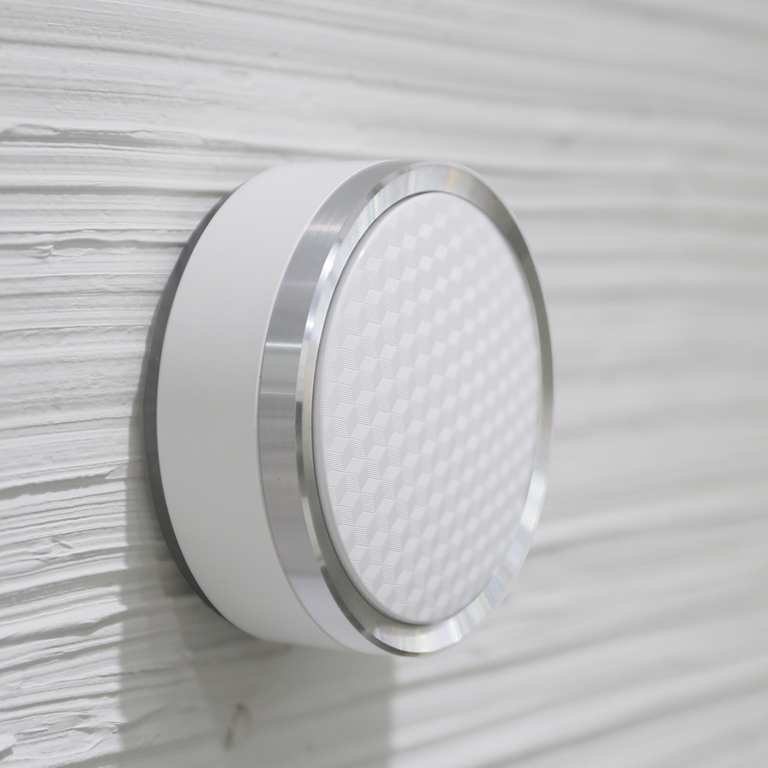
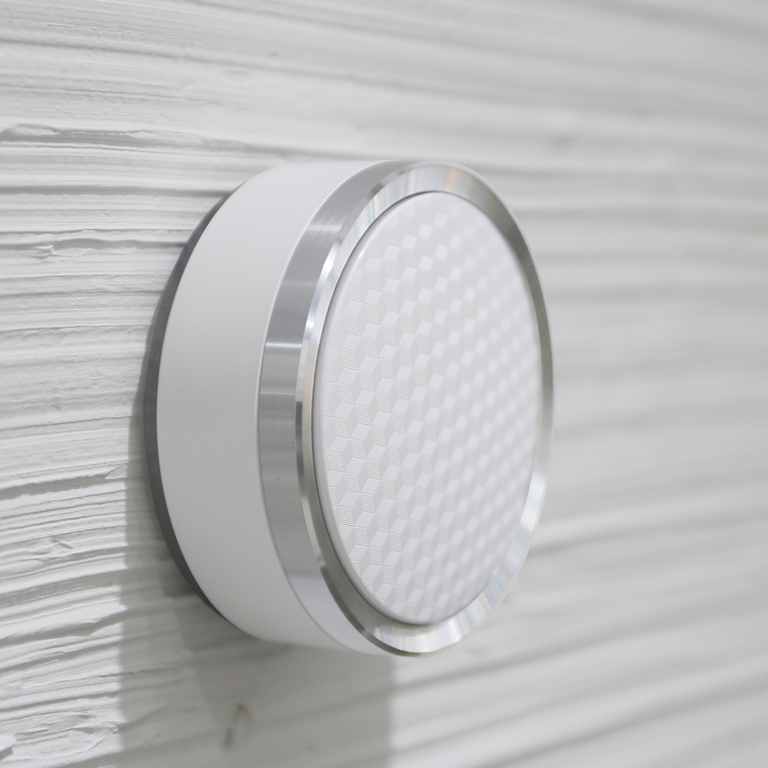
| Name | smanos Smart Hub K2 |
|---|
| Short Description | The smanos K2 gateway is a security-enabled Z-Wave Plus controller that connects to and controls all other Z-Wave certified devices on the same network from other vendors. |
|---|
| Long Description | The smanos K2 gateway wirelessly connects to and controls all your Z-Wave sensors around the house so that they can send vital information or status reports to one another and to your K2 and ultimately your and your family’s smartphones. The smanos K2 is AC-powered, WiFi-based and has Z-Wave and RF modules built in, providing end users with endless possibilities to connect to a wide range of security sensors and smart home devices from smanos and beyond. In addition, the K2 has a backup, rechargeable battery, empowering you and your family with affordable, 24/7 protection and automation capabilities. |
|---|
| Brand | smanos |
|---|
| Product Identifier | K2 |
|---|
| OEM Version | HW: 33 FW: 5.34:02.81 |
|---|
| Hardware Platform | ZM5101 |
|---|
| Z-Wave Version | 6.71.01 |
|---|
| Library Type | CONTROLLER_BRIDGE |
|---|
| Device Type | Central Controller |
|---|
| Role Type | ROLE_TYPE_CONTROLLER_CENTRAL_STATIC |
|---|
| Manufacturer ID | 0x0280 |
|---|
| Product Type ID | 0x0001 |
|---|
| Product ID | 0x0001 |
|---|
| User Icon | 0x0100 |
|---|
| Installer Icon | 0x0100 |
|---|
| Frequency Plans | ANZ: 919.80MHz, 921.40MHz |
|---|
| Categories | All Controllers, Gateway Controller, Security Systems |
|---|
| Countries / Regions | Australia |
|---|
| Supported Command Classes | | Identifier | Name | Key | Version |
|---|
| COMMAND_CLASS_POWERLEVEL | Powerlevel | 0x73 | 1 | | COMMAND_CLASS_INCLUSION_CONTROLLER | Inclusion Controller | 0x74 | 1 | | COMMAND_CLASS_NETWORK_MANAGEMENT_INCLUSION_VERSION_2 | Network Management Inclusion V2 | 0x34 | 0 | | COMMAND_CLASS_APPLICATION_STATUS | Application Status | 0x22 | 1 | | COMMAND_CLASS_CRC_16_ENCAP | CRC16 Encapsulation | 0x56 | 1 | | COMMAND_CLASS_SECURITY | Security S0 | 0x98 | 1 | | COMMAND_CLASS_TRANSPORT_SERVICE_V2 | Transport Service V2 | 0x55 | 2 | | COMMAND_CLASS_VERSION_V2 | Version V2 | 0x86 | 2 | | COMMAND_CLASS_DEVICE_RESET_LOCALLY | Device Reset Locally | 0x5A | 1 | | COMMAND_CLASS_ZWAVEPLUS_INFO_V2 | Z-Wave Plus Info V2 | 0x5E | 2 | | COMMAND_CLASS_ASSOCIATION_V2 | Association V2 | 0x85 | 2 | | COMMAND_CLASS_ASSOCIATION_GRP_INFO_V3 | Association Group Information V3 | 0x59 | 3 | | COMMAND_CLASS_NETWORK_MANAGEMENT_PROXY_V2 | Network Management Proxy V2 | 0x52 | 2 | | COMMAND_CLASS_SECURITY_2 | Security S2 | 0x9F | 1 | | COMMAND_CLASS_NETWORK_MANAGEMENT_BASIC_V2 | Network Management Basic V2 | 0x4D | 2 | | COMMAND_CLASS_SUPERVISION | Supervision | 0x6C | 1 | | COMMAND_CLASS_MANUFACTURER_SPECIFIC_V2 | Manufacturer Specific V2 | 0x72 | 2 |
|
|---|
| Controlled Command Classes | | Identifier | Name | Key | Version |
|---|
| COMMAND_CLASS_NO_OPERATION | No Operation | 0x00 | 1 | | COMMAND_CLASS_THERMOSTAT_FAN_MODE_V4 | Thermostat Fan Mode V4 | 0x44 | 4 | | COMMAND_CLASS_INCLUSION_CONTROLLER | Inclusion Controller | 0x74 | 1 | | COMMAND_CLASS_DOOR_LOCK_V2 | Door Lock V2 | 0x62 | 2 | | COMMAND_CLASS_MULTI_CHANNEL_ASSOCIATION_V3 | Multi-Channel Association V3 | 0x8E | 3 | | COMMAND_CLASS_BATTERY | Battery | 0x80 | 1 | | COMMAND_CLASS_APPLICATION_STATUS | Application Status | 0x22 | 1 | | COMMAND_CLASS_THERMOSTAT_OPERATING_STATE | Thermostat Operating State | 0x42 | 1 | | COMMAND_CLASS_SWITCH_BINARY | Switch Binary | 0x25 | 1 | | COMMAND_CLASS_BASIC | Basic | 0x20 | 1 | | COMMAND_CLASS_CONFIGURATION | Configuration | 0x70 | 1 | | COMMAND_CLASS_CRC_16_ENCAP | CRC16 Encapsulation | 0x56 | 1 | | COMMAND_CLASS_SECURITY | Security S0 | 0x98 | 1 | | COMMAND_CLASS_THERMOSTAT_FAN_STATE_V2 | Thermostat Fan State V2 | 0x45 | 2 | | COMMAND_CLASS_THERMOSTAT_MODE_V2 | Thermostat Mode V2 | 0x40 | 2 | | COMMAND_CLASS_THERMOSTAT_SETPOINT_V3 | Thermostat Setpoint V3 | 0x43 | 3 | | COMMAND_CLASS_TRANSPORT_SERVICE_V2 | Transport Service V2 | 0x55 | 2 | | COMMAND_CLASS_VERSION_V2 | Version V2 | 0x86 | 2 | | COMMAND_CLASS_WAKE_UP_V2 | Wake Up V2 | 0x84 | 2 | | COMMAND_CLASS_DEVICE_RESET_LOCALLY | Device Reset Locally | 0x5A | 1 | | COMMAND_CLASS_ZWAVEPLUS_INFO_V2 | Z-Wave Plus Info V2 | 0x5E | 2 | | COMMAND_CLASS_SWITCH_MULTILEVEL_V3 | Switch Multilevel V3 | 0x26 | 3 | | COMMAND_CLASS_ASSOCIATION_V2 | Association V2 | 0x85 | 2 | | COMMAND_CLASS_METER_V3 | Meter V3 | 0x32 | 3 | | COMMAND_CLASS_SENSOR_MULTILEVEL_V9 | Sensor Multilevel V9 | 0x31 | 9 | | COMMAND_CLASS_MULTI_CHANNEL_V4 | Multi-Channel V4 | 0x60 | 4 | | COMMAND_CLASS_ASSOCIATION_GRP_INFO_V3 | Association Group Information V3 | 0x59 | 3 | | COMMAND_CLASS_NOTIFICATION_V8 | Notification V8 | 0x71 | 8 | | COMMAND_CLASS_SECURITY_2 | Security S2 | 0x9F | 1 | | COMMAND_CLASS_MANUFACTURER_SPECIFIC_V2 | Manufacturer Specific V2 | 0x72 | 2 |
|
|---|
| S2 Classes | S2_UNAUTHENTICATED, S2_AUTHENTICATED, S2_ACCESS_CONTROL |
|---|
| Documents | |
|---|
| Features | | Feature | Values |
|---|
| Color | | | Communications Protocol | | | Firmware Updatable | | Value |
|---|
| Updatable by Consumer via Internet |
| | Battery Type | | | Sensors | | Value |
|---|
| Air Temperature | | Luminance | | Humidity |
| | Supported Notification Types | | Value |
|---|
| Smoke Alarm | | CO Alarm | | CO2 Alarm | | Water Alarm | | Access Control | | Home Security | | Gas Alarm |
| | Battery Quantity | | | Thermostat HVAC Systems Supported | | | Communications Connections | | Value |
|---|
| Ethernet (Wireless/WiFi) |
| | Switch Type | | Value |
|---|
| Decorator Paddle Push |
| | Thermostat Modes | | Value |
|---|
| Heat | | Cool | | Auto | | Auxiliary/Emergency Heat | | Fan Only | | Furnace | | Auto Changeover | | Energy Save Heat | | Energy Save Cool |
| | Supported Meter Type | |
|
|---|
| Association Groups | | Group Number | Maximum Nodes Supported | End Point ID | Description |
|---|
| 1 | 1 | 0 | Z-Wave Plus Lifeline |
|
|---|
| Texts | | ID | Description | Value |
|---|
| 5 | Factory Reset | Note: If this controller is the primary controller for your network, resetting it will result in the nodes in your network being orphaned and it will be necessary after the reset to exclude and re-include all of the nodes in the network. If this controller is being used as a secondary controller in the network, use this procedure to reset this controller only in the event that the network primary controller is missing or otherwise inoperable.
In “Other Z-Wave Settings” section on the “smanos home” app, click on “Reset Z-Wave Module” and a pop-up box will be displayed. Click on “Reset” and the Z-Wave module inside the K2 will be restored to factory settings. | | 23 | Controller Inclusion | After the controller is successfully connected to your home Wi-Fi network, on the “smanos home” app, enter into the Accessories list from the Main Page and find “Z-Wave Products”. Click/tap on “Z-Wave Products” and hit “START INCLUSION” to add the Z-Wave device of your choice. | | 24 | Controller Exclusion | On the “smanos home” app, enter into the Accessories list from the Main Page, click on the room type [Location] where the device was installed. Tap on the device you want to exclude and slide from right to the left, then click on the [Trash Can] icon. Click on “YES” in the pop-up box, and the controller enters into Exclusion mode. Set the Z-Wave device into Learn mode according to its user manual. | | 3 | Learn Mode (adding another controller) | Click on “Connect the K2 to Other Controller” in “Other Z-Wave Settings” section on the “smanos home” app, and the K2 enters into Learn mode. The K2 will terminate Learn mode if the connection is not established right away.
Note: The K2 must exclude other Z-Wave devices first, before it can be connected to another Z-Wave controller. |
|
|---|
| Supported / Controlled Meter Types | | Meter Type | Rate Type | Description |
|---|
| Electric meter | Import | Electric Meter Consumption |
|
|---|
| Supports NWI | Yes |
|---|
| Supports Explorer Frames | Yes |
|---|