Product Recognition | |
|---|
Certification Number | ZC10-18106255 |
|---|
Name | Smart Boost Timer Switch |
|---|
Short Description | The Aeotec Smart Boost Timer Switch is a Z-Wave Plus enabled device and can be included/operated in any Z-Wave™ network with other Z-Wave™ certified devices from other manufacturers and/or other applications. All non-battery operated nodes within the network will act as repeaters regardless of vendor to increase reliability of the network. |
|---|
Long Description | The Aeotec Smart Boost Timer Switch is a Z-Wave Plus enabled device and can be included/operated in any Z-Wave™ network with other Z-Wave™ certified devices from other manufacturers and/or other applications. All non-battery operated nodes within the network will act as repeaters regardless of vendor to increase reliability of the network.
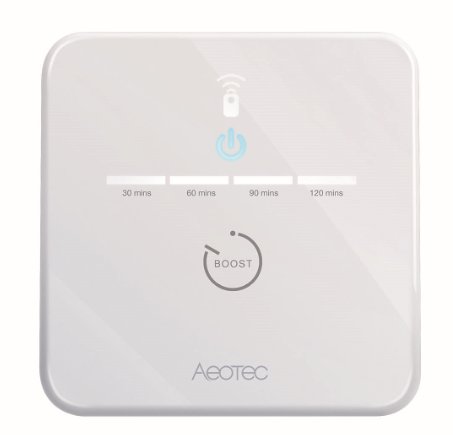
The Aeotec Smart Boost Time Switch supports consumption meter function. When the device has been included in the network, it will report the consumption power periodically. It is also a high output countdown timer that can be used to control immersion heater elements or other electrical appliances rated up to 16A. On the product, four simple white LEDs are used to show the user how much time is left to run. Pressing the switch whilst the unit is operating allows the user to cancel the timing program,and the memory function of the timer will remember the last period selected. |
|---|
Brand | Aeotec |
|---|
Product Identifier | ZWA006-C |
|---|
OEM Version | HW: 2 FW: 1.00:01.00 |
|---|
Hardware Platform | ZM5101 |
|---|
Z-Wave Version | 6.81.01 |
|---|
Library Type | SLAVE_ENHANCED_232 |
|---|
Device Type | On/Off Power Switch |
|---|
Role Type | ROLE_TYPE_SLAVE_ALWAYS_ON |
|---|
Manufacturer ID | 0x0371 |
|---|
Product Type ID | 0x0003 |
|---|
Product ID | 0x00B4 |
|---|
User Icon | 0x0701 |
|---|
Installer Icon | 0x0701 |
|---|
Frequency Plans | EU: 869.85MHz, 868.40MHz |
|---|
Categories | Energy Meters, All Lighting Devices, On/Off Switches/Devices |
|---|
Countries / Regions | European Union |
|---|
Supported Command Classes | Identifier | Name | Key | Version |
|---|
COMMAND_CLASS_FIRMWARE_UPDATE_MD_V4 | Firmware Update Meta-Data V4 | 0x7A | 4 | COMMAND_CLASS_POWERLEVEL | Powerlevel | 0x73 | 1 | COMMAND_CLASS_MULTI_CHANNEL_ASSOCIATION_V3 | Multi-Channel Association V3 | 0x8E | 3 | COMMAND_CLASS_CLOCK | Clock | 0x81 | 1 | COMMAND_CLASS_SCHEDULE | Schedule | 0x53 | 1 | COMMAND_CLASS_SWITCH_BINARY | Switch Binary | 0x25 | 1 | COMMAND_CLASS_CONFIGURATION | Configuration | 0x70 | 1 | COMMAND_CLASS_SECURITY | Security S0 | 0x98 | 1 | COMMAND_CLASS_TRANSPORT_SERVICE_V2 | Transport Service V2 | 0x55 | 2 | COMMAND_CLASS_DEVICE_RESET_LOCALLY | Device Reset Locally | 0x5A | 1 | COMMAND_CLASS_ZWAVEPLUS_INFO_V2 | Z-Wave Plus Info V2 | 0x5E | 2 | COMMAND_CLASS_ASSOCIATION_V2 | Association V2 | 0x85 | 2 | COMMAND_CLASS_ASSOCIATION_GRP_INFO | Association Group Info | 0x59 | 1 | COMMAND_CLASS_BASIC_V2 | Basic V2 | 0x20 | 2 | COMMAND_CLASS_SECURITY_2 | Security S2 | 0x9F | 1 | COMMAND_CLASS_METER_V5 | Meter V5 | 0x32 | 5 | COMMAND_CLASS_SENSOR_MULTILEVEL_V11 | Sensor Multilevel V11 | 0x31 | 11 | COMMAND_CLASS_VERSION_V3 | Version V3 | 0x86 | 3 | COMMAND_CLASS_SUPERVISION | Supervision | 0x6C | 1 | COMMAND_CLASS_MANUFACTURER_SPECIFIC_V2 | Manufacturer Specific V2 | 0x72 | 2 |
|
|---|
Controlled Command Classes | Identifier | Name | Key | Version |
|---|
COMMAND_CLASS_BASIC_V2 | Basic V2 | 0x20 | 2 |
|
|---|
S2 Classes | S2_UNAUTHENTICATED, S2_AUTHENTICATED |
|---|
Documents | Category | Description | File |
|---|
Manual_Primary_Lang | Product or Owner's Manual | |
|
|---|
Features | Feature | Values |
|---|
Switch Type | | Switch Load Capacity Current | | Supported Meter Type | | Firmware Updatable | Value |
|---|
Updatable by Consumer by RF |
| Switch Load Capacity Volt-Ampere | | Battery Quantity | | Battery Type | | Color | | Sensors | | Switch Load Capacity Watts | | Electric Load Type | | Neutral Wire Required | |
|
|---|
Association Groups | Group Number | Maximum Nodes Supported | End Point ID | Description |
|---|
2 | 5 | 0 | COMMAND_CLASS_BASIC/BASIC_SET | 1 | 5 | 0 | COMMAND_CLASS_SWITCH_BINARY/SWITCH_BINARY_REPORT
COMMAND_CLASS_METER_V5/METER_REPORT_V5
COMMAND_CLASS_CLOCK/CLOCK_REPORT
COMMAND_CLASS_SENSOR_MULTILEVEL_V11/SENSOR_MULTILEVEL_REPORT_V11
COMMAND_CLASS_SCHEDULE/SCHEDULE_STATE_REPORT
COMMAND_CLASS_DEVICE_RESET_LOCALLY/DEVICE_RESET_LOCALLY_NOTIFICATION
|
|
|---|
Configuration Parameters | Parameter Number | Name | Description | Format | Size | Min Value | Max Value | Default Value | Parameter Values |
|---|
1 | Power out action | Action in case of power out. This parameter is used to configure the device state after power on. | 0 | 1 | 0 | 0 | 3 | From | To | Description |
|---|
3 | 3 | return to standard schedule (see schedule command class) so this would either be on or off depending on schedule and the time. | 2 | 2 | power off | 1 | 1 | power on | 0 | 0 | keep the last state when re-power on |
| 3 | Auto off timer | Timer acts as auto off after specified minutes, setting is set in seconds. | 0 | 4 | 0 | 0 | 0 | From | To | Description |
|---|
0 | 86400 | 0 - no auto off with timer 1 ~ 86400 auto off after this specified time, unit second. |
| 4 | Current overload protection | Current and overload protection | 0 | 1 | 0 | 0 | 1 | From | To | Description |
|---|
0 | 1 | 0 - disable current and overload protection 1 - enable current and overload protection |
| 2 | LED status | Configure LED (except boost) to be off irrespective of switch status. | 0 | 1 | 0 | 0 | 1 | From | To | Description |
|---|
0 | 2 | 0 - disable all LED except for boost 1 - enable all LED indication 2 - Momentary mode (LED turns on for 5 seconds, then turn off LED) |
| 7 | LED threshold setting | This parameter is used to configure the power led threshold, unit W. When the load 100W, the power led will indicate orange. When no load, the power led will indicate white. | 0 | 2 | 0 | 0 | 100 | From | To | Description |
|---|
0 | 3000 | 0~3000 enabled threshold |
|
|
|---|
Texts | ID | Description | Value |
|---|
1 | Inclusion | 1. Power on the device, and the power led will blink blue slowly.
2. Put the Z-Wave Primary Controller into inclusion mode (If you don’t know how to do this, refer to its manual)
3. Press and hold the action button, and when the yellow LED is on, release the button. It indicates the device has enter learn mode.
4. If added successfully, the power LED will remain green for 2 seconds, then turn off. | 2 | Exclusion | 1. Power on the device.
2. Put the Primary Controller into exclusion mode (If you don’t know how to do this refer to its manual)
3. Press and hold the action button, and when the purple LED turns on, release the button. This indicates that the device has entered learn mode. If removal is successful, the blue LED will blink slowly. | 5 | Factory Reset | Please use this procedure only when the primary controller is missing or inoperable.
1. Make sure the device has been powered.
2. Press and hold the action button for 15 seconds. When the red LED turns on, release the button. Then, the device will enter factory reset mode. If the reset is successful, the LED will blink blue slowly. | 6 | Additional Special Features | Boost Mode
1. Power on the device.
a) Press and hold the button about 1 second, when the power LED turns white, release the button. Then the 1st boost time LED will turn on. This indicates that the device entered boost mode. The switch will turn on immediately and will turn off after 30 minutes (This time can be changed through Configuration Parameter 5).
b) Press and hold the button about 1 second after doing a), when the power LED turns white, release the button. The 1st and 2nd boost time LEDs will turn on, which means the switch will turn off after 60 minutes.
c) Press and hold the button about 1 second after doing b), when the power LED turns white release the button. The 1st, 2nd and 3rd boost time LEDs will turn on, which means the switch will turn off after 90 minutes.
d) Press and hold the button about 1 second after doing c), when the power LED turns white release the button. The 1st, 2nd, 3rd, and 4th boost time LEDs will turn on, which means the switch will turn off after 120 minutes.
e) Press and hold the button about 1 second after doing d), when the power LED turn off release the button. Then all of the boost time leds will turn off, which indicates that boost mode has been exited.
2. Press and hold the button about 5 seconds.
a) When the power LED turns green, release the button, and the device will enter an override schedule state. At this state, the schedule task doesn’t work. The switch can only be turned on or off from the gateway.
b) When the power LED turns red, release the button, and the device will exit the override schedule state. |
|
|---|
Supported / Controlled Meter Types | Meter Type | Rate Type | Description |
|---|
Electric meter | Import | Electric Meter Consumption |
|
|---|
Supported Multilevel Sensors | Multilevel Sensor Type |
|---|
Power |
|
|---|
Supports NWI | Yes |
|---|
Supports Explorer Frames | Yes |
|---|
Supports SmartStart | Yes |
|---|
Radio Range Z-Wave (m) | 40 |
|---|