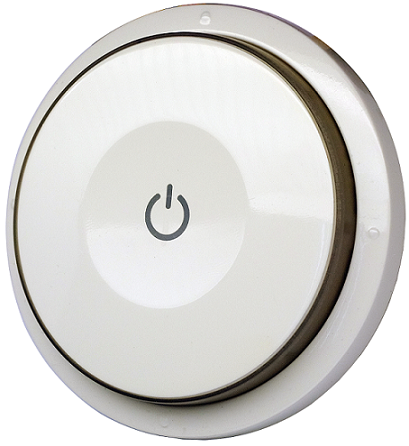
Product Recognition | |
|---|
Certification Number | ZC10-17105808 |
|---|
Name | Smart Color Button |
|---|
Short Description | This device is a multiple functions button switch. It is able to
switch the appliances on/off or adjust the percentage of dimmer.
It can also work as a timer. |
|---|
Long Description | This device is a multiple functions button switch. It is able to
switch the appliances on/off or adjust the percentage of dimmer.
It can also work as a timer. The well designed wall bracket and
magnetic back let the switch can be fixed on the wall. This product
can be included and operated in any Z-Wave™ network with other Z-Wave™ certified devices from other manufacturers and/or other applications. |
|---|
Brand | Philio |
|---|
Product Identifier | PSR04 |
|---|
OEM Version | HW: 1 FW: 1.09:01.06 |
|---|
Hardware Platform | SD3502 |
|---|
Z-Wave Version | 6.51.09 |
|---|
Library Type | SLAVE_ENHANCED_232 |
|---|
Device Type | Wall Controller |
|---|
Role Type | ROLE_TYPE_SLAVE_PORTABLE |
|---|
Manufacturer ID | 0x013C |
|---|
Product Type ID | 0x0009 |
|---|
Product ID | 0x0022 |
|---|
User Icon | 0x1600 |
|---|
Installer Icon | 0x1600 |
|---|
Frequency Plans | ANZ: 919.80MHz, 921.40MHz |
|---|
Categories | All Lighting Devices, Dimming Lighting Devices |
|---|
Countries / Regions | Brazil |
|---|
Supported Command Classes | Identifier | Name | Key | Version |
|---|
COMMAND_CLASS_POWERLEVEL | Powerlevel | 0x73 | 1 | COMMAND_CLASS_BATTERY | Battery | 0x80 | 1 | COMMAND_CLASS_CONFIGURATION | Configuration | 0x70 | 1 | COMMAND_CLASS_SECURITY | Security S0 | 0x98 | 1 | COMMAND_CLASS_CENTRAL_SCENE | Central Scene | 0x5B | 1 | COMMAND_CLASS_VERSION_V2 | Version V2 | 0x86 | 2 | COMMAND_CLASS_WAKE_UP_V2 | Wake Up V2 | 0x84 | 2 | COMMAND_CLASS_DEVICE_RESET_LOCALLY | Device Reset Locally | 0x5A | 1 | COMMAND_CLASS_ZWAVEPLUS_INFO_V2 | Z-Wave Plus Info V2 | 0x5E | 2 | COMMAND_CLASS_ASSOCIATION_V2 | Association V2 | 0x85 | 2 | COMMAND_CLASS_ASSOCIATION_GRP_INFO | Association Group Info | 0x59 | 1 | COMMAND_CLASS_FIRMWARE_UPDATE_MD_V2 | Firmware Update Meta-Data V2 | 0x7A | 2 | COMMAND_CLASS_MANUFACTURER_SPECIFIC_V2 | Manufacturer Specific V2 | 0x72 | 2 | COMMAND_CLASS_MULTI_CMD | Multi-Command | 0x8F | 1 |
|
|---|
Controlled Command Classes | Identifier | Name | Key | Version |
|---|
COMMAND_CLASS_BASIC | Basic | 0x20 | 1 | COMMAND_CLASS_CENTRAL_SCENE | Central Scene | 0x5B | 1 |
|
|---|
Documents | Category | Description | File |
|---|
Manual_Primary_Lang | Product or Owner's Manual | |
|
|---|
Association Groups | Group Number | Maximum Nodes Supported | End Point ID | Description |
|---|
1 | 8 | 0 | Z-Wave Plus Lifeline. The group 1 is for receiving the report message, like triggered event, temperature, humidity etc. | 2 | 8 | 0 | Lighting control group |
|
|---|
Configuration Parameters | Parameter Number | Name | Description | Format | Size | Min Value | Max Value | Default Value | Parameter Values |
|---|
25 | Customer Function | Bit 0: Dimmer setting method. 0 : Auto send Command Basic Set after rotating. 1 : Send Command Basic Set by touching key after rotating Bit 1: Disable buzzer in timer mode. 0: Enable. 1: Disable | 0 | 1 | 0 | 0 | 0 | From | To | Description |
|---|
2 | 2 | Disable buzzer in timer mode. 0: Enable. 1: Disable. | 1 | 1 | Dimmer setting method. 0 : Auto send Command Basic Set after rotating. 1 : Send Command Basic Set by touching key after rotating |
| 1 | Basic Set OFF level | Control the value represented by the left-side in area D. E.g. Setting this configuration to 0x0F means range of Command Basic Set value start from 0x0F | 0 | 1 | 0 | 0 | 0 | From | To | Description |
|---|
0 | 99 | Control the value represented by the left-side in area D. |
| 2 | Basic Set ON level | Control the value represented by the right-side in area D. E.g. Setting this configuration to 0x1E means range of Command Basic Set value start from 0x1E | 0 | 1 | 0 | 0 | 99 | From | To | Description |
|---|
0 | 99 | Control the value represented by the right-side in area D. |
|
|
|---|
Texts | ID | Description | Value |
|---|
1 | Inclusion | 1. Have Z-Wave™ Controller entered inclusion mode.
2. Rotate to area A and then press button three times within 1.5 seconds to enter the inclusion mode.
3. After add successful, the device will wake to receive the setting command from Z-Wave™ Controller about 20 seconds. | 2 | Exclusion | 1. Have Z-Wave™ Controller entered exclusion mode.
2. Rotate to area A and then press button three times within 1.5 seconds to enter the exclusion mode. Node ID has been removed. | 5 | Factory Reset | Notice: Use this procedure only in the event that the primary controller is lost or otherwise inoperable.
1. Rotate to area A and then press button four times within 1.5 seconds and do not release the button in the 4 th pressed, and the red LED will light ON.
2. After the red LED goes out, release the button within 2 seconds.
3. IDs are removed and all settings will reset to factory default. | 4 | Device Wake-Up | After the device adding to the network, it will wake-up once per day in default. When it wake-up it will broadcast the “Wake Up Notification” message to the network, and wake-up 20 seconds for receive the setting commands. The wake-up interval minimum setting is 30 minutes, and maximum setting is 120 hours. And the interval step is 30 minutes. If the user wants to wake-up the device immediately, please rotate to area A and then press the button once. The device will wake-up 10 seconds. |
|
|---|
Supports NWI | Yes |
|---|
Supports Explorer Frames | Yes |
|---|