Product Recognition | |
|---|
Certification Number | ZC10-19106780 |
|---|
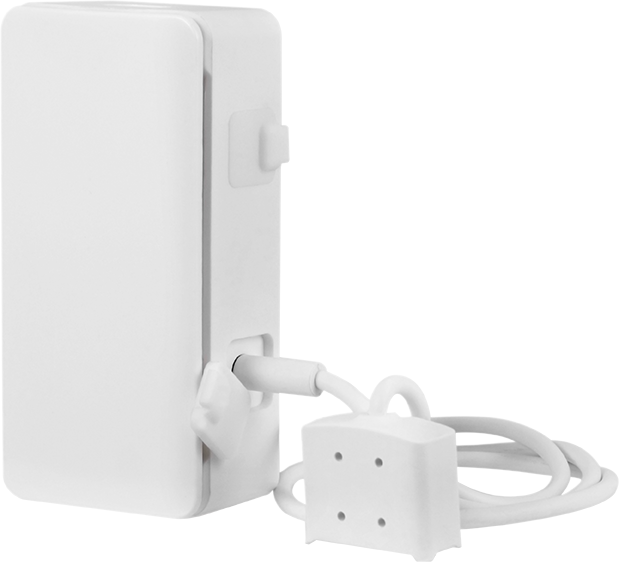
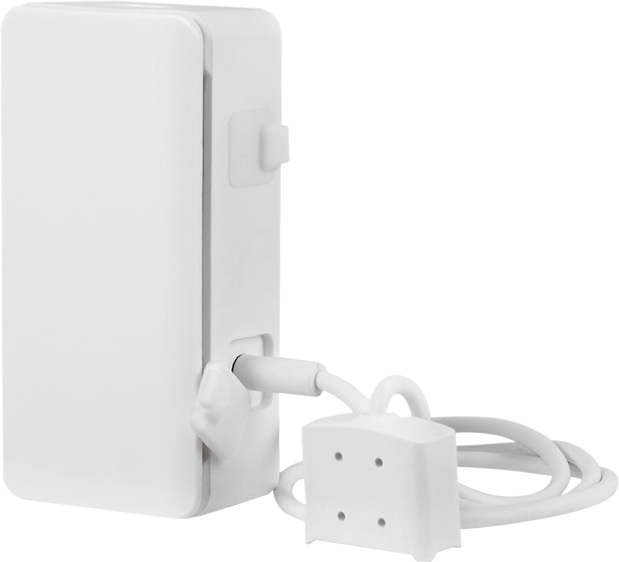
Name | Smart Flood/Freeze Sensor |
|---|
Short Description | Monitor your home from anywhere with the Z-Wave Plus Flood/Freeze Sensor. When paired with a compatible hub, the smart sensor provides notification when water levels or temperatures change. |
|---|
Long Description | Monitor your home from anywhere with the Z-Wave Plus Flood/Freeze Sensor. When paired with a compatible hub, the smart sensor provides notification when water levels or temperatures change.
•Trigger events – The sensor communicates with your hub to initiate desired actions of Z-Wave devices. Increase peace of mind by automatically turning on lights, sending a notification to your phone, activating an alarm or more when temperatures or water levels change.
•Detection alarm – Built-in speaker emits audible alert when water levels or temperatures change to allow immediate action by anyone in the area.
•Dual function – Base contacts and a detachable probe accommodate various setups. Recessed contacts on the base of the sensor are ideal for placement on flat surfaces. The included probe extends reach for use in wells, sump pump holes and other small spaces.
•Temperature sensor – In temperature-sensitive spaces, protect against costly damage caused by freezing or overheating.
•Indicator light – LED indicator displays status and provides feedback during programming. It also serves as notification if tampering with the sensor occurs.
•Universal compatibility – Z-Wave Plus and all previous Z-Wave generations work together to allow continued expansion of your home-automation network. |
|---|
Brand | Jasco |
|---|
Product Identifier | 43985 / ZW6306 |
|---|
Product Line | Sensors |
|---|
OEM Version | HW: 255 FW: 5.55 |
|---|
Hardware Platform | ZM5101 |
|---|
Z-Wave Version | 6.81.03 |
|---|
Library Type | SLAVE_ENHANCED_232 |
|---|
Device Type | Notification Sensor |
|---|
Role Type | ROLE_TYPE_SLAVE_ALWAYS_ON |
|---|
Manufacturer ID | 0x0063 |
|---|
Product Type ID | 0x4953 |
|---|
Product ID | 0x3236 |
|---|
User Icon | 0x0C05 |
|---|
Installer Icon | 0x0C05 |
|---|
Frequency Plans | US: 916.00MHz, 908.40MHz |
|---|
Categories | Sensors |
|---|
Countries / Regions | United States of America |
|---|
Supported Command Classes | Identifier | Name | Key | Version |
|---|
COMMAND_CLASS_CONFIGURATION_V4 | Configuration V4 | 0x70 | 4 | COMMAND_CLASS_FIRMWARE_UPDATE_MD_V4 | Firmware Update Meta-Data V4 | 0x7A | 4 | COMMAND_CLASS_POWERLEVEL | Powerlevel | 0x73 | 1 | COMMAND_CLASS_BATTERY | Battery | 0x80 | 1 | COMMAND_CLASS_APPLICATION_STATUS | Application Status | 0x22 | 1 | COMMAND_CLASS_TRANSPORT_SERVICE_V2 | Transport Service V2 | 0x55 | 2 | COMMAND_CLASS_WAKE_UP_V2 | Wake Up V2 | 0x84 | 2 | COMMAND_CLASS_DEVICE_RESET_LOCALLY | Device Reset Locally | 0x5A | 1 | COMMAND_CLASS_ZWAVEPLUS_INFO_V2 | Z-Wave Plus Info V2 | 0x5E | 2 | COMMAND_CLASS_ASSOCIATION_V2 | Association V2 | 0x85 | 2 | COMMAND_CLASS_ASSOCIATION_GRP_INFO | Association Group Info | 0x59 | 1 | COMMAND_CLASS_NOTIFICATION_V8 | Notification V8 | 0x71 | 8 | COMMAND_CLASS_SECURITY_2 | Security S2 | 0x9F | 1 | COMMAND_CLASS_SENSOR_MULTILEVEL_V11 | Sensor Multilevel V11 | 0x31 | 11 | COMMAND_CLASS_VERSION_V3 | Version V3 | 0x86 | 3 | COMMAND_CLASS_SUPERVISION | Supervision | 0x6C | 1 | COMMAND_CLASS_MANUFACTURER_SPECIFIC_V2 | Manufacturer Specific V2 | 0x72 | 2 |
|
|---|
S2 Classes | S2_UNAUTHENTICATED, S2_AUTHENTICATED |
|---|
Documents | Category | Description | File |
|---|
Manual_Primary_Lang | Product Manual | | Adv_Manual | Advanced Information Product Manual | |
|
|---|
Features | Feature | Values |
|---|
Battery Type | | Color | | Battery Quantity | |
|
|---|
Association Groups | Group Number | Maximum Nodes Supported | End Point ID | Group Name | Description |
|---|
1 | 5 | 0 | Lifeline and Notification | This device supports lifeline and notification (association group 1) supporting 5 nodes.
Lifeline association supports the “device reset locally” function. |
|
|---|
Configuration Parameters | Parameter Number | Name | Format | Size | Min Value | Max Value | Default Value | Parameter Values | Description |
|---|
23 | Battery Report Interval | 2 | 2 | 5 | 1440 | 1440 |
Warning: Undefined variable $field_object in /nas/content/live/zwaprodcatalog/wp-content/themes/hello-elementor-child/single-z-wave-product.php on line 98
From | To | Description |
|---|
5 | 60 | 5-60 Minutes | 360 | 360 | 6 Hours | 1440 | 1440 | Daily | 720 | 720 | 12 Hours |
| | 51 | High Temp Alarm | 1 | 2 | -4 | 122 | 104 | From | To | Description |
|---|
104 | 104 | 104F (Default) | -4 | 122 | -4F to 122F |
| Notification type: Heat = 04 Over limit event = 02 Over limit non-event = 00 | 52 | Temperature Report Interval (When USB operated) | 2 | 2 | 5 | 360 | 60 | From | To | Description |
|---|
360 | 360 | 6 Hours | 60 | 60 | Hourly | 5 | 60 | 5-60 Minutes |
| | 53 | Tamper Alert Configuration | 2 | 2 | 1 | 5 | 1 | From | To | Description |
|---|
5 | 5 | No LED, no beeps | 4 | 4 | Red LED flash once, no beeps | 3 | 3 | Red LED continuous flash, no beeps | 2 | 2 | Red LED flashes once, continuous beeps | 1 | 1 | (Default) - Red LED continuous flash and beeps |
| |
|
|---|
Texts | ID | Description | Value |
|---|
8 | Where to find S2 DSK on product | If prompted by the controller to enter the S2 security code, refer to the QR code/S2 security number on the back of the box or the QR code label on the product (see above). Enter the 5-digit code. | 2 | Classic Exclusion | 1. Follow the instructions for your Z-Wave certified controller to remove the sensor from the Z-Wave network.
2. Once the controller is ready to remove your sensor, press and release the programming button one time on the sensor (see figure 10).
3. The red LED will blink five times to indicate it has been removed. Secure the top cover. | 4 | Wake-Up Procedure | 1. Remove the top cover of the sensor.
2. Press the button once. | 5 | Factory Reset Procedure | 1. Press the programming button 10 times within 6 seconds (interval between presses of the button cannot be longer than 1 second).
2. The red LED will activate for 2 seconds, followed by three quick flashes. This confirms the sensor has been reset. Secure the top cover into place.
Note: This should only be used if your network’s primary controller is missing or otherwise inoperable. | 1 | Classic Inclusion | 1. Follow the instructions for your Z-Wave certified controller to add the sensor in the Z-Wave network.
2. Once the controller is ready to add your device, remove the top cover of the sensor. Ensure battery is installed with the correct polarity and the battery tab has been removed, or ensure micro USB is plugged into USB port.
3. Press and release the programming button (see figure 10). This starts the manual add process. The red LED flashes quickly as it searches for a network. After 25 seconds, the LED will stop flashing. Press the programming button to manually start the add process. If it times out, the LED will stop flashing. Press and release the programming button again.
4. The controller’s app will indicate if it discovers the sensor. If prompted by the controller to enter the S2 security code, refer to the QR code/security number on the back of the box or the QR code label on the product (see above). Enter the 5-digit code. |
|
|---|
Supported Notification Types | Notification Type | Event / State |
|---|
Water Alarm | Sensor status: Water leak detected |
|
|---|
Supported Multilevel Sensors | Multilevel Sensor Type |
|---|
Air temperature |
|
|---|
Supports NWI | Yes |
|---|
Supports Explorer Frames | Yes |
|---|
Supports SmartStart | Yes |
|---|