Product Recognition | |
|---|
Certification Number | ZC10-16065096 |
|---|
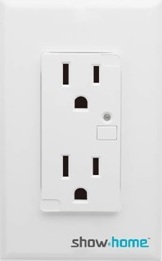
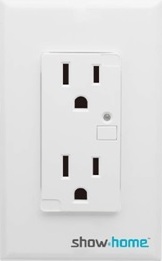
Name | Smart Outlet |
|---|
Short Description | Smart Outlets,receptacle outlets on/off |
|---|
Long Description | Two In-wall sockets controlled by Z-Wave controller and can be configured in Z-Wave sensor network so you can control two outlets from your mobile phone. |
|---|
Brand | show home |
|---|
Product Identifier | ZW32 |
|---|
OEM Version | HW: 1 FW: 20.15 |
|---|
Hardware Platform | ZM5202 |
|---|
Z-Wave Version | 6.51.06 |
|---|
Library Type | SLAVE_ROUTING |
|---|
Device Type | On/Off Power Switch |
|---|
Role Type | ROLE_TYPE_SLAVE_ALWAYS_ON |
|---|
Manufacturer ID | 0x015D |
|---|
Product Type ID | 0x0115 |
|---|
Product ID | 0x201C |
|---|
User Icon | 0x0700 |
|---|
Installer Icon | 0x0702 |
|---|
Frequency Plans | US: 916.00MHz, 908.40MHz |
|---|
Categories | All Lighting Devices, On/Off Switches/Devices |
|---|
Countries / Regions | United States of America |
|---|
Documents | Category | Description | File |
|---|
Manual_Primary_Lang | Product or Owner's Manual | |
|
|---|
Features | Feature | Values |
|---|
Color | | Electric Load Type | Value |
|---|
Incandescent | Fluorescent | LED |
| Firmware Updatable | Value |
|---|
Updatable by Professional/Technician |
| Switch Load Capacity Watts | | Neutral Wire Required | |
|
|---|
Association Groups | Group Number | Maximum Nodes Supported | End Point ID | Description |
|---|
1 | 5 | 0 | Z-Wave Plus Lifeline |
|
|---|
Texts | ID | Description | Value |
|---|
2 | Exclusion | 1. Follow the instructions for your Z-Wave certified controller to exclude a device from the Z-Wave network.
2. Once the controller is ready to Exclude your device, triple press the front button to exclude it from the network. | 1 | Inclusion | 1. Follow the instructions for your Z-Wave certified controller to include a device to the Z-Wave network.
2. Once the controller is ready to include your device, triple press the front button to include it into the network.
3. Once your controller has confirmed that the device has been included, refresh the Z-Wave network to optimize performance.
4. The device is associated in the same group when it included in setting process. Now you can control your Z-Wave device according to groups, scenes, schedules and automation programmed. | 5 | Factory Reset | Use controller to remove device from network will reset it to factory default.
""Use this procedure only in the event that the network primary controller is missing or otherwise inoperable."" |
|
|---|
Supports NWI | Yes |
|---|
Supports Explorer Frames | Yes |
|---|
Radio Range Z-Wave (m) | 40 |
|---|