Product Recognition | |
|---|
Certification Number | ZC10-18086200 |
|---|
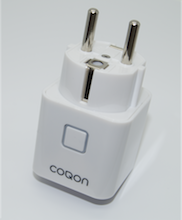
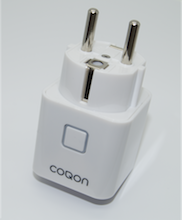
Name | Smart Power Adaptor Zwischenstecker |
|---|
Short Description | Smart Power Adaptor with current power consumption measuring. The adaptor can be used for switching devices on and off under the use of the COQON Qbox or any other Z-Wave Controller. |
|---|
Long Description | The adaptor allows the remote controlled switching on and off of the connected electrical devices.
It also measures current power consumption and total cumulative consumption.
Increase your comfort:
Wake up in the morning from the radio, the light goes on and the coffee machine is already preheated.
Save energy costs:
Disconnect power to your devices at the touch of a button or at a time you specify. - Save energy and costs. |
|---|
Brand | COQON |
|---|
Product Identifier | PSMZ0002 |
|---|
OEM Version | HW: 0 FW: 1.04 |
|---|
Hardware Platform | ZM5101 |
|---|
Z-Wave Version | 6.71.01 |
|---|
Library Type | SLAVE_ENHANCED_232 |
|---|
Device Type | On/Off Power Switch |
|---|
Role Type | ROLE_TYPE_SLAVE_ALWAYS_ON |
|---|
Manufacturer ID | 0x0140 |
|---|
Product Type ID | 0x0802 |
|---|
Product ID | 0x1002 |
|---|
User Icon | 0x0700 |
|---|
Installer Icon | 0x0700 |
|---|
Frequency Plans | EU: 869.85MHz, 868.40MHz |
|---|
Categories | All Lighting Devices, On/Off Switches/Devices |
|---|
Countries / Regions | European Union |
|---|
Supported Command Classes | Identifier | Name | Key | Version |
|---|
COMMAND_CLASS_FIRMWARE_UPDATE_MD_V4 | Firmware Update Meta-Data V4 | 0x7A | 4 | COMMAND_CLASS_POWERLEVEL | Powerlevel | 0x73 | 1 | COMMAND_CLASS_PROTECTION_V2 | Protection V2 | 0x75 | 2 | COMMAND_CLASS_MULTI_CHANNEL_ASSOCIATION_V3 | Multi-Channel Association V3 | 0x8E | 3 | COMMAND_CLASS_SWITCH_ALL | Switch All | 0x27 | 1 | COMMAND_CLASS_SWITCH_BINARY | Switch Binary | 0x25 | 1 | COMMAND_CLASS_CONFIGURATION | Configuration | 0x70 | 1 | COMMAND_CLASS_TRANSPORT_SERVICE_V2 | Transport Service V2 | 0x55 | 2 | COMMAND_CLASS_VERSION_V2 | Version V2 | 0x86 | 2 | COMMAND_CLASS_DEVICE_RESET_LOCALLY | Device Reset Locally | 0x5A | 1 | COMMAND_CLASS_ZWAVEPLUS_INFO_V2 | Z-Wave Plus Info V2 | 0x5E | 2 | COMMAND_CLASS_ASSOCIATION_V2 | Association V2 | 0x85 | 2 | COMMAND_CLASS_ASSOCIATION_GRP_INFO_V3 | Association Group Information V3 | 0x59 | 3 | COMMAND_CLASS_NOTIFICATION_V8 | Notification V8 | 0x71 | 8 | COMMAND_CLASS_BASIC_V2 | Basic V2 | 0x20 | 2 | COMMAND_CLASS_SECURITY_2 | Security S2 | 0x9F | 1 | COMMAND_CLASS_SUPERVISION | Supervision | 0x6C | 1 | COMMAND_CLASS_MANUFACTURER_SPECIFIC_V2 | Manufacturer Specific V2 | 0x72 | 2 | COMMAND_CLASS_METER_V4 | Meter V4 | 0x32 | 4 |
|
|---|
Controlled Command Classes | Identifier | Name | Key | Version |
|---|
COMMAND_CLASS_BASIC_V2 | Basic V2 | 0x20 | 2 |
|
|---|
S2 Classes | S2_UNAUTHENTICATED |
|---|
Documents | Category | Description | File |
|---|
Manual_Primary_Lang | Product or Owner's Manual | |
|
|---|
Features | Feature | Values |
|---|
Electric Load Type | | Firmware Updatable | Value |
|---|
Updatable by Consumer by RF |
| Switch Load Capacity Current | | Switch Load Capacity Volt-Ampere | | Color | | Supported Meter Type | | Supported Notification Types | |
|
|---|
Association Groups | Group Number | Maximum Nodes Supported | End Point ID | Description |
|---|
1 | 5 | 0 | Z-Wave Plus Lifeline | 2 | 5 | 0 | Follow State | 3 | 5 | 0 | Follow Complementary State | 4 | 5 | 0 | Metering - High Threshold - Set On/Off | 5 | 5 | 0 | Metering - Low Threshold - Set On/Off |
|
|---|
Configuration Parameters | Parameter Number | Name | Description | Format | Size | Min Value | Max Value | Default Value | Parameter Values |
|---|
25 | High Power Treshold | High Power Treshold (W) | 0 | 2 | 0 | 0 | 3000 | From | To | Description |
|---|
0 | 0 | 0= High Power Threshold disabled | 1 | 32767 | 1-32767= High Power Threshold |
| 1 | Power Status | Status when power is powered up | 0 | 1 | 0 | 0 | 2 | From | To | Description |
|---|
1 | 1 | 1= ON | 0 | 0 | 0= OFF | 2 | 2 | 2= Status when last powered |
| 3 | Enable/disable Group 2 & 3 | This allows enable/disable for Group 2&3 | 0 | 1 | 0 | 0 | 3 | From | To | Description |
|---|
0 | 0 | 0= Group 2 & 3 disable | 1 | 1 | 1= Group 2 enable | 2 | 2 | 2= Group 3 enable | 3 | 3 | 3= Group 2&3 enable |
| 5 | Over Voltage Alarm | Over Voltage Alarm (V) | 0 | 2 | 0 | 0 | 0 | From | To | Description |
|---|
0 | 0 | 0= Over Voltage Alarm disabled | 1 | 260 | 1-260= Over Voltage Alarm Threshold |
| 6 | Over Current Alarm | Over Current Alarm (mA) | 0 | 2 | 0 | 0 | 0 | From | To | Description |
|---|
1 | 20000 | 1-20000= Over Current Alaram Threshold | 0 | 0 | 0= Over Current Alarm disabled |
| 23 | Energy Report | Energy Sending Report | 0 | 2 | 0 | 0 | 1000 | From | To | Description |
|---|
0 | 0 | 0= Energy Report disable | 1 | 32767 | 1-32767= 1Wh to 32767 Wh |
| 24 | Meterin Report | Metering Report Time (second) | 0 | 2 | 0 | 0 | 3600 | From | To | Description |
|---|
0 | 0 | 0= Metering Report disable | 1 | 32767 | 30-32767= Metering Report sent to lifeline |
|
|
|---|
Texts | ID | Description | Value |
|---|
5 | Factory Reset | To set the device back to factory default press the function key for 10 seconds. The LED will flash red 5 times and then turn off.
Please use this procedure only when the primary controller is missing or inoperable. | 2 | Exclusion | First start the COQON App. Select the device you want to remove and tap on the trash can icon to start the ""exclusion"" process , then press ""exclude now"". After the 30 seconds countdown has started press the function key 3 times within 2 seconds to remove the Device. | 1 | Inclusion | First start the COQON App. Select ""Device"" then ""Settings"" and tap on ""+"" to add yo ur Smart Plug. Select ""Add new COQON Device"" then scan the data code of the device or type in the product code manually and press Enter. Now follow the steps in the app and press ""inclusion"". After the 30 seconds countdown has started press the function key 3 times within 2 seconds to add the Device. Once connected, the Smart Plug LED will stop flashing. |
|
|---|
Supported / Controlled Meter Types | Meter Type | Rate Type | Description |
|---|
Electric meter | Import | Electric Meter Consumption |
|
|---|
Supported Notification Types | Notification Type | Event / State |
|---|
Power Management | (Refer to parameters): State idle |
|
|---|
Supports NWI | Yes |
|---|
Supports Explorer Frames | Yes |
|---|
Radio Range Z-Wave (m) | 40 |
|---|