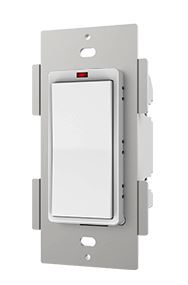
Product Recognition | |
|---|
Certification Number | ZC10-16085169 |
|---|
Name | Smart Switch |
|---|
Short Description | Smart Switch is a Z-Wave Switch module specifically used to enable Z-Wave command and control (on/off) of any connected device such as bulbs. |
|---|
Long Description | Smart Switch is a Z-Wave Switch module specifically used to enable Z-Wave command and control (on/off) of any connected device such as bulbs. |
|---|
Brand | Hank |
|---|
Product Identifier | HKZW-SW01 |
|---|
OEM Version | HW: 1 FW: 1.03 |
|---|
Hardware Platform | ZM5202 |
|---|
Z-Wave Version | 6.51.07 |
|---|
Library Type | SLAVE_ENHANCED_232 |
|---|
Device Type | On/Off Power Switch |
|---|
Role Type | ROLE_TYPE_SLAVE_ALWAYS_ON |
|---|
Manufacturer ID | 0x0208 |
|---|
Product Type ID | 0x0101 |
|---|
Product ID | 0x0003 |
|---|
User Icon | 0x0700 |
|---|
Installer Icon | 0x0700 |
|---|
Frequency Plans | US: 916.00MHz, 908.40MHz |
|---|
Categories | All Lighting Devices, On/Off Switches/Devices |
|---|
Countries / Regions | United States of America |
|---|
Documents | Category | Description | File |
|---|
Manual_Primary_Lang | Product or Owner's Manual | |
|
|---|
Features | Feature | Values |
|---|
Color | | Electric Load Type | Value |
|---|
Incandescent | Fluorescent | LED | Inductive (e.g. Motor) |
| Firmware Updatable | Value |
|---|
Updatable by Consumer by RF |
| Switch Load Capacity Current | | Switch Load Capacity Watts | | Neutral Wire Required | | Switch Type | Value |
|---|
Decorator Paddle Rocker |
|
|
|---|
Association Groups | Group Number | Maximum Nodes Supported | End Point ID | Description |
|---|
1 | 5 | 0 | Z-Wave Plus Lifeline
Smart Switch will send basic report to the associated nodes whenever it is turned on or off |
|
|---|
Configuration Parameters | Parameter Number | Name | Description | Format | Size | Min Value | Max Value | Default Value | Parameter Values |
|---|
24 | Notification when Load status change | Smart Switch can send notifications to association device (Group Lifeline) when state of Smart Switch’s load is changed. | 0 | 1 | 0 | 0 | 1 | From | To | Description |
|---|
1 | 1 | Send Basic report. | 2 | 2 | Send Basic report only when Load condition is not changed by Z-WAVE Command. | 0 | 0 | The function is disabled. |
|
|
|---|
Texts | ID | Description | Value |
|---|
1 | Inclusion | 1) Connect the power supply.
2) Set the Z-Wave network main controller into learning mode (see Z-Wave network controller operating manual).
3) Triple click the Z-Button, LED indicator should blink fast。
4) Smart Switch should be recognized and included into the Z-Wave network. | 2 | Exclusion | 1) Connect the power supply.
2) Set the Z-Wave network controller into the remove mode (see Z-Wave controller operating manual)
3) Triple click the Z-button. | 5 | Factory Reset | 1) Power on the Switch.
2) Press and hold the Z-button for more than 20 seconds.
3) If holding time more than one second, the LED will blink faster and faster. If holding time more than 20 seconds, the LED indicator will be on for 3 seconds, which indicates that the reset is complete, then it will blink slowly indicating that it is not a part of a Z-Wave network.
Use this procedure only in the event that the network primary controller is missing or otherwise inoperable. |
|
|---|
Supports NWI | Yes |
|---|
Supports Explorer Frames | Yes |
|---|