Product Recognition | |
|---|
Certification Number | ZC10-19086710 |
|---|
Name | Smart Touch Light Switch (2-way) |
|---|
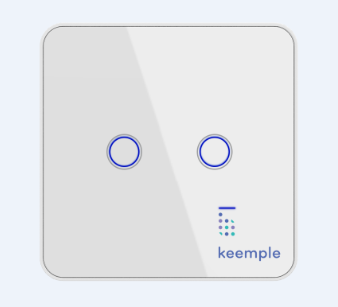
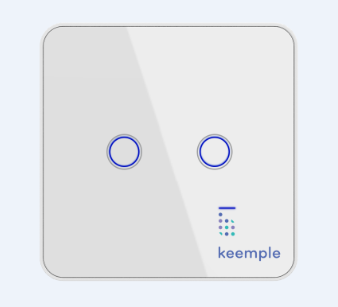
Short Description | KP-SW-08 is an intelligent touch switch that two buttons can control two way outputs separately. When the device is inclusion or exclusion from Z-Wave network, only the left button of the panel can take effect. |
|---|
Long Description | Touch switch is an in-wall switchgear based on Z-Wave wireless radio frequency technology for intelligent control. This product can be added to the gateway or PC controller supporting Z-Wave Plus, remotely controlled through the APP interface, or manually controlled by the touch. In addition, the product also supports the scene mode, the user can configure the scene through the APP, combine various devices in the same scene, and run the scene function through the APP or manually. |
|---|
Brand | keemple |
|---|
Product Identifier | KP-SW-08 |
|---|
OEM Version | HW: 1 FW: 1.00 |
|---|
Hardware Platform | ZM5202 |
|---|
Z-Wave Version | 6.81.03 |
|---|
Library Type | SLAVE_ENHANCED_232 |
|---|
Device Type | On/Off Power Switch |
|---|
Role Type | ROLE_TYPE_SLAVE_ALWAYS_ON |
|---|
Manufacturer ID | 0x041A |
|---|
Product Type ID | 0x0100 |
|---|
Product ID | 0x0003 |
|---|
User Icon | 0x1D02 |
|---|
Installer Icon | 0x1D02 |
|---|
Frequency Plans | EU: 869.85MHz, 868.40MHz |
|---|
Categories | All Lighting Devices, On/Off Switches/Devices |
|---|
Countries / Regions | European Union |
|---|
Supported Command Classes | Identifier | Name | Key | Version |
|---|
COMMAND_CLASS_FIRMWARE_UPDATE_MD_V4 | Firmware Update Meta-Data V4 | 0x7A | 4 | COMMAND_CLASS_SCENE_ACTUATOR_CONF | Scene Actuator Conf | 0x2C | 1 | COMMAND_CLASS_POWERLEVEL | Powerlevel | 0x73 | 1 | COMMAND_CLASS_MULTI_CHANNEL_ASSOCIATION_V3 | Multi-Channel Association V3 | 0x8E | 3 | COMMAND_CLASS_SWITCH_BINARY | Switch Binary | 0x25 | 1 | COMMAND_CLASS_BASIC | Basic | 0x20 | 1 | COMMAND_CLASS_CONFIGURATION | Configuration | 0x70 | 1 | COMMAND_CLASS_SECURITY | Security S0 | 0x98 | 1 | COMMAND_CLASS_TRANSPORT_SERVICE_V2 | Transport Service V2 | 0x55 | 2 | COMMAND_CLASS_VERSION_V2 | Version V2 | 0x86 | 2 | COMMAND_CLASS_DEVICE_RESET_LOCALLY | Device Reset Locally | 0x5A | 1 | COMMAND_CLASS_ZWAVEPLUS_INFO_V2 | Z-Wave Plus Info V2 | 0x5E | 2 | COMMAND_CLASS_ASSOCIATION_V2 | Association V2 | 0x85 | 2 | COMMAND_CLASS_ASSOCIATION_GRP_INFO | Association Group Info | 0x59 | 1 | COMMAND_CLASS_MULTI_CHANNEL_V4 | Multi-Channel V4 | 0x60 | 4 | COMMAND_CLASS_SECURITY_2 | Security S2 | 0x9F | 1 | COMMAND_CLASS_CENTRAL_SCENE_V3 | Central Scene V3 | 0x5B | 3 | COMMAND_CLASS_SUPERVISION | Supervision | 0x6C | 1 | COMMAND_CLASS_SCENE_ACTIVATION | Scene Activation | 0x2B | 1 | COMMAND_CLASS_MANUFACTURER_SPECIFIC_V2 | Manufacturer Specific V2 | 0x72 | 2 |
|
|---|
S2 Classes | S2_UNAUTHENTICATED |
|---|
Documents | Category | Description | File |
|---|
Manual_Primary_Lang | Product or Owner's Manual | |
|
|---|
Features | Feature | Values |
|---|
Color | | Communications Protocol | | Electric Load Type | Value |
|---|
Incandescent | Fluorescent | MLV (Magnetic) | ELV (Electronic) | LED | Dimmable LED | Inductive (e.g. Motor) | Dimmable Fluorescent | Dimmable MLV (Magnetic) | Dimmable ELV (Magnetic) |
| Firmware Updatable | Value |
|---|
Updatable by Consumer via Internet |
| Loads Controlled | | Switch Load Capacity Current | | Switch Load Capacity Volt-Ampere | | Switch Load Capacity Watts | | Switch Type | Value |
|---|
Push Button with Indicator |
| Z-Wave Scene Type | Value |
|---|
Scene & Central Scene |
|
|
|---|
Association Groups | Group Number | Maximum Nodes Supported | End Point ID | Description |
|---|
1 | 5 | 0 | Z-Wave Plus Lifeline | 2 | 5 | 0 | scene control | 3 | 5 | 0 | Endpoint 1: Switch status report | 4 | 5 | 0 | Endpoint 2: Switch status report |
|
|---|
Configuration Parameters | Parameter Number | Name | Description | Format | Size | Min Value | Max Value | Default Value | Parameter Values |
|---|
24 | Notification when Load status change | Touch Switch can send notifications to association device when state of Touch Switch’s load change. | 0 | 1 | 0 | 0 | 1 | From | To | Description |
|---|
0 | 0 | The function is disabled. | 1 | 1 | Send Switch binary report. | 2 | 2 | Send Switch binary report only when Load condition is not changed by Z-WAVE Command. |
|
|
|---|
Texts | ID | Description | Value |
|---|
1 | Inclusion | 1) Connect the power supply.
2) Set the Z-Wave network main controller into learning mode.
3) Press and hold the button 1 (the red light flashes slowly) until the pink light flashes slowly and
then release, the device sends the network k information (blue light flashes quickly).
4) After the network is successfully connected, the LED indicator of the device is steady blue, and the load is off by default. | 2 | Exclusion | 1) Power on the switch.
2) Set the Z-Wave network controller into the exclusion mode.
3) Long press the switch button 1 (Red LED blink slowly) when Pink LED indicator light blink slowly, release the button, then the device start to send out exclusion information(Blue LED indicator in quick blinking).
4) When exclusion successfully, LED display is steady blue, load is off. | 5 | Factory Reset | Reset procedure will delete all information in the Z-Wave network or Z-Wave gateway, and will restore switch to factory default settings.
1. Make sure switch is powered.
2. Press and hold the Switch button 1 for 20 seconds.
3. Until the pink light is always on, release the button.
Use this procedure only in the event that the network primary controller is missing or otherwise inoperable. |
|
|---|
Supports NWI | Yes |
|---|
Supports Explorer Frames | Yes |
|---|
Supports SmartStart | Yes |
|---|
Radio Range Z-Wave (m) | 40 |
|---|