Product Recognition | |
|---|
Certification Number | ZC10-15020002 |
|---|
Name | SSP |
|---|
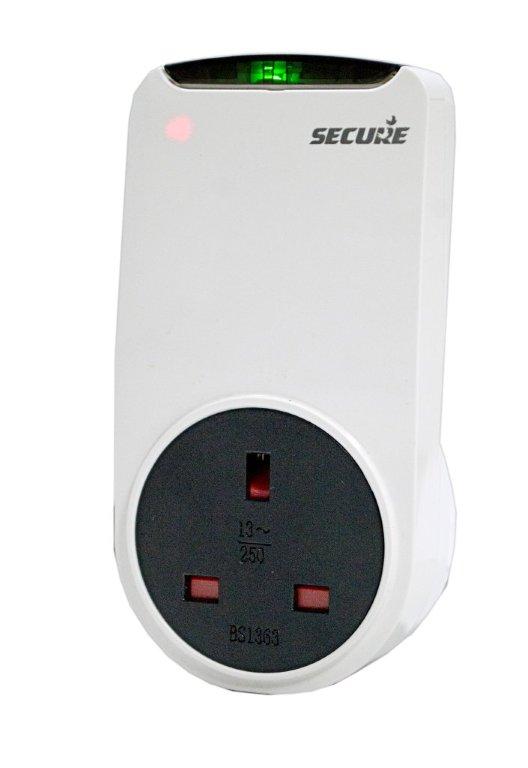
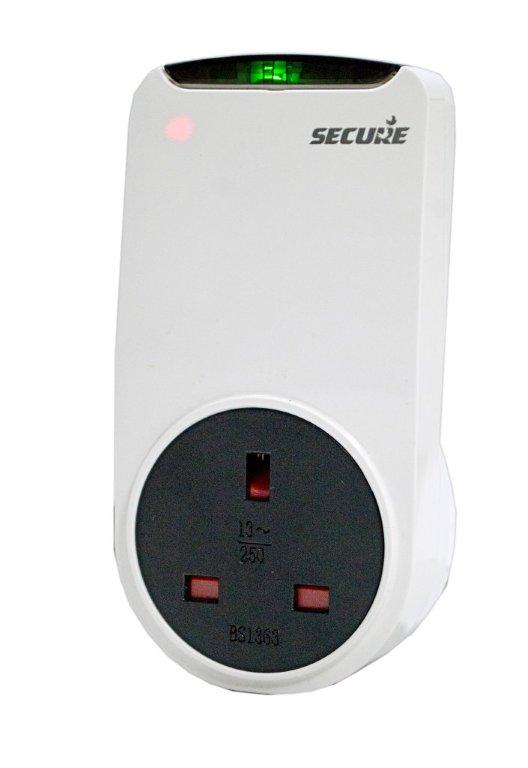
Short Description | SSP 301 is mains power device with UK plug type, that can switch (power On/Off) the load of 3000 W and it will also acts as repeater in Z-Wave network, to help other devices to reach there destination. |
|---|
Long Description | The Secure SSP 301 is a switch and repeater that forms part of a Z-Wave Plus™ home automation network. The SSP 301 is a mains powered device with UK plug type, that will switch (power On/Off) a connected appliance either by the Z-Wave network or manually by pressing its integrated button.
The SSP 301 acts as a repeater in a Z-Wave network by helping messages from other devices reach there destinations. |
|---|
Brand | Secure Controls (UK) |
|---|
Product Identifier | SSP 301 |
|---|
OEM Version | 01 |
|---|
Hardware Platform | ZM5202 |
|---|
Z-Wave Version | 6.51.02 |
|---|
Library Type | SLAVE_ROUTING |
|---|
Device Type | On/Off Power Switch |
|---|
Role Type | ROLE_TYPE_SLAVE_ALWAYS_ON |
|---|
Manufacturer ID | 0x0059 |
|---|
Product Type ID | 0x000E |
|---|
Product ID | 0x0001 |
|---|
Frequency Plans | EU: 869.85MHz, 868.40MHz |
|---|
Categories | All Lighting Devices, On/Off Switches/Devices |
|---|
Countries / Regions | European Union |
|---|
Documents | Category | Description | File |
|---|
Manual_Primary_Lang | Product or Owner's Manual | |
|
|---|
Association Groups | Group Number | Maximum Nodes Supported | End Point ID | Description |
|---|
1 | 4 | 0 | Z-Wave Plus Lifeline |
|
|---|
Configuration Parameters | Parameter Number | Name | Description | Format | Size | Min Value | Max Value | Default Value | Parameter Values |
|---|
1 | Delta Based Switch Status Reporting | This configuration enable the switch status reporting, when switch status changed for OFF to ON or ON to OFF. | 0 | 1 | 0 | 0 | 1 | | 2 | Time interval based Switch Status Reporting | This configuration enable the switch status reporting based on the time interval configured. Note: Controllers may only allow configuring signed values. In order to set values in the range 32768 …65520, the value sent in the application shall be equal to desired value minus 65520. For example, to set time interval to 36000 seconds it may be needed to set a value 36000−65536=−29536. | 0 | 2 | 0 | 0 | 0 | | 3 | Relay & LED configuration | This configuration is used to change the relay LED status when relay is open/close and also enable to whether to retain the last relay status over power cycle. 0 - Relay status will not be retain over power cycle, and Relay status LED will lit when relay ON and relay status LED will off when relay OFF. 1 - Relay status will be retain over power cycle, and Relay status LED will lit when relay ON and relay status LED will off when relay OFF. 2 - Relay status will not be retain over power cycle, and Relay status LED will off when relay ON and relay status LED will lit when relay OFF. 3 - Relay status will be retain over power cycle, and Relay status LED will off when relay ON and relay status LED will lit when relay OFF. | 0 | 1 | 0 | 0 | 0 | |
|
|---|
Texts | ID | Description | Value |
|---|
1 | Inclusion | To include the SSP 301 onto a network, put the controller into inclusion mode. Now press and hold the button on SSP 301 for 4 to 7 seconds then
release. The network status LED will start flashing (twice per second) on successful start of inclusion process. On successful inclusion the LED will turn off. | 2 | Exclusion | To exclude the SSP 301 from a network, put the controller into exclusion mode. Now press and hold the button on SSP 301 for 4 to 7 seconds then
release. After successful exclusion the network status LED will start flashing once per second, and the device will reset to factory default. | 4 | Device Wake-Up | NA | 6 | Additional Special Features | NA | 3 | Learn Mode (adding another controller) | NA | 5 | Factory Reset | Please use this procedure only when the primary controller is missing or otherwise inoperable, Power cycle the device, press and hold the button
for 7-11 seconds within the 60 seconds of power cycle to put the device in factory default. It reset all configuration and association to factory default. It also removes the device from Z-Wave network. |
|
|---|
Supports NWI | Yes |
|---|
Supports Explorer Frames | Yes |
|---|
Radio Range Z-Wave (m) | 40 |
|---|