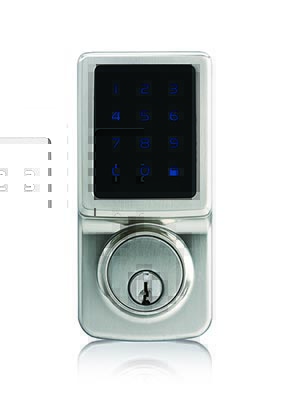
Product Recognition | |
|---|
Certification Number | ZC10-17025445 |
|---|
Name | TPD Z-Wave |
|---|
Short Description | An electronic touchscreen deadbolt with Z-Wave. |
|---|
Long Description | Great Convenience
。Touch to activate, touch to lock
。Connect your Z-Wave smart home system and operate from anywhere
。Holds up to 25 user codes
。Holds up to 4 single-entry codes
。Vacation mode (deactivates all user codes temporarily)
。Auto-lock with adjustable delay (10 - 99 seconds)
。Back-up mechanical keyway
Uncompromised Security
。ANSI Grade 2 quality – deadbolt operates over 150,000 times
。ANSI A156.25 compliant - resistant to dust, rain, and corrosion under variable
temperatures
。4-digit random guiding code prevents code-probing
。Touch screen is temporarily disabled after 4 consecutive incorrect entries
Easy Installation
。Easy installation with a Philips screwdriver
。Fits most standard door preparations
。Online video instruction available (please scan the QR code on this box) |
|---|
Brand | Faultless |
|---|
Product Identifier | DBZF-3410 |
|---|
OEM Version | HW: 255 FW: 1.66:01.01 |
|---|
Hardware Platform | ZM5202 |
|---|
Z-Wave Version | 6.51.07 |
|---|
Library Type | SLAVE_ENHANCED |
|---|
Device Type | Door Lock - Keypad |
|---|
Role Type | ROLE_TYPE_SLAVE_SLEEPING_LISTENING |
|---|
Manufacturer ID | 0x0262 |
|---|
Product Type ID | 0x0003 |
|---|
Product ID | 0x0001 |
|---|
User Icon | 0x0300 |
|---|
Installer Icon | 0x0300 |
|---|
Frequency Plans | US: 916.00MHz, 908.40MHz |
|---|
Categories | Locks |
|---|
Countries / Regions | United States of America |
|---|
Supported Command Classes | Identifier | Name | Key | Version |
|---|
COMMAND_CLASS_POWERLEVEL | Powerlevel | 0x73 | 1 | COMMAND_CLASS_USER_CODE | User Code | 0x63 | 1 | COMMAND_CLASS_DOOR_LOCK_V2 | Door Lock V2 | 0x62 | 2 | COMMAND_CLASS_BATTERY | Battery | 0x80 | 1 | COMMAND_CLASS_SECURITY | Security S0 | 0x98 | 1 | COMMAND_CLASS_VERSION_V2 | Version V2 | 0x86 | 2 | COMMAND_CLASS_DEVICE_RESET_LOCALLY | Device Reset Locally | 0x5A | 1 | COMMAND_CLASS_ZWAVEPLUS_INFO_V2 | Z-Wave Plus Info V2 | 0x5E | 2 | COMMAND_CLASS_ASSOCIATION_V2 | Association V2 | 0x85 | 2 | COMMAND_CLASS_ASSOCIATION_GRP_INFO | Association Group Info | 0x59 | 1 | COMMAND_CLASS_FIRMWARE_UPDATE_MD_V3 | Firmware Update Meta-Data V3 | 0x7A | 3 | COMMAND_CLASS_MANUFACTURER_SPECIFIC_V2 | Manufacturer Specific V2 | 0x72 | 2 |
|
|---|
Documents | Category | Description | File |
|---|
Manual_Primary_Lang | Product or Owner's Manual | |
|
|---|
Features | Feature | Values |
|---|
Battery Quantity | | Battery Type | | Door Lock Type | |
|
|---|
Association Groups | Group Number | Maximum Nodes Supported | End Point ID | Description |
|---|
1 | 5 | 0 | Z-Wave Plus Lifeline; A NOTIFICATION frame is sent to the nodes in this association group when a lifeline event occurs. |
|
|---|
Texts | ID | Description | Value |
|---|
1 | Inclusion | 1. Press [SET] for 1 second
2. Enter 4-8 digits Programing Code
3. Press the buttons #90#
4. Include successfully (beep * 1) | 2 | Exclusion | 1. Press [SET] for 1 second
2. Enter 4-8 digits Programing Code
3. Press the buttons #90#
4. Exclude successfully (beep * 1) | 5 | Factory Reset | 1. Remove one battery.
2. Press and hold SET button while inserting the battery back. Hold the set button until long beep has finished.
3. Resotring the lock to factory settings will remove its connection to your network and clear all devices from its assocation group. The reset procedure should only be used when the primary controller is missing or inoperable.
4. Please re-enter the default Programming Code to set up the lock after restoring to factory settings. |
|
|---|
Supports NWI | Yes |
|---|
Supports Explorer Frames | Yes |
|---|
Is Flirs | Yes |
|---|
Radio Range Z-Wave (m) | 40 |
|---|

.jpg)