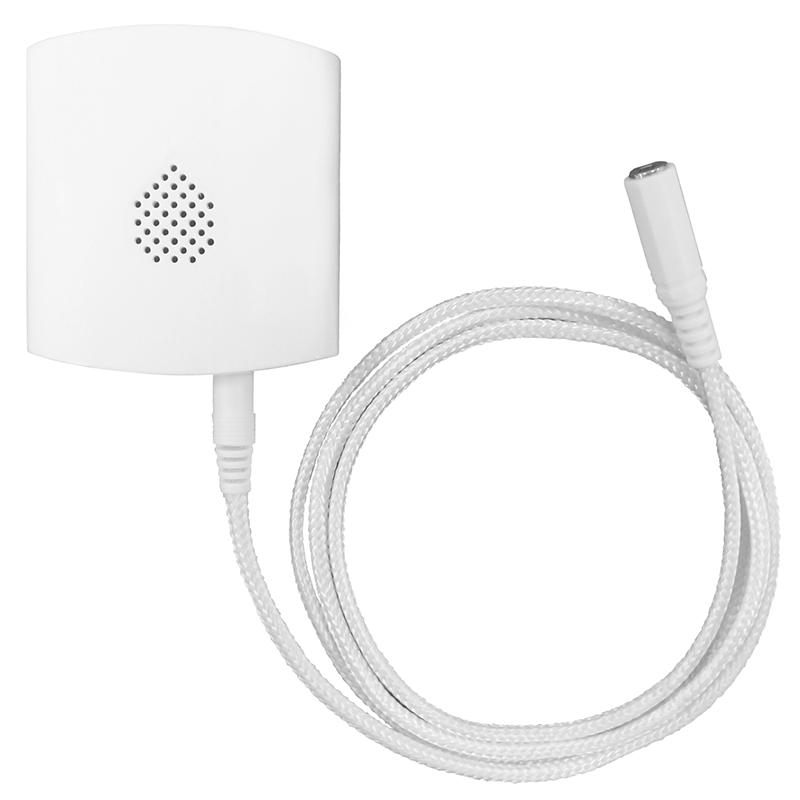
Product Recognition | |
|---|
Certification Number | ZC10-19086692 |
|---|
Name | Water Leakage Sensor |
|---|
Short Description | WLS-23-ZW is a Z-Wave enabled device and is fully compatible with any Z-Wave enabled network. It is a Security Enabled Z-Wave Plus product and is capable of sending wireless signals to the Z-Wave enabled network upon water detection. |
|---|
Long Description | WLS-23-ZW is a Z-Wave enabled device and is fully compatible with any Z-Wave enabled network. It is a Security Enabled Z-Wave Plus product and is capable of sending wireless signals to the Z-Wave enabled network upon water detection. The Water Sensing Cable and built-in water sensing probes can detect water leakage or flood condition. It can be placed on the ground, or mounted on the wall and further extended by connecting to another water sensing cable to improve detection range. |
|---|
Brand | Climax Technology |
|---|
Product Identifier | WLS-23-ZW |
|---|
OEM Version | HW: 255 FW: 4.04 |
|---|
Hardware Platform | ZM5202 |
|---|
Z-Wave Version | 6.81.04 |
|---|
Library Type | SLAVE_ENHANCED_232 |
|---|
Device Type | Notification Sensor |
|---|
Role Type | ROLE_TYPE_SLAVE_SLEEPING_REPORTING |
|---|
Manufacturer ID | 0x018E |
|---|
Product Type ID | 0x0003 |
|---|
Product ID | 0x0012 |
|---|
User Icon | 0x0C07 |
|---|
Installer Icon | 0x0C07 |
|---|
Frequency Plans | EU: 869.85MHz, 868.40MHz |
|---|
Categories | Sensors |
|---|
Countries / Regions | European Union |
|---|
Supported Command Classes | Identifier | Name | Key | Version |
|---|
COMMAND_CLASS_FIRMWARE_UPDATE_MD_V4 | Firmware Update Meta-Data V4 | 0x7A | 4 | COMMAND_CLASS_POWERLEVEL | Powerlevel | 0x73 | 1 | COMMAND_CLASS_MULTI_CHANNEL_ASSOCIATION_V3 | Multi-Channel Association V3 | 0x8E | 3 | COMMAND_CLASS_BATTERY | Battery | 0x80 | 1 | COMMAND_CLASS_TRANSPORT_SERVICE_V2 | Transport Service V2 | 0x55 | 2 | COMMAND_CLASS_WAKE_UP_V2 | Wake Up V2 | 0x84 | 2 | COMMAND_CLASS_DEVICE_RESET_LOCALLY | Device Reset Locally | 0x5A | 1 | COMMAND_CLASS_ZWAVEPLUS_INFO_V2 | Z-Wave Plus Info V2 | 0x5E | 2 | COMMAND_CLASS_ASSOCIATION_V2 | Association V2 | 0x85 | 2 | COMMAND_CLASS_ASSOCIATION_GRP_INFO | Association Group Info | 0x59 | 1 | COMMAND_CLASS_NOTIFICATION_V8 | Notification V8 | 0x71 | 8 | COMMAND_CLASS_SECURITY_2 | Security S2 | 0x9F | 1 | COMMAND_CLASS_SENSOR_MULTILEVEL_V11 | Sensor Multilevel V11 | 0x31 | 11 | COMMAND_CLASS_VERSION_V3 | Version V3 | 0x86 | 3 | COMMAND_CLASS_SUPERVISION | Supervision | 0x6C | 1 | COMMAND_CLASS_MANUFACTURER_SPECIFIC_V2 | Manufacturer Specific V2 | 0x72 | 2 |
|
|---|
Controlled Command Classes | Identifier | Name | Key | Version |
|---|
COMMAND_CLASS_BASIC | Basic | 0x20 | 1 |
|
|---|
S2 Classes | S2_UNAUTHENTICATED |
|---|
Documents | Category | Description | File |
|---|
Manual_Primary_Lang | Product or Owner's Manual | |
|
|---|
Features | Feature | Values |
|---|
Sensors | Value |
|---|
Air Temperature | Humidity |
| Supported Notification Types | | Battery Quantity | | Battery Type | |
|
|---|
Association Groups | Group Number | Maximum Nodes Supported | End Point ID | Description |
|---|
1 | 1 | 0 | Group 1 for “LifeLine”: (maximum node: one)
Sensor Multilevel CC (COMMAND_CLASS_SENSOR_MULTILEVEL_V4)
Notification CC,V8 (COMMAND_CLASS_NOTIFICATION)
Battery CC (COMMAND_CLASS_BATTERY)
Device Reset Locally CC, V4 (COMMAND_CLASS_DEVICE_RESET_LOCALLY)
*. Factory Reset [COMMAND_CLASS_ DEVICE_RESET_LOCALLY] [NOTIFICATION_REPORT]
1. Press and hold the function button for 10 seconds to perform factory reset and send
factory reset report to the Control Panel.
*. Battery: [COMMAND_CLASS_BATTERY] [BATTERY_REPORT]
0x64 --- 100% Battery Full
0x5A --- 90% Battery
0x50 --- 80% Battery
0x46 --- 70% Battery
0x3C --- 60% Battery
0x32 --- 50% Battery
0x28 --- 40% Battery
0x1E --- 30% Battery
0x14 --- 20% Low Battery
0xFF --- Battery Dead (Cut Off)
Cut Off --- The device will stop working and the LED will flash every 4 seconds.
*. Water Alarm/Restore: [COMMAND_CLASS_NOTIFICATION] [NOTIFICATION_REPORT]
Water Alarm: 00 00 00 FF 05 02 00
Water Restore: 00 00 00 FF 05 00 01 02
*. Test Button: [WAKE_UP_NOTIFICATION]
Press the function button once to awaken the Water Leak Sensor and it will send
a wake up notification along with temperature and humidity report to the Control
Panel.
*. Temperature/Humidity: [COMMAND_CLASS_SENSOR_MULTILEVEL][SENSOR_MULTILEVEL_REPORT]
Press the function button once to send temperature and humidity information to the Control Panel.
Temperature: 01 42 09 D1
If temperature signal 01 42 09 D1 is transmitted, 09 D1 can be viewed as 0x09D1 in Hexadecimal number. You can
convert hexadecimal to decimal and divide by 100 to check the temperature data (in Celsius).
0x09D1=2513=25.13℃.
*. Humidity: 05 02 00 3B
If humidity signal 05 02 00 3B is transmitted, 00 3B can be viewed as 0x003B in Hexadecimal number.
You can convert hexadecimal to decimal to check the humidity level (in percentage).
003B=0x003B=59% | 2 | 1 | 0 | Group 2 for “Basic Set”: (maximum node: one)
1. When the Water Leak Sensor is triggered, it will send “Basic set” (0xFF) to the node in Group 2.
2. When the Water Leak Sensor is restored, it will send “Basic set” (0x00) to the node in Group 2. |
|
|---|
Texts | ID | Description | Value |
|---|
1 | Inclusion | 1. Open the cover by removing the bottom fixing screw (using a Philips screwdriver) on the Water Leak Sensor.
2. Insert the battery in the battery compartment
3. Put the Z-Wave gateway or control panel into Inclusion mode (please refer to the Z-Wave gateway or control panel manual).
4. Within 1.5 seconds, press the Function Button 3 times.
5. Refer to the operation manual of the Z-Wave gateway or control panel to complete the adding process.
6. If the sensor has already been added (included) into another Z-Wave Gateway/Control Panel, or if the sensor is unable to be learnt into the current Z-Wave Gateway/Control Panel, please exclude it first (see Removing Device) before attempting to include it into the current Z-Wave Gateway/Control Panel.
7. Reattach the cover to the base and tighten the bottom-fixing screw. | 2 | Exclusion | 1. Put the Z-Wave gateway or control panel into Exclusion mode (please refer to the Z-Wave gateway or control panel manual).
2. Within 1.5 seconds, press the Function Button 3 times and the Water Leak Sensor will be removed from the Z-Wave network. | 5 | Factory Reset | (Only use factory reset when network Control Panel/Gateway is missing or inoperable).
Press and hold the Function Button of the Water Leak Sensor for 10 seconds to factory reset. | 4 | Device Wake-Up | This function uses the Z-Wave Wake Up Command Class. The Wake Up Command Class allows the battery-powered Water Leak Sensor to notify the Control Panel/Gateway that it is awake and ready to receive any queued commands. The wake up interval is programmed automatically according to the Control Panel’s setting when the Water Leakage Sensor is included. The default wakeup interval is 5 minutes. |
|
|---|
Supported Notification Types | Notification Type | Event / State |
|---|
Water Alarm | (Refer to parameters): State idle |
|
|---|
Supported Multilevel Sensors | Multilevel Sensor Type |
|---|
Air temperature | Humidity |
|
|---|
Supports NWI | Yes |
|---|
Supports Explorer Frames | Yes |
|---|
Radio Range Z-Wave (m) | 40 |
|---|